

Ultimate Guide to YouTube Thumbnail Testing
If I want more clicks from YouTube, I don’t guess my thumbnail anymore - I test it. Even a 1% to 2% CTR gain can lead to thousands of extra views on 100,000 impressions, and some A/B tests have shown 37% to 110% CTR lifts.
Here’s the short version: I run thumbnail tests inside YouTube Studio, change one variable at a time, let the test run for 7 to 14 days, and judge the result by watch time share first, not just CTR. That matters because a thumbnail can get more clicks and still lose if people leave too fast.
If I had to sum up the whole process in a few points, it would be this:
- Test, don’t guess
- Use YouTube Studio Test & Compare
- Aim for at least 1,000 impressions per variant
- Check CTR, watch time share, and retention together
- Test clear changes like faces, text, color, and composition
- Design for mobile first
- Track every result in a simple log
- Turn winners into repeatable thumbnail templates
This guide is about building a simple system I can use on every upload, so thumbnail picks stop being random and start being based on what viewers pick.
Thumbnail Testing, CTR, and the Metrics That Matter
How Thumbnail Tests Work and What Counts as an Impression
Once your test goes live, the next step is simple in theory and easy to mess up in practice: read the data the right way.
YouTube Studio's Test and Compare lets you upload up to three thumbnail variants for one video. YouTube shows each version to different viewers at the same time, which helps cut down on time-of-day bias.
An impression means one thumbnail view. Click-through rate (CTR) is the share of those impressions that turn into clicks. So if you get 800 clicks from 10,000 impressions, that's an 8.0% CTR.
For context, median CTR is about 4.1%, while strong channels often land in the 5% to 8% range.
Why CTR Alone Is Not Enough
A high CTR means people clicked. That's good. But it doesn't tell you if they stuck around.
That's why the winning thumbnail shouldn't be judged by clicks alone.
YouTube's Test and Compare picks winners based on watch time share, which is the total watch time each thumbnail variant earns. So yes, a thumbnail can lose even if it has the higher CTR. If viewers bounce fast, that extra clicking doesn't help much.
When you look at test results, put CTR next to average view duration and retention. That combo tells a better story. If one variant gets a high CTR but shows a steep drop in the first 30 seconds, the thumbnail may be promising more than the video delivers.
Traffic Requirements and What Small Channels Should Expect
Small channels usually need more patience here. Early traffic is often too thin to give you a clean read, and low-volume tests can make random swings look meaningful.
YouTube recommends at least 1,000 impressions per variant for usable results, and high-confidence reads usually need 10,000+ total impressions across all variants. If you're below 500 impressions per variant, the data is generally too noisy to trust.
Tests can run for up to 14 days before YouTube declares a winner or marks the result inconclusive. For smaller channels, it's often smart to let the test run the full two weeks. Early impressions may come mostly from subscribers, while later traffic can spread into Browse and Suggested.
If a test comes back inconclusive, the usual issue is one of two things: not enough traffic, or thumbnail ideas that were too close to each other. More distinct concepts - like a close-up face versus a product shot - give the data more room to show a winner (see these YouTube thumbnail ideas for more inspiration).
Use those benchmarks before calling a winner.
sbb-itb-b59debf
How to Set Up Clean Thumbnail Tests in YouTube Studio
How to Use Test and Compare Step by Step
CTR and watch time only help if your test setup is clean. Once you know which metrics matter, use YouTube Studio’s Test & Compare to run a proper thumbnail test.
Test & Compare is available in desktop YouTube Studio for channels with advanced features. It doesn’t work on Shorts, Made for Kids videos, private videos, or active Premieres.
For a new upload, open Test & Compare in the thumbnail step and add up to three variants. For an existing video, open the video in Content, go to Thumbnail, and select Test & Compare from the three-dot menu.
Keep every variant at 1280 x 720 or higher. If one thumbnail is low resolution, YouTube will downscale the whole test to 480p.
At that point, keep the test tight. Change one thing only so you can tell what moved the result.
Test One Variable at a Time and Pick a Realistic Duration
Test one variable at a time so you can tie the result to a single change. That variable might be:
- facial expression
- text
- background color
If you change all three at once, you won’t know what did the work. One version may get more clicks because of the color, while another may hold attention because of the image. Mix too many edits together, and the result gets muddy.
Run tests for 7 to 14 days. Then wait for the full test period before making a call. Cutting it short can send you in the wrong direction.
Track Every Test in a Simple Channel Log
Once the test is live, log the result the same way every time. A simple spreadsheet can turn each test into something you can reuse later. After 10 to 20 logged tests, patterns usually start to show up.
| Column | Example |
|---|---|
| Video Title | "Ultimate Guide to SEO" |
| Test Dates | 06/25/2026 – 07/09/2026 |
| Variable Tested | Background color (blue vs. yellow) |
| Winner | Variant B (yellow) |
| Watch Time Share | 64% |
| Notes | "Yellow background provided higher contrast" |
It also helps to add a Hypothesis column and a short Notes/Learnings field. That way, each test doesn’t just give you a winner. It gives you a lesson you can use on the next upload.
How To A/B Test YouTube Thumbnails
Which Thumbnail Variations Are Worth Testing
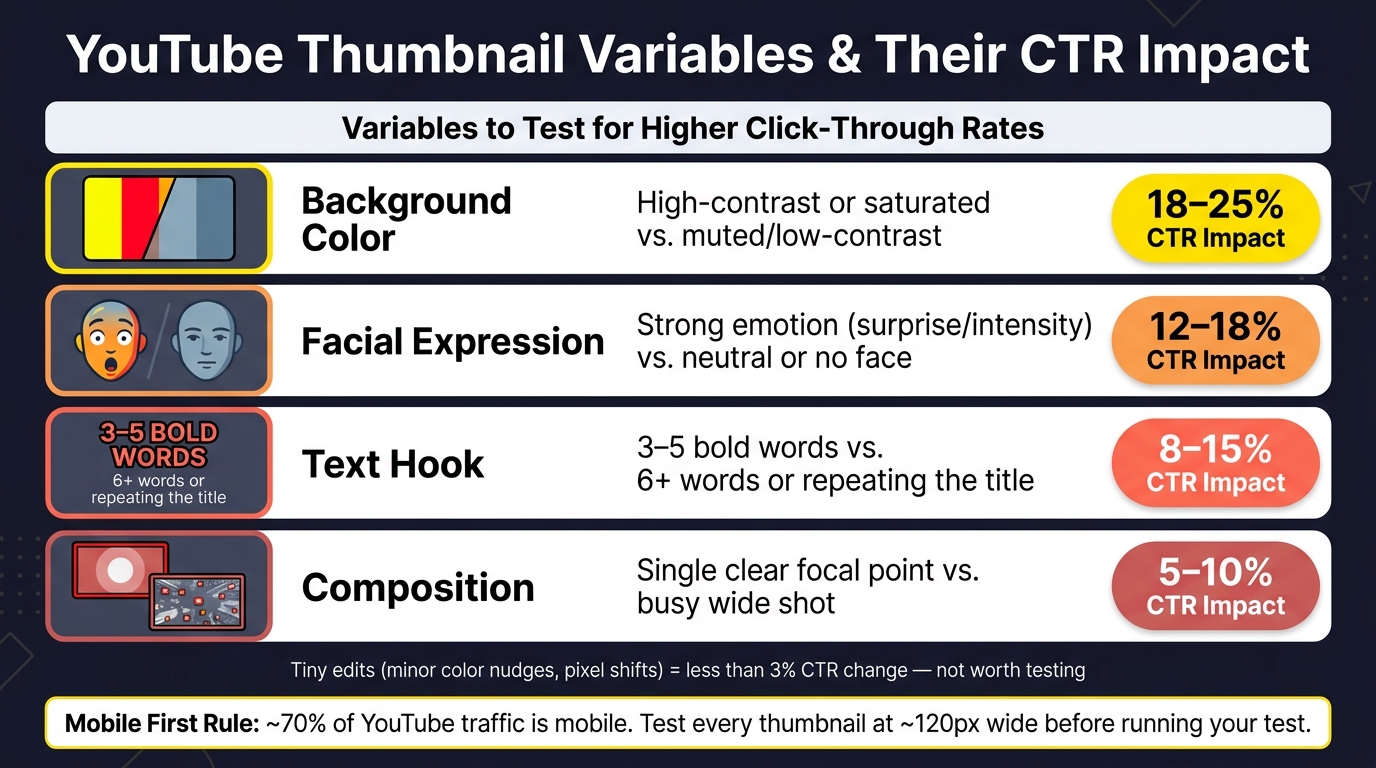
YouTube Thumbnail A/B Testing: Key Variables & CTR Impact
Test Faces, Objects, Color Contrast, and Text Clarity
Once your test setup is ready, test changes that people can spot right away. Big visual differences tend to move viewer behavior. Tiny edits, like nudging an element a few pixels or changing a color just a little, usually lead to less than a 3% CTR change and aren't worth the effort.
Start with the variables most likely to matter:
| Thumbnail Element | High-Impact Variant | Average CTR Impact |
|---|---|---|
| Background Color | High-contrast or saturated colors (yellow, red, black) vs. muted or low-contrast tones | 18–25% |
| Facial Expression | Strong emotion, such as surprise or intensity, vs. neutral or no face | 12–18% |
| Text Hook | 3–5 bold words vs. 6+ words or repeating the video title | 8–15% |
| Composition | Single clear focal point vs. busy wide shot | 5–10% |
The goal isn't cartoonish overreaction. Use emotion that feels real. A face that shows tension, surprise, or focus can pull attention fast, but fake-looking shock faces often do more harm than good. These are common thumbnail mistakes to avoid that can tank your performance.
Design for Mobile Viewers First
After you choose a variable, check it on mobile versus desktop before you run the test. This part matters a lot. Use one focal point, make subjects larger, and keep text to 3–5 readable words that still look clear at about 120 px wide. Since about 70% of YouTube traffic comes from mobile devices, mobile legibility should act like a simple pass-or-fail check.
If a thumbnail falls apart on a phone screen, it's probably not a test worth running.
Create Multiple Testable Variants Faster with ThumbnailCreator
If you want to make several clean variants without starting from scratch each time, use a tool built for one-change testing. ThumbnailCreator can speed up the process by generating variants from one base image and letting you swap faces, objects, or text while keeping the rest of the design the same.
That also helps keep your test honest. Pre-designed templates give you a steady starting point, so variant B feels like a proper test, not a whole new direction.
How to Read Results and Build a Repeatable Workflow
Compare CTR, Watch Time, and Retention Before Picking a Winner
After the test ends, read the results in the same order YouTube does. Start with watch time share, not CTR. CTR gives you context, but it shouldn't make the final call. The thumbnail that drives the strongest watch time share and holds retention better is usually the one to keep.
YouTube puts each test into one of three buckets:
| Outcome | What It Means | What to Do |
|---|---|---|
| Winner | Clear watch time lead | Use it and apply the pattern |
| No Meaningful Difference | No meaningful difference | Choose the better brand fit |
| Inconclusive | Not enough data | Retest with more different variants or more traffic |
Once you've got a winner, don't stop at "this one worked." The next move is to figure out why it worked, then turn that into a workflow you can use again.
Turn Winning Patterns into Templates and a Repeatable Workflow
Look for patterns across your winners. Maybe your top tutorial thumbnails keep using the same framing, text placement, or layout. Maybe reaction videos do better with close-up faces, while product demos work best with a clean side-by-side setup.
That pattern hunting is where things start to click. Build a small set of proven thumbnail styles tied to your repeat video formats, then turn the best ones into reusable templates for future uploads. ThumbnailCreator can help here by saving winning designs as presets.
Conclusion: Keep Testing Simple, Documented, and Consistent
The payoff comes from A/B testing vs gut feeling and repeating the process, not from one lucky win. Run one-variable tests, let them go the full 7 to 14 days, compare watch time next to CTR, and write down what won and why. Over time, that log turns into a channel-specific playbook based on patterns that already worked.
FAQs
What if my test is inconclusive?
An inconclusive result means the test didn't find a clear statistical difference in engagement between your thumbnail versions based on watch time share.
That usually happens for a few simple reasons:
- There weren't enough impressions
- The thumbnail designs were too similar
- The performance gap was too small to matter statistically
When that happens, your original thumbnail remains the default. That said, you can still manually pick any version from the test.
For your next test, try using more distinct thumbnail variations and give the experiment enough time to gather enough data.
Can I test thumbnails on older videos?
Yes. You can test thumbnails on older videos with YouTube’s Test & Compare feature. It’s a simple way to refresh content, spark new interest, and get more out of evergreen videos that still have life left in them.
There’s one catch: older videos often get fewer daily impressions. So results can take weeks, or even months, to reach statistical significance. In other words, testing older content can work well, but you’ll need some patience.
How often should I test thumbnails?
Run thumbnail tests for 7–14 days if you want cleaner, steadier results.
For new videos, wait 2–3 days after publishing before you start testing. That early burst often comes from loyal subscribers, and it can tilt the numbers.
A good target is 1,000–2,000 impressions for each variant before you pick a winner. If the video doesn’t get much traffic, give the test more time.
One more thing: don’t change the title or thumbnail while the test is running. If you do, the experiment will stop.