

Upload Frequency: How Competitors Drive More Views
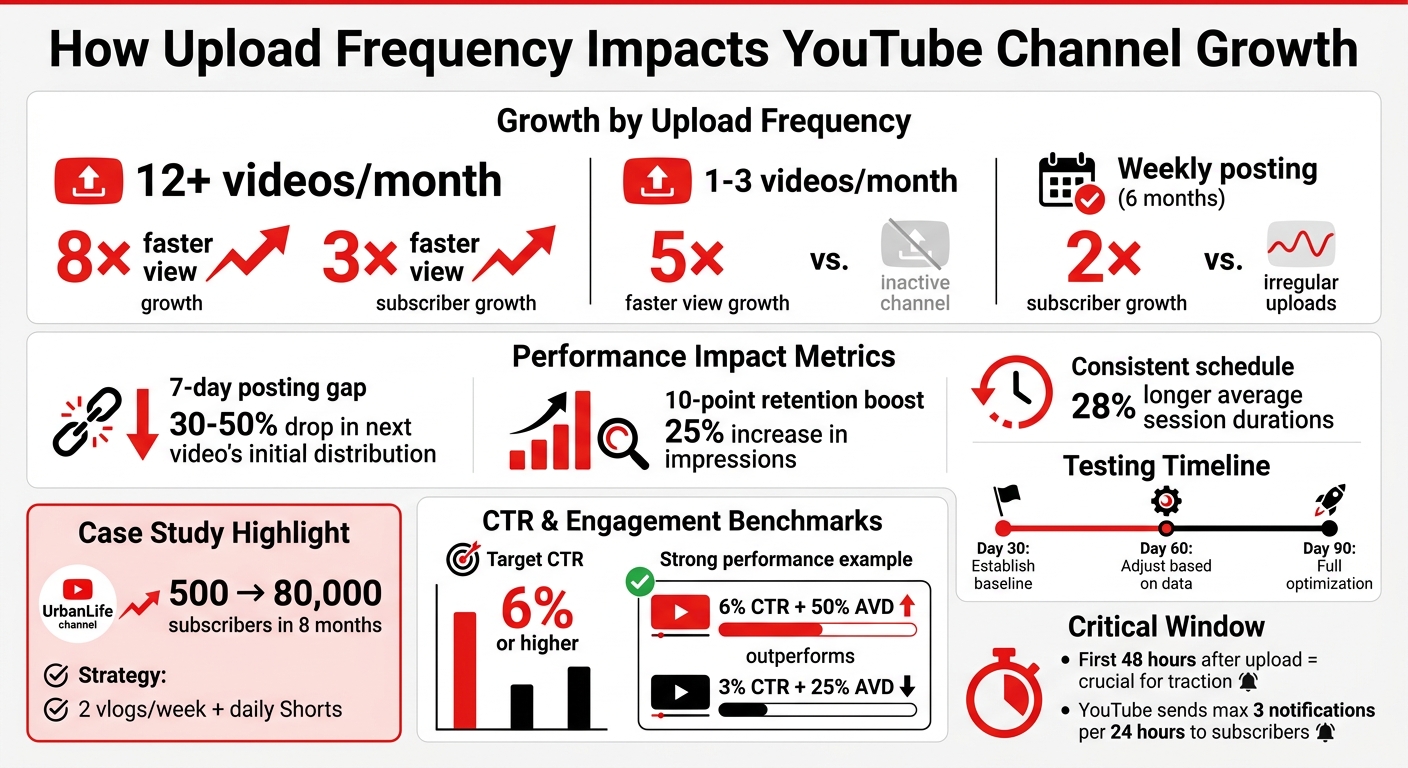
Uploading consistently can help your YouTube channel grow faster. While YouTube’s algorithm doesn’t directly prioritize upload frequency, channels posting 12+ videos monthly grow views 8× faster and subscribers 3× faster than those posting less than once a month. Here’s why:
- More uploads = more data for YouTube. Frequent uploads give the algorithm more content to analyze and distribute effectively.
- Consistency matters. A predictable schedule builds audience habits and improves your channel’s visibility. Even a 7-day break can reduce your next video’s reach by 30–50%.
- Competitors set audience expectations. Analyzing their upload schedules reveals when your audience is most active and what posting rhythm works best.
To stand out, balance quality and quantity. Use tools like TubeBuddy or VidIQ to track competitors, and focus on metrics like click-through rate (CTR) and watch time. Start small with a realistic schedule, test for 30–90 days, and refine based on performance.
YouTube Upload Frequency Impact on Channel Growth Statistics
Finding Competitors and Analyzing Their Upload Schedules
How to Find Competitors in Your Niche
Start by identifying 5–8 competitors who target the same audience as you. A good mix includes 2–3 channels of a similar size, 2–3 slightly larger ones, and 1–2 aspirational channels that represent where you'd like to be in the future. This variety helps set realistic goals while also showing what's possible as your channel grows.
To find these competitors, search for 3–5 key terms related to your niche. Focus on channels that consistently appear in the results, especially those with videos uploaded in the last six months and over 10,000 views. Skip over any channels that haven’t posted in the last 60 days.
You can also use YouTube's built-in tools, like the "Related Channels" section or the "Other channels your audience watches" feature, to discover additional competitors. As Mustafa Alfredji, Founder & CEO of MySocial, explains:
The creators who grow consistently aren't the ones who guess what to post next. They're the ones who study what's already working, reverse-engineer the patterns, and adapt them.
Once you’ve compiled your list of competitors, the next step is to dig into their upload habits.
Monitoring Competitor Upload Schedules
Analyze the latest 30–50 videos from each competitor’s channel to uncover patterns in their weekly uploads, preferred days, and the times they post. This will give you a clearer picture of when their audience is most active.
Pay attention to how they balance long-form content with Shorts. Many creators use Shorts as a way to attract new viewers and keep engagement high between longer uploads. Look out for "outlier" videos - those that perform 5–10 times better than the channel's average. These videos can reveal untapped content opportunities or ideal posting times. You can also optimize performance by testing thumbnails at scale to see which designs resonate best with your audience.
To stay organized, create a spreadsheet to track 5–10 channels. Record details like upload frequency, average views, and the types of content that perform best. Update this data every month to keep up with shifts in trends. For added efficiency, consider tools like TubeBuddy (starting at $2/month), VidIQ (from $7.50/month), or Social Blade (free version available, with premium plans starting at $3.99/month). These tools can send you alerts when competitors post new videos, helping you monitor their strategies in real time.
Since the first 48 hours after a video goes live are crucial for gaining traction on YouTube, watch how competitors promote their content during this window. This can offer valuable insights into strategies for boosting early engagement.
sbb-itb-b59debf
How Upload Frequency Affects Performance Metrics
Performance Metrics to Track
Knowing which metrics to focus on is key to understanding how your upload schedule impacts performance. Metrics like average views per video give a snapshot of how many people are tuning in, while watch time reveals how engaged your audience is.
Pay attention to click-through rate (CTR) and average view duration (AVD) as well. For example, a 6% CTR paired with a 50% AVD can outperform two videos with a 3% CTR and 25% AVD. This highlights how quality often trumps quantity when it comes to results.
Even small improvements in audience retention can have a big impact. A 10-percentage-point boost in retention can lead to a 25% increase in impressions. These metrics are essential for understanding how your upload frequency influences your audience and overall growth.
Upload Frequency and Audience Growth Patterns
Data makes it clear: uploading more often can lead to faster growth. Channels that post 12 or more videos per month grow their views nearly 8× faster and gain subscribers over 3× faster than those posting less than once a month. Even smaller increases in frequency can make a difference - channels posting 1–3 videos monthly grow views nearly 5× faster than inactive ones.
Consistency is a game-changer. Channels that stick to a weekly posting schedule for six months see 2× subscriber growth compared to those with irregular uploads. A predictable schedule also builds audience habits, with some channels reporting 28% longer average session durations.
Take the example of UrbanLife, a travel and lifestyle channel. In 2025, they shifted from uploading one vlog every 10 days to two longer vlogs per week, plus daily Shorts. This change helped them skyrocket from 500 to 80,000 subscribers in just eight months. By combining short-form content for discovery with in-depth videos, they created multiple ways to engage viewers.
That said, posting too frequently can backfire. YouTube creator Thomas Frank experimented with increasing his uploads from once a week to three times a week over 90 days in 2025. While his total views rose by 15%, his per-video watch time dropped by 40%. Adjusting to one high-quality video every two weeks, along with 4–5 Shorts, led to a 180% increase in per-video views and faster subscriber growth.
On the flip side, long gaps between uploads can hurt performance. A 7-day posting gap can cause your next video’s initial distribution to drop by 30–50% compared to your previous schedule. The platform’s algorithm favors consistency, so maintaining a steady rhythm is crucial for staying visible.
These trends highlight how sticking to a consistent upload schedule can help boost your channel’s performance over time.
Exactly How Often You Should Upload on YouTube (Based on Real Data)
Creating Your Upload Schedule
To start, figure out how many hours you can dedicate to creating content each week. Break down the time needed for research, filming, editing, and thumbnail design. If you’re working solo with less than 10 hours a week, aim for one long-form video weekly or biweekly, paired with 3–5 Shorts. With 10–20 hours available, you might handle two long-form videos or one long-form video plus daily Shorts. Full-time creators can often manage 2–3 long-form videos weekly alongside daily Shorts.
Consider batch production as a time-saver. Filming 2–3 videos in one session helps you stay ahead and maintain consistency. Keep a buffer of at least two completed videos to avoid disruptions to your schedule.
Here’s a tactical tip: analyze competitors to find "dead days" when they don’t post. For example, if most upload on Tuesdays and Thursdays, try scheduling your content for Wednesdays or Saturdays. This can reduce competition in YouTube’s suggested feed. When combining Shorts and long-form videos, post your Shorts 2–3 days before a long-form upload to avoid overlapping impressions.
Also, remember that YouTube sends a maximum of three notifications to subscribers within a 24-hour period. Posting more than that can actually limit your reach, so spacing out your uploads strategically is more effective than flooding your channel.
Once you’ve set your schedule, test its impact over a structured timeframe.
Testing Different Upload Frequencies
Use the 30-60-90 rule to test and refine your upload schedule. Start with a new schedule for 30 days to establish a baseline, adjust based on performance data at 60 days, and optimize fully by 90 days. This approach gives YouTube’s algorithm enough data to show you what’s working.
Focus on how individual videos perform rather than just total views. YouTube’s algorithm prioritizes engagement with each video, not how often you upload. Schedule uploads 1–2 hours before your audience’s peak activity (use YouTube Studio’s "When your viewers are on YouTube" chart). Keep an eye on metrics like average views per video, watch time, and click-through rate to evaluate performance.
Pay special attention to outlier videos - those that get 5×–10× your usual views. Look for patterns in their titles, thumbnails, or hooks to understand what’s resonating with your audience. These insights can guide your future content strategy.
Once you’ve fine-tuned your schedule, shift your focus to improving video visibility with strong thumbnails.
Improving Click-Through Rates with Better Thumbnails
While upload timing and frequency help with overall reach, eye-catching thumbnails are key to grabbing attention right away. A click-through rate (CTR) of 6% or higher is considered a solid benchmark. Even small improvements in CTR can make a big difference in how your videos perform.
Tools like ThumbnailCreator simplify the process of designing professional, attention-grabbing thumbnails. This AI tool offers features like face swapping, text editing, and object swapping, allowing you to test different designs quickly and find what works best.
When creating thumbnails, compare your mockups to competitor videos in search results. If your thumbnail blends in, tweak the colors or layout to make it stand out. This quick step ensures your videos are more noticeable in crowded feeds and suggested sections.
Don’t underestimate the importance of thumbnails - they can make or break your video’s impact. Spending just a few extra minutes on them, especially with professional tools, can help you create multiple variations to test and find the best-performing design.
Conclusion
Studying competitor upload schedules helps uncover patterns that reveal when your shared audience is most active and engaged. Research shows that creators who consistently analyze their competition grow three times faster than those who don’t. By pinpointing "dead days" in your niche and identifying top-performing content formats, you can strategically position your uploads to stand out in a crowded feed.
But timing alone isn’t enough - you need to pair it with strong execution. Even the best timing won’t save a video if the thumbnail fails to grab attention. Tools like ThumbnailCreator can simplify the process, allowing you to batch-produce professional thumbnails quickly, so you can focus on creating instead of getting stuck in design delays.
While eye-catching thumbnails help boost initial clicks, YouTube rewards videos based on sustained performance. Upload frequency isn’t the key driver here. As Todd Beaupré, YouTube’s Senior Director of Growth and Discovery, puts it:
Upload frequency is not a factor that the YouTube algorithm focuses on. The algorithm is designed to focus on current video performance, not past performance or upload frequency.
The goal is to find a sustainable schedule that allows you to maximize each video’s performance. Focus on delivering strong packaging and timing that aligns with audience behavior.
Once you’ve developed a strategy, stick to a schedule that matches your capacity and refine it over time. Keep an eye on key metrics like click-through rate (aim for 6% or higher), watch time, and engagement ratios to measure success. And don’t forget - the first 48 hours are critical. Make every upload count with scroll-stopping thumbnails and compelling titles.
FAQs
How often should I upload if I’m short on time?
If you're short on time, focus on uploading one high-quality video each week. What truly matters is consistency, not how often you post. Regular uploads help build trust with your audience and can improve how your content performs in the algorithm. Begin with a weekly schedule and only increase your output if you can maintain the same level of quality. Remember, quality always outweighs quantity when it comes to fostering better engagement and sustained growth.
Will uploading more hurt my watch time per video?
Uploading more videos generally won't negatively impact your watch time per video, provided you maintain both quality and consistency. However, overloading your schedule with too many uploads can lead to burnout, which often results in a drop in content quality. This, in turn, might lower viewer engagement and reduce overall watch time. The key is to find a balance - post frequently enough to keep your audience engaged, but always prioritize creating high-quality content.
How do I pick the best day and time to post?
Research indicates that the best times to post are Saturday evenings in the US, between 6 PM and 10 PM Eastern Time, and Sunday mornings in Europe, between 7 AM and 1 PM CET. These time slots coincide with periods of high engagement, giving your videos a better chance to gain traction. That said, analyzing your specific audience's viewing patterns can offer more precise guidance for fine-tuning your posting schedule.