

How To Identify Competitors in Your YouTube Niche
If you want to grow your YouTube channel effectively, you need to study your competitors. This means analyzing what works in your niche, following YouTube thumbnail guides for visual inspiration, discovering untapped content opportunities, and setting realistic goals based on similar channels. Here's how you can do it:
- Define Your Niche: Be specific. For example, "Gaming" is broad, but "Budget roguelike games under $10" is focused.
- Find Keywords: Use YouTube's search bar in incognito mode to identify popular search terms.
- Analyze Top Channels: Look at the top 5–10 channels in your niche. Focus on their average views, engagement rates, and thumbnail comparisons to see what drives clicks.
- Engagement Metrics: High like-to-view (6%+) and comment-to-view (1.5%+) ratios show strong audience connection.
- Tools to Help: Use tools like TubeBuddy or VidIQ to track competitors' performance and trends.
- Content Gaps: Check competitors' comments for viewer suggestions to find topics they haven’t covered.
Step 1: Define Your Niche and Main Keywords
If you want to analyze competitors effectively, you need to start with a clearly defined niche. This step is crucial because the success of your channel often hinges on how specific your niche is. For example, "Gaming" is incredibly broad and competitive, but focusing on something like "Budget roguelike games under $10" gives you a targeted audience and a clearer path to stand out. The more specific you are, the easier it is to identify your competitors and attract viewers who are genuinely interested in your content.
Narrow Down Your Niche
To refine your niche, consider the 3-Circle Framework: overlap your passion, market demand, and the level of competition. A well-defined niche not only helps you connect with your audience but also assists YouTube's algorithm in categorizing your content correctly. This increases the likelihood that your videos will be recommended to the right viewers.
Here's a sobering statistic: 95% of YouTube videos get fewer than 1,000 views, often because creators fail to define their niche properly. To avoid this pitfall, test your niche's potential with the "50-Video Test." If you can brainstorm 50 unique video ideas within your niche, you're on the right track. If not, your focus might be too narrow. Beyond niche selection, ensure you aren't making common thumbnail mistakes that could further suppress your reach.
| Niche Level | Example Hierarchy |
|---|---|
| Industry | Gaming |
| Category | Indie Games |
| Niche | Roguelike Indie Games |
| Sub-Niche | Budget Roguelike Games under $10 |
Once your niche is set, the next step is to zero in on the keywords that define it.
Find Your Main Keywords
After narrowing your niche, identify 2-3 primary keywords that represent it. To get unbiased results, use YouTube's search bar in incognito mode. This avoids personalized recommendations based on your browsing history and shows what a neutral viewer would see.
"YouTube's algorithm returns customized results based on your browsing history, so try logging out and searching in incognito mode to view a generic list." - Shopify Staff
Start by typing your main topic into the search bar and pressing space. You’ll see autocomplete suggestions, which reflect what users are actively searching for. For even more specific ideas, use the wildcard operator. For instance, typing "Samsung Galaxy S*" will reveal searches for specific models and related long-tail keywords.
Don’t forget to explore the "Research" tab in YouTube Studio Analytics. This tool highlights phrases your audience uses to find content, including "Content Gap" tags. These tags indicate topics viewers are searching for but can’t find quality videos on. Tackling these gaps is a great way to create content that meets unmet demand.
sbb-itb-b59debf
Step 2: Review Top Search Results
Once you've nailed down your primary keywords, plug them into YouTube's search bar and take a close look at the top 5–10 channels that keep popping up. These are your main competitors. Try searching for several related keywords too, and make note of which channels show up repeatedly. If you see the same names over and over, you've likely identified the dominant players in your niche.
"Competition is relative. Most creators aren't competing with MrBeast - at least not directly. It's the people standing on either side of them that they compete with, not those floating above".
In other words, focus on channels that are closer to your level. If you're just starting out, comparing yourself to a channel with 5 million subscribers won't be helpful. Instead, aim for channels with a similar audience size or those slightly ahead of you - like one with 50,000 subscribers.
Once you've identified your main competitors, it's time to dig into their performance metrics.
Check Channel Performance
When you're sizing up a competitor's channel, the average views per video is the number you want to focus on. Andy Davidson from TubeBuddy emphasizes this, saying it "shows the true, repeatable performance of a channel regardless of subscriber count". For example, a channel with 100,000 subscribers but only 2,000 views per video is less successful than one with 20,000 subscribers consistently pulling in 15,000 views.
To get a clear picture, analyze the last 10–15 videos on each competitor's channel. This will give you insight into their current performance trends. Take note of how often they post, as this can clue you into the ideal publishing schedule for your niche. Want to check if a channel is monetized? Open it in an incognito browser window and look for signs like "Join" buttons, "Super Thanks" features, or mid-roll ads.
Beyond raw numbers, pay attention to engagement ratios. These metrics can tell you how well the audience is connecting with the content:
- A comment-to-view ratio over 1.5% signals strong community interaction.
- A like-to-view ratio above 6% suggests the content resonates with viewers.
For example, a video with 50,000 views and 3,000 comments is often more insightful to analyze than one with 500,000 views but only 2,000 comments.
Find Content Similarities
After evaluating performance, dig into the types of content that are driving engagement. Group your competitors' videos into categories like tutorials, product reviews, vlogs, case studies, or comparison videos. Which of these formats seem to generate the most buzz? Also, take note of the runtime of their most successful videos to figure out the ideal video length for your niche.
Pay special attention to how they structure their titles, descriptions, and tags. This will help you uncover the "keyword spine" they use to rank in search results. Another pro tip: scan the comment sections of their videos. You’ll often find audience suggestions for topics that haven’t been covered yet. These unaddressed questions are golden opportunities for you to create content that fills those gaps - before your competitors catch on.
Step 3: Use YouTube's Built-In Tools to Find Competitors
Once you've assessed your performance, it's time to dig into YouTube's built-in tools to uncover your competitors. These native features make it easy to identify who’s thriving in your niche - without relying on third-party tools. By using search filters and exploring the "Related Channels" section, you can pinpoint creators making waves in your space. Remember to search in incognito mode (as mentioned in Step 1) to avoid skewed results influenced by your personal browsing history.
Apply Search Filters
Start by typing your main keywords into YouTube's search bar, then click on the Filters option. Narrow your results by selecting criteria like upload date (e.g., "Past year" or "Past month") and view count. This ensures you're focusing on active channels rather than those that haven't posted in a while.
If you're planning to include Shorts in your content strategy, make sure to check out the Shorts tab. This filter highlights creators who are excelling in short-form content, giving you insight into potential competitors in that format.
Once you've refined your search results, it's time to explore related channels to expand your understanding of the competitive landscape.
Check Related Channels
After identifying key competitors, visit their channel pages and click on the "Channels" tab. This section showcases other creators they feature or collaborate with, giving you a peek into their network. These channels are often highly relevant competitors - or even potential allies - that you might not have noticed during your initial search.
Another goldmine for finding competitors is the "Recommended" sidebar that appears when watching a competitor's video. YouTube's algorithm curates this list to suggest similar creators, offering you a quick way to discover additional channels worth analyzing.
For a more data-driven approach, head to the "Audience" tab in YouTube Studio Analytics. The "Other channels your audience watches" panel provides a list of channels that overlap with your viewer base. Since this data reflects actual viewer behavior, it’s one of the most reliable ways to identify direct competitors.
Step 4: Check Audience Overlap and Engagement
After identifying your competitors, it's important to ensure their audience aligns with yours - not just in topics but also in engagement and demographics. A channel might cover similar subjects, but if its viewers don't match your target audience's preferences and behaviors, it’s not a true competitor. This step helps filter out channels that merely share keywords, leaving you with those that genuinely overlap with your audience.
Review Engagement Metrics
View counts alone don’t tell the whole story. A video might rack up 100,000 views, but if it only garners 200 likes and 10 comments, it signals weak engagement. The audience may be clicking but not connecting. To measure this, focus on engagement ratios instead of raw numbers.
Start by calculating the like-to-view ratio: divide the total likes by total views, then multiply by 100. A ratio above 6% indicates the content resonates well with viewers. Similarly, the comment-to-view ratio is key - anything over 1.5% points to an active, engaged community. If your competitors consistently hit these benchmarks, it’s a strong sign their audience shares interests and expectations similar to yours.
Dive into the comment sections for deeper insights. Look for recurring themes, inside jokes, or frequently asked questions. Marketing expert Nia Patel suggests:
"Your competitors' comment sections can also be a good place to go to because they might have their audience members suggesting ideas that the competitor hasn't posted yet".
These patterns reveal what the audience values and highlight opportunities to address gaps in the current content landscape.
Verify Demographic Match
While you can’t directly access competitor demographics, there are indirect ways to confirm alignment. For example, check if competitors have monetization features like the "Join" button or "Super Thanks" enabled. These features suggest their niche is commercially viable and attracts viewers willing to spend money.
For a more precise approach, utilize your studio's audience overlap metrics. If a competitor appears with a high percentage overlap, it’s strong evidence that you’re targeting the same audience. Cross-check this with engagement data - if both channels show similar interaction styles and sentiment in their comments, you’ve likely found a competitor whose audience aligns closely with yours.
Step 5: Compare Competitor Performance Metrics
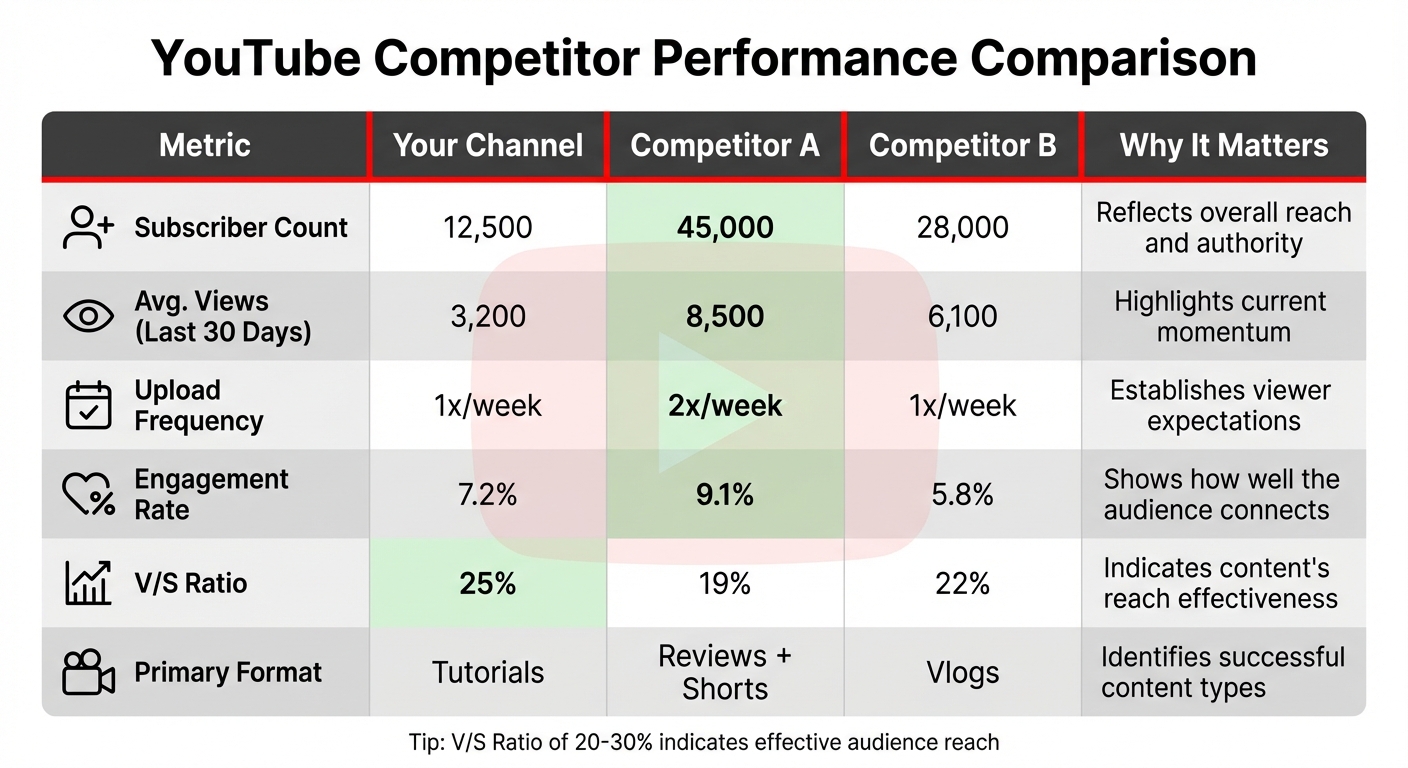
YouTube Competitor Analysis Performance Metrics Comparison Table
Once you've evaluated channel performance and audience engagement, it's time to put those metrics side by side with your competitors. This comparison sharpens your strategy by identifying gaps and opportunities. By compiling your findings into a performance comparison table, you’ll get a clear picture of how you stack up against rivals and where there’s room to improve. A well-organized table makes it easier to make informed decisions.
Build a Performance Comparison Table
Start by gathering data on 5–10 competitors. Choose a mix of direct competitors (those covering the same topics), indirect competitors (those targeting your audience with different content), and a couple of aspirational channels that represent where you want to be in the next year. Focus on metrics that indicate consistent success rather than one-off viral hits.
One of the most telling metrics is average views per video, which often says more about a channel's current performance than subscriber count. For instance, a channel with 50,000 subscribers averaging 20,000 views per video is performing better than one with 200,000 subscribers averaging only 8,000 views. To get a solid picture, analyze the last 10–15 videos from each channel.
Your table should also include other key metrics like upload frequency (how often content is posted), engagement rate (likes and comments as a percentage of views), click-through rate benchmarks, and the V/S ratio - this is the ratio of a video's views to the channel's subscriber count. A V/S ratio between 20–30% is a good indicator that a channel is effectively reaching its audience. Add notes on content formats, like thumbnail styles or video types, to better understand why certain metrics stand out.
Here’s an example of how to structure your data:
| Metric | Your Channel | Competitor A | Competitor B | Why It Matters |
|---|---|---|---|---|
| Subscriber Count | 12,500 | 45,000 | 28,000 | Reflects overall reach and authority |
| Avg. Views (Last 30 Days) | 3,200 | 8,500 | 6,100 | Highlights current momentum |
| Upload Frequency | 1x/week | 2x/week | 1x/week | Establishes viewer expectations |
| Engagement Rate | 7.2% | 9.1% | 5.8% | Shows how well the audience connects |
| V/S Ratio | 25% | 19% | 22% | Indicates content's reach effectiveness |
| Primary Format | Tutorials | Reviews + Shorts | Vlogs | Identifies successful content types |
Review this table regularly - at least monthly. If you notice a sudden jump in a competitor's engagement rate, dig into their recent uploads to see what’s driving the change. Maybe they’ve started using YouTube Shorts or revamped their thumbnails. These insights can guide you in fine-tuning your own strategy.
Tools for Competitor Analysis
Finding the right tools can save you a ton of time and effort by automating data collection and spotting trends you might otherwise miss. With over 2.4 million new videos uploaded daily, trying to track all this manually is a non-starter. Instead, focus on tools that help you identify patterns and deliver insights quickly.
TubeBuddy and VidIQ are two solid options for comparing channels side by side. TubeBuddy's Competitor Analysis Tool allows you to track up to 10 channels simultaneously, offering data on lifetime views, subscriber growth, and engagement trends. On the other hand, VidIQ shines with its real-time tracking, including a "Views Per Hour" feature that reveals how fast a competitor's new video is gaining traction. Pricing is pretty accessible - TubeBuddy starts at about $4.50/month, while VidIQ begins at $7.50/month.
If you're looking for deeper insights, OutlierKit ($15/month) is a great tool for spotting videos that outperform a channel's average by 3–10 times. This makes it easier to identify repeatable content strategies instead of getting distracted by one-off viral hits. For a broader view, Socialinsider offers a 14-day free trial and includes features like cross-platform benchmarking and sentiment analysis of competitor comment sections - perfect for uncovering content opportunities.
Use ThumbnailCreator for Professional Thumbnails

Once you’ve nailed down competitor trends, it’s time to focus on creating eye-catching thumbnails. About 90% of YouTube’s top-performing videos use custom thumbnails, and these visuals play a huge role in boosting your click-through rate. Enter ThumbnailCreator (https://thumbnailcreator.com), an AI-powered tool that helps you design professional, high-impact thumbnails in just minutes.
This platform lets you swap faces, edit text, and tweak objects to create bold, high-contrast visuals that align with the trends you’ve uncovered. It even offers templates tailored for different content types - whether you’re making tutorials, reviews, or vlogs. And since thumbnails essentially promise viewers what your video will deliver, ThumbnailCreator allows you to test multiple designs quickly. Pair it with A/B testing features from tools like TubeBuddy to see which thumbnail variations drive the most clicks, and refine your designs based on real-world performance data.
Conclusion and Next Steps
This guide outlines a straightforward approach to identifying and analyzing competitors in your YouTube niche. Begin by pinpointing your primary keywords and examining top search results to uncover channels that cater to your target audience. Don’t overlook YouTube’s built-in tools - like the "Other channels your audience watches" feature in Analytics - to discover competitors you might not have considered. Once you’ve identified your competitors, focus on analyzing their strategies and addressing any gaps you find.
A great place to spot opportunities is in the comment sections of competitor videos. Marketing expert Nia Patel highlights this well:
"Your competitors' comment sections can also be a good place to go to because they might have their audience members suggesting ideas that the competitor hasn't posted yet".
These overlooked ideas can become your quickest wins and set you apart in your niche.
From there, put your findings to the test over a 90-day period. Implement three to four specific changes - like experimenting with a new title format, launching a Shorts series, or updating your thumbnail designs - and track the results. Afterward, refine your strategy based on what worked best. Keep your competitor list manageable by focusing on 5–7 channels, mixing direct rivals with aspirational creators known for strong storytelling or production quality.
FAQs
How can I tell if a channel is a direct competitor to mine?
To spot a direct competitor, consider whether their channel is aimed at the same audience, creates similar content, and regularly shows up in top search results for your niche keywords. Pay attention to overlaps in the topics they cover, their content style, and how their audience interacts with their content to determine if they’re truly competing with you.
What metrics matter most when comparing channels in my niche?
When evaluating your channel's performance, focus on key metrics like video views, engagement (including likes and comments), click-through rates (CTR), audience retention, and the effectiveness of your content's format and style. These data points provide a clear picture of what’s working well, where improvements are needed, and where potential growth opportunities lie.
How can I find content gaps my competitors are missing?
To uncover content gaps that your competitors might be overlooking, start by examining their channels closely. Pay attention to areas like unexplored topics or content that isn’t performing well. Look for patterns such as high audience drop-off rates, frequently asked but unanswered viewer questions, or even videos that almost went viral but fell short.
Dive into their performance metrics and strategies to pinpoint where they might be missing opportunities. Once you’ve identified these gaps, you can create content that addresses them in a way that stands out. This approach not only helps set your channel apart but also attracts viewers who feel their needs aren’t being met elsewhere.