

YouTube Shorts vs Long Videos: Engagement Rate
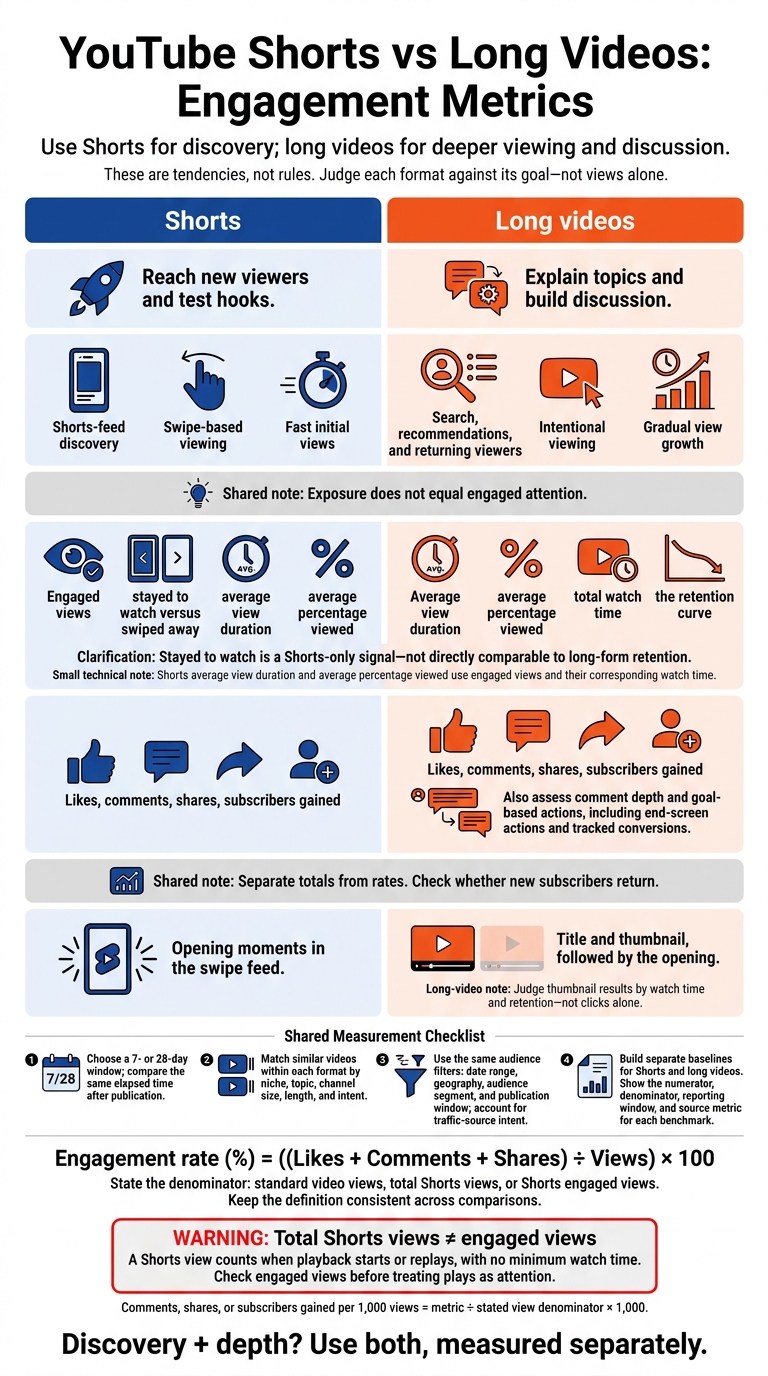
I’d use Shorts for discovery and long videos for deeper viewing and discussion - not pick a winner by views alone. To compare your results, I’d start with the same 7- or 28-day window and measure each format against its goal.
Here’s the catch: a Shorts view counts when playback starts or replays, with no minimum watch time. So I’d check engaged views before treating those plays as attention.
Quick Comparison
| What I’d compare | Shorts | Long videos |
|---|---|---|
| Main goal | Reach new viewers and test hooks | Explain topics and build discussion |
| Attention | Engaged views, stayed-to-watch rate, retention | Average view duration, retention, watch time |
| Response | Likes, comments, shares, subscribers gained | The same metrics, plus comment depth and goal-based actions |
| First impression | Opening moments in the swipe feed | Title and thumbnail, followed by the opening |
| Fair benchmark | Similar Shorts over the same reporting window | Similar long videos over that window |
For interaction rate, I’d use (likes + comments + shares) ÷ stated views × 100. <u>The denominator matters:</u> total Shorts views and engaged views aren’t interchangeable.
I’d also check whether new subscribers return. For long videos, I’d test thumbnails that match the content - including AI-made concepts - but judge the result by watch time and retention, not clicks alone.
YouTube Shorts vs Long Videos: Engagement Metrics
YouTube Shorts vs Long-Form Content | Which One Grows Faster?
sbb-itb-b59debf
How to Measure Engagement
Each metric tells you something different. Interaction rate measures likes, comments, and shares per view. Retention and average view duration show how long viewers stay, while watch time measures total viewing time. Subscriber conversion tracks subscribers gained per view. Use the same time window and audience filters when comparing formats. This ensures your data aligns with thumbnail CTR benchmarks for your specific niche.
In YouTube Studio → Analytics → Content, compare Shorts and Videos using the same date range, geography, audience segment, and publication window. Record metrics separately for each format. For Shorts, include engaged views and stayed-to-watch rate. For both formats, track average view duration, watch time, likes, comments, shares, and subscribers gained.
Shorts: Engaged Views and Swipe Behavior
For Shorts in the swipe feed, start with stayed to watch versus swiped away, then check engaged views. Compare average view duration, average percentage viewed, and the viewing and interaction metrics listed above.
Long-Form Videos: Retention and Discussion
For long-form videos, review average view duration, average percentage viewed, total watch time, and the retention curve. Look for drop-offs at the opening, during transitions, and around key explanations.
Review comment depth alongside likes, shares, and subscribers gained. This helps you assess discussion separately from viewer retention and subscriber conversion.
Engagement Rate Formulas and View Definitions
Use Engagement rate (%) = ((Likes + Comments + Shares) ÷ Views) × 100.
Clearly state which view count you use as the denominator: standard video views, total Shorts views, or Shorts engaged views. Keep that denominator the same across comparisons. To calculate comments, shares, or subscribers gained per 1,000 views, divide each metric by the stated denominator and multiply by 1,000.
Compare Shorts and long videos by viewer behavior and your goal - not raw view count.
Shorts vs Long-Form Videos: Performance and Goals
Viewing Behavior and Interaction Trends
With the metrics defined, look at how each format performs against your goal. Shorts favor fast discovery; long-form favors longer viewing and discussion. These are tendencies, not rules.
| Metric | Shorts tendency | Long-form tendency | Engagement takeaway |
|---|---|---|---|
| Reach | Shorts-feed discovery | Search, recommendations, and returning viewers | Exposure does not equal engaged attention. |
| View velocity | Fast initial views | Gradual view growth | Compare results at the same time after publication. |
| Viewing context | Swipe-based viewing | Intentional viewing | Viewer intent shapes interaction rates. |
| Stayed to watch | Shorts-only signal of whether viewers stay rather than swipe | Not directly comparable | Keep separate from long-form retention. |
| Average view duration | Shorter viewing time | More minutes per view | Account for video length when comparing results. |
| Total watch time | Grows through reach | Grows through viewing depth | Separate totals from per-view performance. |
| Likes | Quick reactions | Satisfaction after longer viewing | Separate totals from rates. |
| Comments | Fast responses | More room for discussion | Topic and community affect results. |
| Shares | Shareable moments | Content worth referring back to | Compare totals and rates. |
| Subscriber conversion | Discovery introduces viewers | Detailed content builds trust | Measure conversion against each format’s goal. |
These patterns help you match the format to the outcome you want.
Which Format Fits Your Channel Goal?
Choose the format that gives viewers enough information to take the next step you want them to take. A strong hook in a Short tests interest. It does not prove demand for a long-form version. Judge each format against its own goal.
| Channel goal | Recommended format | Success metrics |
|---|---|---|
| Reach and awareness | Shorts | Engaged views, shares, new viewers |
| Concept or hook testing | Shorts | Stayed to watch, early retention, comments |
| Teasers and product demonstrations | Shorts | Retention, shares, channel actions |
| Detailed education | Long-form | Retention, watch time, returning viewers |
| Search-driven evergreen content | Long-form | Search traffic, sustained views, watch time |
| Discussion and deeper conversion | Long-form | Qualified comments, end-screen actions, tracked conversions |
| Discovery plus depth | Both, measured separately | Goal-specific metrics, movement between formats |
How to Benchmark Similar Videos
Benchmarks work only when you group similar videos and measure them over the same window. Match niche, topic, channel size, length, and intent within each format. A beginner tutorial and an entertainment clip are not comparable just because both cover coffee.
| Measurement task | Shorts approach | Long-form approach | Comparison rule |
|---|---|---|---|
| Group uploads | Match topic, intent, duration, publication period, and audience size | Match the same factors within long-form | Build separate baselines for each format. |
| Set the window | Compare medians at 7 or 28 days after publication | Use the same elapsed windows | Avoid lifetime totals that favor older uploads. |
| Segment distribution | Isolate Shorts-feed traffic where available | Separate search, Home, Suggested, and external traffic | Match audience segments and account for traffic-source intent. |
| Assess attention | Engaged views, stayed to watch, retention | Retention, average view duration, watch time | Shorts average view duration and average percentage viewed use engaged views and their corresponding watch time. |
| Assess response | Shares and subscribers gained per stated denominator, plus totals | Interaction rates and subscriber conversion, plus totals | Keep denominator definitions consistent and explicit. |
For every benchmark, show the numerator, denominator, reporting window, and source metric. Keep Shorts and long-form benchmarks separate so you can track discovery, retention, and conversion without mixing the formats.
Match Long-Form Thumbnails to the Content
Long-form engagement starts with a viewer choosing to click. That makes the thumbnail important before the video even begins. The title and thumbnail must match what the video delivers. For Search, state the topic clearly. For Browse, use a simple visual hook. For Suggested, show the angle without overpromising. Then make sure the opening backs up that promise promptly.
Impressions CTR measures how often viewers click after a registered impression. It’s not total views divided by every thumbnail exposure. After the click, watch time and retention help show whether the video met expectations.
Create Thumbnail Concepts With ThumbnailCreator
ThumbnailCreator helps creators generate thumbnail concepts using AI, templates, face swapping, text editing, and object swapping. Build each concept around one recognizable subject, strong contrast, and little text. Any text should stay readable at small sizes and add information rather than repeat the title.
Check generated or swapped imagery for accuracy. It shouldn’t suggest that the video features a person, product, or result that isn’t there. The tool can speed up production, but it doesn’t guarantee better performance.
Track CTR and Viewer Satisfaction
Keep the title unchanged when testing thumbnails vs. relying on gut feeling. Otherwise, you won’t know which change affected CTR. YouTube’s long-form A/B-testing workflow supports up to three variations, can run for up to two weeks, and picks winners based on watch time - not CTR alone.
Track registered impressions, CTR, average view duration, retention - especially during the first 30 seconds - and watch time. Review comments and shares alongside those numbers.
High CTR means little if viewers leave quickly. Before crediting or blaming the thumbnail, check for changes in traffic sources and audiences. Reaching more viewers can lower CTR without meaning performance got worse. Early exits point to a thumbnail that promised too much or an opening that didn’t deliver enough.
Shorts work differently. Automatic playback makes the opening moments and whether viewers swipe away more relevant to Shorts-feed evaluation than long-form thumbnail CTR.
Conclusion: Choose a Format That Serves Your Goal
The comparison of retention, discussion, and fast interactions points to a clear choice: Use Shorts for discovery and fast interactions, and long-form videos for deeper viewing and discussion. Use both only if they serve the same audience and deliver on the same promise - not just to publish more videos.
For benchmarks, compare similar videos aimed at the same audience over the same time window. Track each format separately in YouTube Studio and use the same denominator in every comparison. Total Shorts views and engaged views aren’t interchangeable.
Evaluate Shorts by engaged views, swipe behavior, and subscriber gain. For long-form videos, look at watch time, retention, discussion, and actions tied to your goal. Engagement measures differ by format, so judge performance by how well it serves your goal - not just view count or CTR.
FAQs
Why do my Shorts get views but few comments?
Shorts are built for quick viewing, so viewers often scroll to the next video instead of leaving a comment. High view counts show reach, but they don’t guarantee comments or shares.
To encourage interaction, give viewers a clear reason to pause and join the conversation - not just watch.
How can I tell if Shorts viewers watch my long videos?
Use YouTube Studio analytics to check traffic sources and audience behavior. Compare audiences by video format to see if Shorts viewers also watch your long-form videos. Then check retention reports and watch time to find out whether they stick around.
If viewers click but leave soon after, your thumbnail or intro may promise something the video doesn’t deliver. ThumbnailCreator can help you create consistent, professional thumbnails that better match your content.
How many uploads do I need for a reliable engagement benchmark?
Build your engagement baseline from your latest 10 to 20 comparable uploads. Match them by topic, format, audience intent, traffic source, and time since publication.
For metrics like click-through rate, use the median of those uploads rather than platform-wide averages. When testing thumbnails, aim for 1,000 to 2,000 impressions per variant. A total of 10,000 impressions generally provides the most statistically significant results.