

How Close-Ups Impact YouTube Thumbnail Click Rates
Yes - close-ups can get more clicks, but only when they make the thumbnail easier to read and match the video. In the article, I found one clear pattern: large face crops tend to work best on mobile, especially when the face fills 30%–50% of the image, shows a natural expression, and looks straight at the viewer.
Here’s the short version:
- Faces grab attention fast, often within about 300 milliseconds
- Emotional expressions can lift CTR by 20%–45%
- Subtle expressions can beat exaggerated shock faces by 15%–20%
- Faces do not win in every niche
- Watch time matters more than clicks alone
- Business content often works well without a face
- Vlog and lifestyle content often gets more from close-ups
In other words: a close-up is not a trick for more clicks. It is a way to make your thumbnail clearer at a glance.
If I were applying this advice, I’d keep it simple:
- Use one face
- Crop it tight
- Keep the expression natural
- Test one change at a time
- Judge results by CTR and retention together
| Factor | What the article says |
|---|---|
| Face size | Best when the face covers 30%–50% of the thumbnail |
| Expression | Subtle or closed-mouth often beats overdone reactions |
| Best metric | Watch time per impression, not CTR by itself |
| Best for | Creator-led content like vlogs, lifestyle, and personality-driven videos |
| Less useful for | Business, corporate, or answer-first topics |
So if you want the plain answer: close-ups help most when your face is part of the reason people click, and when the thumbnail sets the right expectation for the video.
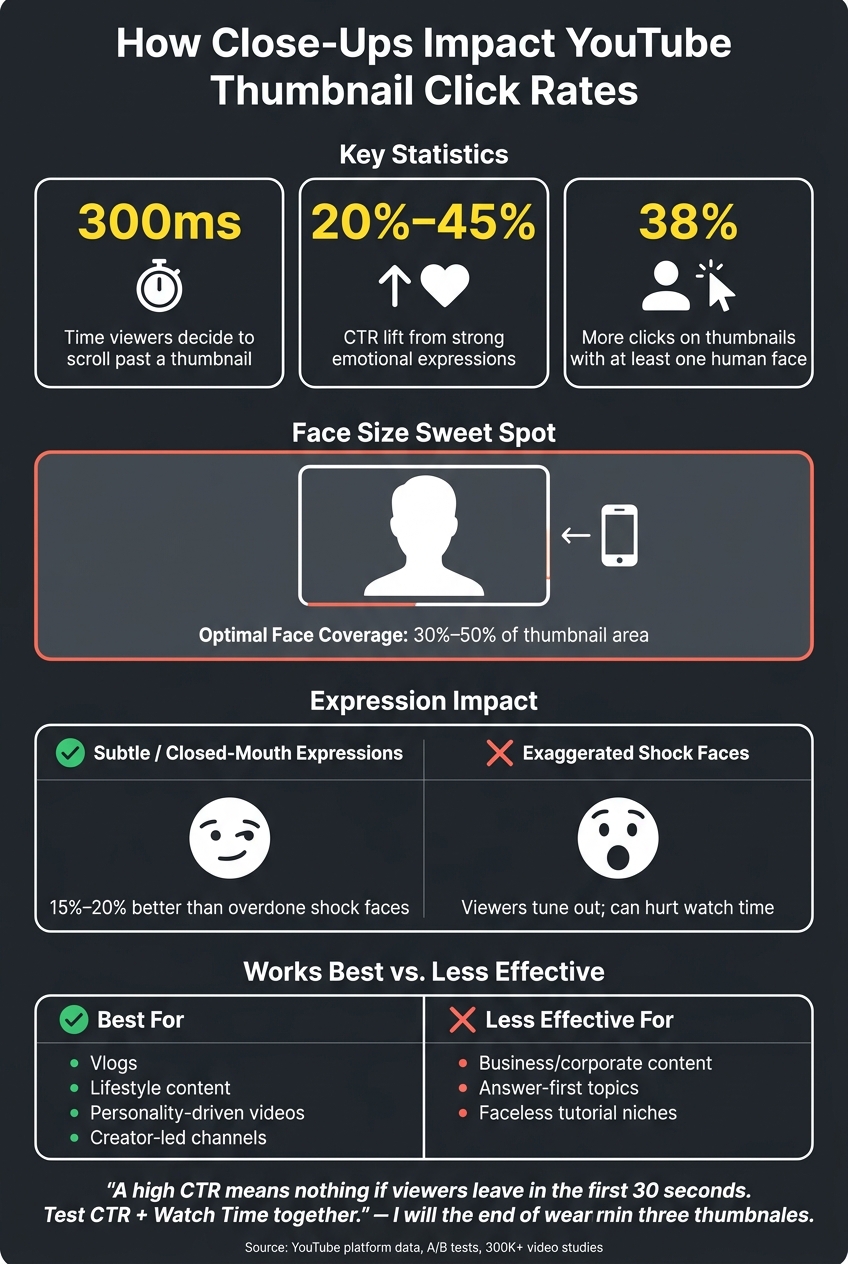
YouTube Thumbnail Close-Ups: Key Stats & Best Practices
How I consistently get 15%+ CTR on all my thumbnails (NO B*S GUIDE)
sbb-itb-b59debf
What Research Says About Faces, Attention, and Click Behavior
Research on attention helps explain why close-up faces can stop the scroll.
Why Human Faces Draw the Eye First
Human faces trigger a fast, automatic response in the brain, which helps them stand out in a scrolling feed. That speed matters. People often decide whether to keep scrolling in about 300 milliseconds.
At thumbnail size, large close-ups are also easier to process than busy backgrounds or small text. Put simply, a face is often easier to spot in a split second than a crowded image packed with detail.
How Facial Expressions Affect Viewer Curiosity
Facial expressions send emotion almost instantly, often before someone reads a single word. That instant emotional cue can spark curiosity fast.
The numbers back that up. Strong emotional expressions can lift CTR by 20% to 45% compared with neutral designs. But there’s a catch: people tend to tune out exaggerated shock.
A/B tests show that closed-mouth, determined, or subtle expressions can beat over-the-top reactions by 15% to 20%. That makes sense. When every thumbnail screams, viewers start to ignore the noise.
Where the Evidence Falls Short
The research linking faces and attention is solid, but a lot of it comes from broad attention science, not studies centered only on YouTube thumbnails. And when you zoom out to bigger platform data sets, the picture gets messier.
One study of 323,000 videos found that faces added almost zero lift in median views when averaged across all categories.
Channel size also changes the equation. For established creators, a familiar face can work like brand recognition. For smaller channels, an unfamiliar face may not do much on its own, so the expression has to carry more weight.
"If you over-index on CTR, it could become click-bait, which could tank retention, and hurt performance." - Rene Ritchie, Creator Liaison, YouTube
That gap is why platform testing matters more than theory by itself.
What Platform Data and Creator Tests Show
Controlled tests show where close-ups help most.
CTR Results: Close-Up vs. Non-Close-Up Thumbnail Tests
Some datasets show a clear lift from faces. Thumbnails with at least one human face get 38% more clicks than faceless options in certain tests.
But the bigger picture is messier. A study of more than 300,000 viral videos found no steady average lift for faces over faceless thumbnails, which is exactly why niche context matters so much. In other words, there isn't one magic rule that works everywhere.
The patterns that show up most often are pretty specific: a single face with direct eye contact, a larger face area that takes up 30% to 50% of the thumbnail, and faceless designs in business niches.
So the useful question isn't just whether face thumbnails vs. no face work. It's which kind of face treatment fits the niche best.
Watch Time and Retention After the Click
Clicks only matter if the thumbnail sets the right expectation. That's why YouTube's Test & Compare tool looks at watch time, not just clicks, because a thumbnail that gets the click but loses the viewer fast can drag down overall performance.
If the thumbnail, title, and first 30 seconds don't line up, early retention drops. And when a video gets clicks from a misleading thumbnail but viewers leave fast, YouTube can push that video down.
Closed-mouth expressions are a good example. MrBeast found that switching from open-mouthed shock expressions to closed-mouth expressions improved watch time across every video tested.
Why Results Differ by Niche
A close-up that works in one niche can miss in another. In vlog and lifestyle content, the creator's face is part of the product, so a close-up can feel like an invitation. In business and corporate content, viewers are usually after an answer or a result, so faceless thumbnails often do better.
When the audience doesn't already know the creator, the expression has to carry more weight.
Those patterns start to matter when they shape the design rules below.
How to Apply the Research to Thumbnail Design
Design Rules Backed by the Evidence
The research points to three main design calls: crop, gaze, and expression.
In plain English: use one main face, crop it large, have the subject look straight at the camera, and keep the expression natural.
| Rule | Action |
|---|---|
| Face size | Cover 30%–50% of the frame; use tight, shoulder-up crops |
| Eye contact | Look straight into the lens |
| Face count | One face; remove or crop out secondary faces |
| Expression | Use subtle micro-expressions instead of an overdone shock-face |
| Background contrast | Use solid or gradient backgrounds to reduce visual noise |
That last point matters more now than it used to. Natural-looking thumbnails are starting to beat forced or overly polished designs as viewers push back on exaggerated expressions. A raised eyebrow or a closed-mouth smirk often works better than a big, staged shock-face.
How to Run a Clean Thumbnail Test
After you lock in the crop, test one change at a time. That's the whole game.
If you change too many things at once, you won't know what caused the result. So if you're testing a close-up crop against a mid-shot, keep the title, text overlay, and background color the same.
YouTube's native Test & Compare tool can run up to three thumbnail variants at the same time by splitting viewers into separate audience groups. And when you read the results, don't look at clicks alone. Watch time tells you more.
| Single A/B Test | Multi-Variant Test | |
|---|---|---|
| Best for | New channels testing whether a face adds value | Established channels optimizing framing and crop |
| Variable control | High - easy to isolate one element | Moderate - requires careful alignment across variants |
| Primary metric | CTR + 30-second retention | Watch time per impression |
| Minimum run time | 2–4 weeks or 1,000 impressions per variant | Same, but longer to reduce noise |
Here's a simple pre-launch check: shrink the thumbnail to mobile size and squint at it. If the face and focal point don't stand out right away, the crop or contrast probably needs more work.
Where ThumbnailCreator Fits in the Workflow
ThumbnailCreator is useful when you want to build matched variants fast and test a single variable without redoing the whole design.
Its face swapping feature lets you try different expressions on the same base thumbnail, which makes side-by-side testing much easier. Object swapping helps you build a non-face version just as fast as a close-up version. And if editing isn't your strong suit, the AI generation and pre-designed templates cut down the time between "I want to test this" and "the test is live."
Conclusion: What Close-Ups Actually Change
Close-ups change one thing more than anything else: they make thumbnails easier to read fast.
That’s the main job. On a small mobile screen, a tighter face shot can make the image clearer in a split second. Yes, close-ups can lift CTR, but that lift depends on the niche, the expression, and how well the image lines up with the video itself. In plain English, close-ups are best used as a readability tool, not a magic trick for getting clicks.
There’s a bigger point here too. A high CTR doesn’t mean much if people bail in the first 30 seconds. YouTube tests thumbnails against watch time, not clicks by themselves. If the thumbnail sets one expectation and the video delivers another, retention drops. And that tells the algorithm the video didn’t live up to the promise.
Key Points to Take Away
The close-up itself isn’t the whole story. What matters is whether the design choice is deliberate and matched to the video. The evidence points to a few clear takeaways:
- Face size matters - covering 30–50% of the frame makes the thumbnail easier to read on mobile
- Expression must match the video - when the emotion feels off, retention suffers and early drop-off goes up
- Results change by niche, audience familiarity, and how well the thumbnail matches the video
- Watch time matters more than CTR in testing - use YouTube's Test & Compare tool to track what matters most
The formula you can repeat is pretty simple: test one variable at a time, read retention alongside CTR, and keep the thumbnail honest and authentic. Close-ups help when they make the promise clearer, not louder.
FAQs
Do close-ups work for every YouTube niche?
No. Facial close-ups can lift click-through rates in niches like finance, business education, and personal vlogging because they help build trust or show emotion.
But they often do worse in gaming and corporate tutorials, where viewers usually prefer action-focused imagery or direct visuals of the content.
ThumbnailCreator can help creators test different faces, expressions, templates, and designs for their audience.
How can I tell if a close-up is helping watch time?
Test and compare your results. Thumbnails mainly affect CTR, not watch time. So a close-up only helps when it fits the video, pulls in the right viewers, and gives them a reason to stick around.
Use ThumbnailCreator to A/B test different thumbnail versions. Then check CTR and audience retention in YouTube Analytics to see if the close-up is bringing in viewers who keep watching.
Should I use my face if my channel is still small?
It depends on your niche and your content style.
A face can help click-through rate, but that lift is often stronger for channels that already have an audience. On smaller channels, adding a face may make little to no measurable difference.
So start with the basics first: a clear, high-contrast thumbnail that shows the video’s story or emotion at a glance.
If you do use your face, go with a genuine expression instead of over-the-top shock. It usually feels more natural, and it still gets the point across.