

YouTube Title Tests for Better CTR Comparisons
A higher CTR doesn’t always mean a better YouTube title. Test up to three title variants on the same video, keep the thumbnail and other settings unchanged, and judge results by watch time - not clicks alone.
A clean comparison comes down to four steps:
- Test title wording in isolation. Let YouTube’s native test finish, which can take a few days to two weeks.
- Research similar competitor videos. Use their titles for test ideas, not CTR estimates. Public views, likes, and comments don’t reveal CTR.
- Check viewing quality. Review the test results alongside any available variant-level CTR, retention, and watch-time data. Mark missing metrics as unavailable.
- Test thumbnails separately. Save the results, choose whether to keep, retest, or reject the title, and use that decision to guide the next test.
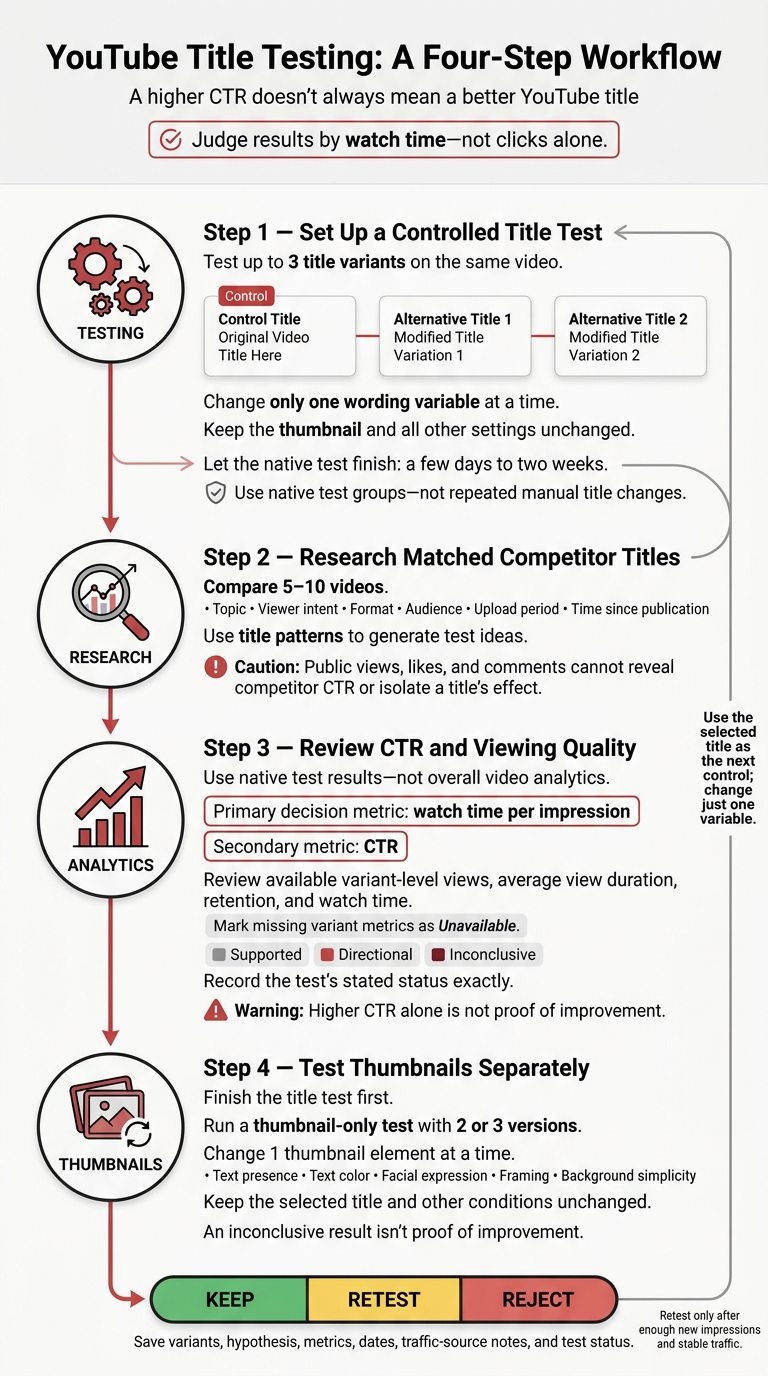
YouTube Title Testing: A Four-Step Workflow
The NEW YouTube Title A/B Testing Feature (how to use it & what to be aware of)
sbb-itb-b59debf
1. Set Up a Controlled Title Test
Choose a recent long-form video with steady impressions and enough recent traffic to support a test. Avoid videos in a viral spike or major promotional push; too few impressions can leave results inconclusive. On a computer, open the video in YouTube Studio and select the A/B testing option in its details. Check that your channel has Advanced features enabled. This sets a clean baseline for competitor comparisons.
Choose Up to 3 Accurate Title Variants
Save the current title as your control, then write up to two alternatives. Start with one hypothesis and change only one variable at a time: the viewer benefit, level of detail, or wording around search intent. Keep the audience, underlying search intent, and topic promise the same across all variants. Keep capitalization and punctuation consistent unless you’re testing them. Every claim must match the video.
Keep Test Groups and Conditions Consistent
Use native test groups on the same upload. Keep the thumbnail fixed (or apply advanced thumbnail optimization techniques in a separate test) to isolate the effect of title wording, and leave all other variables unchanged. Don’t try to simulate a test by repeatedly changing the title. Log any unavoidable changes, including holidays, major news, paid promotion, and traffic-source shifts. That way, you won’t mistake a distribution change for a wording effect.
Set the Test Window and Record Metrics
Let the native test finish. YouTube says this can take a few days to two weeks. Don’t end it based on early CTR benchmarks alone. Set watch time per impression as your primary decision metric, with CTR as a secondary metric. Note whether the video is in its launch, evergreen, or renewed traffic phase.
Record the video ID, title text, thumbnail version, dates, and traffic mix. Save the results as a benchmark for your next title comparison. Track impressions, CTR, views, average view duration, and watch time. Judge each variant using test results - not overall video analytics. Follow YouTube’s definition of impressions: impressions CTR excludes some viewing surfaces, including external sites and apps.
Save this baseline before comparing it with matched competitor titles.
2. Research Competitor Titles on the Same Topic
Build a Matched Video Comparison
Choose 5–10 videos that match your topic, viewer intent, format, audience, upload period, and time since publication. Write down your selection rules before collecting titles. This keeps high view counts from pulling you toward unrelated videos.
Use the worksheet header below, with one row per video. Enter only data you can observe. Save each title exactly as written, and give its angle a neutral label: question, numbered benefit, warning, audience qualifier, or specific outcome.
| Video URL or identifier and title | Topic/intent | Format | Upload date | Observation date | Title pattern | Title angle | Thumbnail comparisons | Views | Visible likes | Comments | Public engagement rate |
|---|
Calculate public engagement rate = ((likes + comments) / views) × 100 only when all three figures are available and views exceed zero. Otherwise, enter Unavailable and note what’s missing. This rate measures public interactions relative to views - not thumbnail clicks or CTR.
Do Not Infer Competitor CTR From Public Metrics
Public views, likes, and comments cannot reveal impressions CTR or isolate a title’s effect. Audience differences, channel recognition, thumbnails, video age, and traffic sources all affect results. Broader distribution can increase views while lowering CTR. So the most-viewed video doesn’t automatically have the highest CTR.
Even when creators share their CTR, context matters. When available, record the reporting date, measurement window, video age, impression volume, traffic sources, and title-thumbnail combination. Those details still don’t prove that the wording caused the result. Use recurring patterns to pick a wording feature to test with your own audience - not to copy unsupported promises or rank unrelated videos. For more help with visual strategy, see our YouTube thumbnail guides.
3. Review CTR and Watch-Time Results
Compare your title test results with the competitor-inspired hypothesis.
Use only metrics reported by YouTube Analytics or the native test reports. The video’s overall retention or average view duration cannot tell you which title won. Mark missing variant metrics as Unavailable.
Hypothetical worksheet: These figures show how to organize a January 8–15, 2026, comparison.
Version Impressions CTR Views Average view duration Watch time from impressions Dates Test status Control 20,000 5.0% 1,000 4:10 69.4 hours Jan. 8–15, 2026 Hypothetical Variant A 19,600 5.5% 1,078 4:02 72.4 hours Jan. 8–15, 2026 Hypothetical Variant B Unavailable Unavailable Unavailable Unavailable Unavailable Jan. 8–15, 2026 Unavailable
Compare only the tested title variants in this table - not the video’s overall analytics.
Calculate Percentage-Point and Relative CTR Changes
Calculate changes using variant-level CTR:
- Percentage-point change: variant CTR − control CTR
- Relative change: ((variant CTR − control CTR) / control CTR) × 100, provided control CTR is not zero
The hypothetical change above is +0.5 percentage points, or +10% relative growth - not 10 percentage points.
Before reading that difference as a win, check impression volume, the observation window, and the video’s distribution phase. Compare available traffic-source and audience data as well. A shift toward Browse features or a broader audience can change CTR without proving the title improved. External traffic does not necessarily generate registered YouTube impressions.
Check Viewing Quality and Strength of Results
Read CTR alongside variant-level views, average view duration, retention, and watch time. Higher CTR paired with weaker viewing may mean the title overpromises. Lower CTR can come with stronger watch time or broader distribution.
YouTube’s native tests prioritize watch time, not CTR alone. When available, use watch time from impressions to connect registered exposure with subsequent viewing.
Classify the finding as Supported, Directional, or Inconclusive, taking limited exposure, conflicting metrics, and missing variant data into account. Record the test’s stated status exactly. Save the selected title, supporting metrics, dates, traffic-source notes, and the competitor-inspired hypothesis.
4. Test Thumbnails Separately
Finish testing the title before running a A/B testing vs gut feeling for a thumbnail-only test on the same upload. Testing both together measures the full package - not the thumbnail alone. Keeping them separate gives you a clean baseline for the next test.
Keep everything else the same: video, title, topic, promotion, and audience. Avoid major paid promotion during the test, and use YouTube’s Test & Compare tool rather than swapping thumbnails on different days. In YouTube Studio, select Thumbnail only and test two or three versions.
Change 1 Thumbnail Element at a Time
Pick one visual element to test: text presence, text color, facial expression, framing, or background simplicity. Test whether to include text before testing its color or placement. A redesign with several changes might win, but it won’t tell you which change made the difference.
Use ThumbnailCreator to edit only your chosen element, then check that the rest of the layout stays the same.
Give the test enough exposure before judging the results. Save each thumbnail file and record exactly what changed. An inconclusive result isn’t proof of improvement. Save the winning thumbnail and its result as the baseline for your next single-element test.
Conclusion: Save the Results and Plan the Next Test
When the test ends, save the results in one place. Include the final title, all variants, the original hypothesis, test type, why you chose it, video URL, variables you kept unchanged, audience filters, traffic sources, and exact start and end timestamps.
Record impressions, CTR, average view duration, and watch time. YouTube’s title tests prioritize watch time, so check whether a higher CTR also led to better viewing quality. Use competitor titles for research - not as evidence of CTR performance.
Finish with one decision: keep, retest, or reject. Retest only after you’ve collected enough new impressions and traffic is stable. Use the selected title as the baseline, or control, for your next title test, and change just one variable.
FAQs
How many impressions do I need for a reliable title test?
Aim for at least 1,000 to 2,000 impressions per variant. With 1,000 impressions, results may point toward a winner if the performance gap is large. For more reliable results, aim for 2,000 to 5,000 per variant. For the highest confidence, target 10,000 total impressions across variants.
Wait at least 24 to 48 hours before judging results to limit subscriber bias. Ideally, let tests run for 7 to 14 days so you can see consistent audience patterns.
What should I do if CTR rises but watch time falls?
Your thumbnail might promise more than your video delivers, drawing clicks from viewers who leave soon after. A higher CTR is a win only if engagement, average view duration, and retention don’t drop.
Watch for two red flags: an average watch-time drop of more than 5%, or more than 40% of viewers leaving within the first 30 seconds. Use ThumbnailCreator to make your visuals match your content, and adjust your video’s opening to deliver on the thumbnail’s promise sooner.
When should I retest an inconclusive title?
Before retesting, check that you have enough traffic - ideally 1,000 to 5,000 impressions per variant. If the result is still inconclusive, record it instead of forcing a winner.
For the retest, make the visual differences easier to spot. Try a close-up face versus a product shot, or vary the amount of text. Keep your original thumbnail as the control baseline.