

Thumbnails vs Titles: What Drives More Clicks?
Neither wins every time. I’d fix whichever makes your video harder to notice or understand first. Simplify a cluttered thumbnail, make a vague title specific, or change both if they promise different things. If you are just starting out, follow a YouTube thumbnail beginners guide to master the basics.
Here’s how I compare them:
Quick Comparison
| What I check | Thumbnail | Title |
|---|---|---|
| Attention and emotion | Uses images, contrast, and expressions | Uses curiosity and personal relevance |
| Topic and search intent | Shows the subject or outcome | Names the topic, question, or payoff |
| What to test | Subject, layout, contrast, or text | Wording, detail, or angle |
| Risk of misleading viewers | Shows something the video doesn’t deliver | Promises more than the video delivers |
| How they work together | Draws the eye | Explains why to click |
I’d test titles, thumbnails, or paired versions in YouTube Studio, with up to 3 options when testing is available. Tests can take up to 2 weeks. My rule: <u>don’t judge by clicks alone</u>. Compare CTR, watch time, and retention - and compare results from the same traffic source.
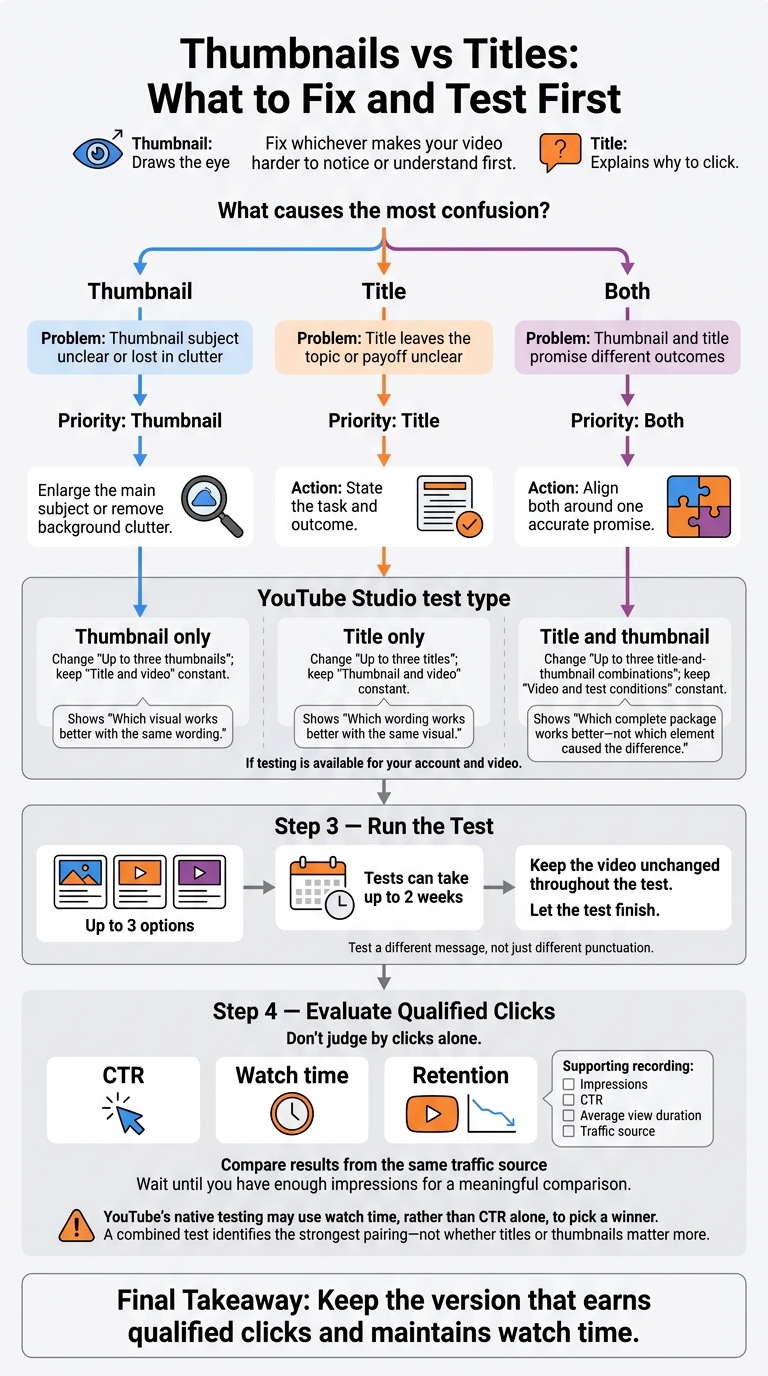
Thumbnails vs Titles: What to Fix and Test First
Thumbnails vs Titles: What Each Does Best
Thumbnails Draw Attention
Make one subject easy to recognize at a glance. Use a single main subject, clear contrast, and a focused layout. Check the thumbnail at a small size on your phone. If the subject gets lost or the text is hard to read, simplify it. Faces, expressions, and demonstrations work only when they match what’s in the video.
ThumbnailCreator helps you produce thumbnail variations faster with AI generation, templates, text editing, face swapping, and object swapping. Use these tools to test layouts and subject focus while keeping the video’s promise intact.
If the image is clear but clicks still lag, the title usually needs to be more specific.
Titles Explain the Topic and Promise
Put the topic and payoff first. Titles get cut off on mobile, so lead with the main question. Match your wording to what your audience wants, and add context rather than repeat the thumbnail text. YouTube recommends accurate titles and separates search-focused wording from curiosity-focused wording.
For a hypothetical phone-repair business, pair a close-up of a cracked iPhone screen with Is Your Cracked Phone Screen Worth Repairing? Cost, Risks, and When to Replace It.
Once the title is specific, make sure the thumbnail supports the same promise.
Thumbnail and Title Comparison
Use this breakdown to see where each element does the most work.
| Criterion | Thumbnail | Title |
|---|---|---|
| Emotional impact | Uses expressions, contrast, and visual tension | Uses curiosity, urgency, or personal relevance |
| Topic clarity | Suggests the subject or outcome, but may leave room for doubt | Names the topic and can state the specific question or benefit |
| Search-intent clarity | Visually supports the expected subject | Can directly address the viewer’s query |
| Testing ease | Change composition, subject, contrast, or text | Change wording, specificity, or angle |
| Misleading-expectation risk | Can suggest a result the video never delivers | Can overstate the benefit or scope |
| Reliance on the other element | Needs words to explain unclear images | Works better with an image that draws attention |
Home, suggested, and search reward different strengths. Check traffic source, CTR, and watch time to assess which element is holding the video back.
sbb-itb-b59debf
How To Write Better YouTube Titles & Thumbnails
What Should You Improve First?
Fix whatever causes the most confusion first. Before judging performance, compare results from the same traffic source. Browse and Suggested can produce different CTRs, so compare like with like. Wait until you have enough impressions for a meaningful comparison, then record impressions, CTR, average view duration, and traffic source.
Use this quick rule to choose your first change.
| Observed Problem | First Priority | Initial Change |
|---|---|---|
| Thumbnail subject unclear or lost in clutter | Thumbnail | Enlarge the main subject or remove background clutter |
| Title leaves the topic or payoff unclear | Title | State the task and outcome |
| Thumbnail and title promise different outcomes | Both | Align both around one accurate promise |
Start With an Unclear Thumbnail
If the thumbnail is the weak link, start there. Reviewing thumbnail use cases can help identify the right strategy for your content type. Make one visual change at a time so you can tell which change affected CTR. Keep key visual details and faces out of the lower-right corner, where YouTube’s timestamp overlay can cover them.
Start With a Vague Title
Can a new viewer understand the task and payoff without knowing your channel? If not, rewrite the title to spell out both. Promise only a benefit the video delivers.
Change Both When Their Messages Conflict
If the thumbnail and title point to different outcomes, revise them together. Build both around one accurate promise, then judge the result using CTR and average view duration.
Test Thumbnails and Titles in YouTube Studio
Once you’ve found the weaker element, test it in YouTube Studio. Its A/B testing lets you compare titles, thumbnails, or both.
Test One Element or Both Together
Open the video in YouTube Studio and choose Title only, Thumbnail only, or Title and thumbnail. If testing is available for your account and video, you can add up to three options. Keep the video unchanged throughout the test.
Match the test type to the problem you found.
| Test Type | What Changes | What Stays Constant | What It Shows |
|---|---|---|---|
| Title only | Up to three titles | Thumbnail and video | Which wording works better with the same visual |
| Thumbnail only | Up to three thumbnails | Title and video | Which visual works better with the same wording |
| Title and thumbnail | Up to three title-and-thumbnail combinations | Video and test conditions | Which complete package works better - not which element caused the difference |
Test a different message, not just different punctuation. A combined test helps you choose the strongest pairing. It doesn’t tell you whether titles or thumbnails matter more. Native testing gives you a cleaner comparison than manual swaps.
Compare CTR and Watch Time
Look at CTR, watch time, and retention together. YouTube’s native testing may use watch time, rather than CTR alone, to pick a winner. More clicks don’t help if viewers leave soon after.
Let the test finish; it can take up to two weeks. Check whether differences in audiences or traffic sources limit how you can use the results for future uploads. Don’t call a winner based on a small sample or before-and-after swaps.
Conclusion: Fix the Weakest Element First
Start with the weakest element: the thumbnail, the title, or both if they clash. Then test in YouTube Studio. Keep the version that earns qualified clicks and maintains watch time.
FAQs
What’s a good CTR for my YouTube niche?
A good YouTube click-through rate (CTR) typically falls between 4% and 5%. A rate of 6% or higher is strong, while anything above 10% is top-tier.
Benchmarks vary by niche: gaming averages about 8.5%; entertainment/lifestyle ranges from 6%–9%; business/finance, 4%–6%; and education, 3%–5%.
A CTR below 3% generally leaves room for improvement. But watch-time share matters more than raw clicks: a high CTR paired with viewers leaving soon after clicking can hurt your channel’s reach.
How many impressions do I need for a reliable test?
Aim for at least 1,000 impressions per variant. Some tests suggest 1,500–2,000 impressions to reduce false positives. Tests focused on specific design variables may need up to 10,000 impressions for more complete data.
Depending on the test, let it run for 24 hours to 14 days to account for daily changes in viewer behavior.
Should I update thumbnails and titles on older videos?
Yes, updating thumbnails and titles on older, evergreen videos can improve performance. Use ThumbnailCreator to quickly generate and test new designs.
For reliable results, change one element at a time, such as text placement or background color. Don’t update the thumbnail and title at the same time.
Run each test for 7–14 days or until you reach at least 1,000–5,000 impressions. This gives you enough data to guide your next steps without disrupting your channel’s performance.