
Social Media Posts Generator
Generate platform-specific social media posts from YouTube videos — choose platforms, tone, and post count, with optional AI quote card images.
The Social Media Posts Generator creates ready-to-post content for multiple platforms from your YouTube video. Choose which platforms you want, set the tone, and the AI generates captions with hashtags tailored to each platform's style and character limits.
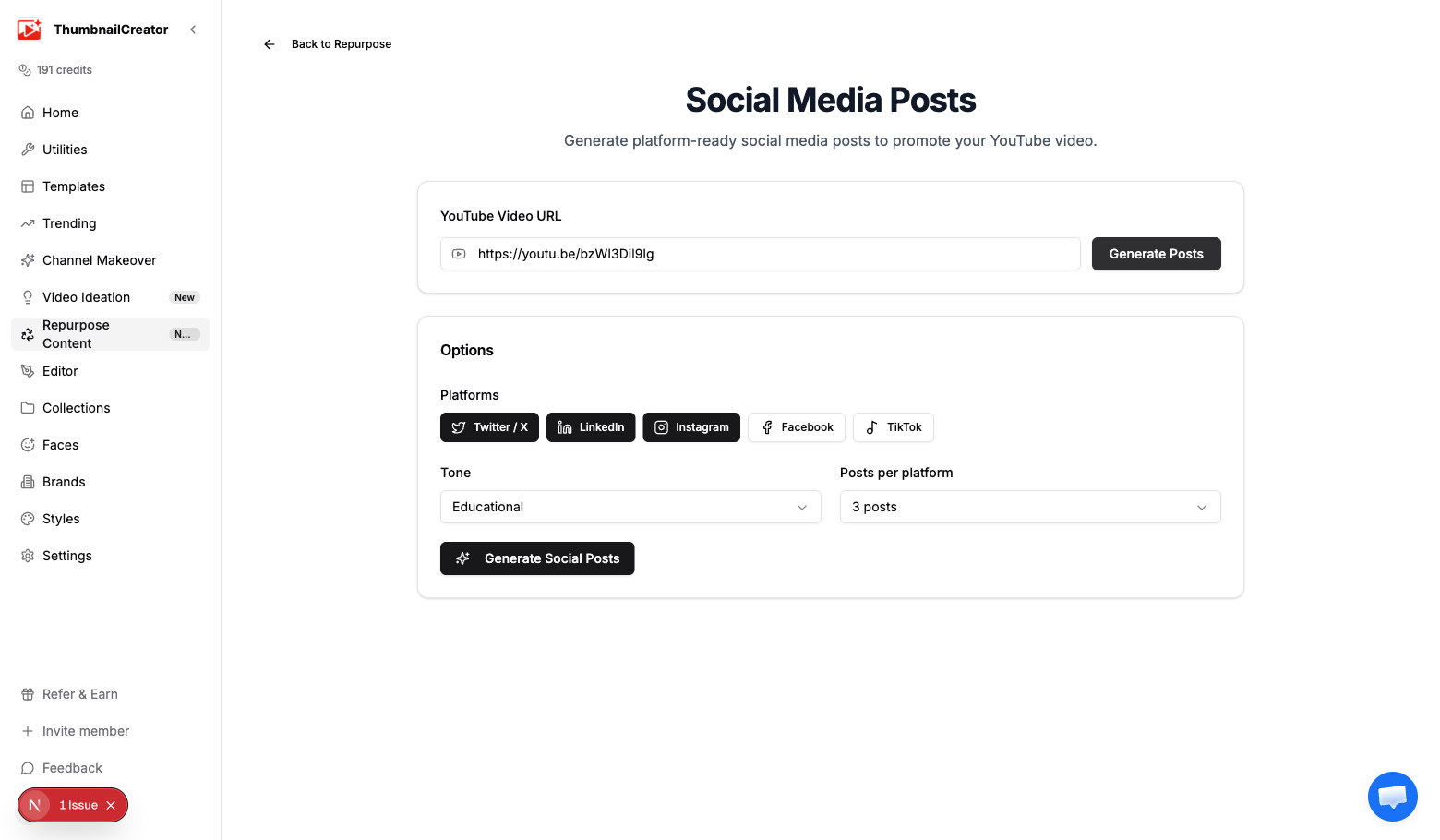
Generating Social Posts
- Go to Repurpose in the sidebar and analyze a video, or navigate directly to the social posts generator
- Paste your YouTube video URL if it isn't pre-filled
- Select your platforms, tone, and post count
- Click Generate Social Posts
- Wait a few seconds for the AI to generate all posts
Options
Platforms
Select one or more platforms. Each generates posts formatted specifically for that platform:
- Twitter / X — Short, punchy posts within character limits. Thread-friendly format with hooks.
- LinkedIn — Professional tone with insight-driven framing. Longer format with line breaks for readability.
- Instagram — Caption-optimized with emoji usage and hashtag blocks. Designed for feed posts.
- Facebook — Conversational and shareable. Optimized for engagement (comments, shares).
- TikTok — Trend-aware captions with relevant hashtags. Short and hook-driven.
Click platform buttons to toggle them on and off. At least one platform must be selected.
Tone
Controls the voice across all generated posts:
- Educational — Teaches something from the video. Positions you as an expert. Good for tutorial and how-to content.
- Entertaining — Fun, attention-grabbing, and shareable. Uses humor, curiosity, or surprise. Good for reaction and challenge content.
- Inspirational — Motivating and aspirational. Highlights transformation or achievement. Good for storytime and personal growth content.
- Controversial — Takes a bold stance or challenges conventional thinking. Drives debate and engagement. Use carefully.
Posts per platform
Choose how many posts to generate for each selected platform:
- 3 posts — A small set for quick selection. Good for one-off promotion.
- 5 posts — A solid variety to choose from. Good for a week of drip-posting.
- 8 posts — A large batch for extended promotion campaigns or content calendars.
Output
Posts are grouped by platform. Each post includes:
- Caption — The main post text, formatted for the platform
- Hashtags — Platform-appropriate hashtags (more for Instagram/TikTok, fewer for LinkedIn/Twitter)
- Copy button — One-click copy of the full post (caption + hashtags) to your clipboard
Platform-specific formatting
The AI adapts its output for each platform:
- Twitter posts respect character limits and use thread-style hooks
- LinkedIn posts use professional language with paragraph breaks
- Instagram posts include emoji-rich captions with hashtag blocks separated from the main text
- Facebook posts are conversational and optimized for sharing
- TikTok posts use trending language patterns with relevant hashtags
Quote Card Images
For any individual post, you can generate an AI-designed quote card — a stylized image featuring a key quote from the video:
- Click the image generation button on any post card
- The AI creates a 1080x1080 square image with the quote styled for social sharing
- The image is generated using your selected quote and a visual style that matches the platform
Each quote card costs 1 credit. The text posts themselves are free.
Quote card styles
Quote cards are generated in one of four styles:
- Dark — Dark background with light text
- Light — Light background with dark text
- Gradient — Colorful gradient background
- Minimal — Clean, simple design with lots of whitespace
Tips
- Generate for all 5 platforms at once — it costs nothing extra and you'll have content ready for everywhere
- Use 8 posts per platform for a launch campaign, then schedule them across the first two weeks after publishing your video
- Educational tone works best on LinkedIn and Twitter; Entertaining works best on TikTok and Instagram
- Copy posts directly into your scheduling tool (Buffer, Hootsuite, Later, etc.) for batch scheduling
- Generate quote cards for your strongest posts — visual posts get significantly more engagement than text-only
- Use the Controversial tone sparingly and review before posting — bold takes drive engagement but can backfire
- Pair with the Newsletter Generator to cross-promote: mention the newsletter in social posts and the video in the newsletter
Related
- Repurpose Your Videos — Overview of all repurpose content types
- Blog Post Generator — Turn the same video into a blog post
- Infographic Generator — Create a visual infographic from the video
- Understanding Credits — How credits work for quote card generation