

AI Tools for Cross-Promotional Thumbnails
I’d choose ThumbnailCreator for batch variations, Canva AI for exact layout control, and Adobe Express for campaigns built around existing brand assets. Pikzels adds concept scoring, while Thumbmagic turns video material into two drafts in about 45 seconds. Vidocu’s features remain unverified in the supplied sources.
I compare generation speed, editing, brand controls, exports, pricing, and commercial-use terms. My rule: judge time to sponsor approval, not just time to the first draft - and <u>track clicks and sales separately</u>.
Quick Comparison
| Tool | Main workflow | Editing and brand control | Export details reported | Price or access reported |
|---|---|---|---|---|
| ThumbnailCreator | Batch generation from text, URLs, or images | Style cloning, face and object edits | 3,840 × 2,160 JPG; under 2 MB | From $8/month; 7-day trial |
| Canva AI | Prompt drafts and templates | Manual layouts and Brand Kits | PNG, JPG, PDF | Free; Pro from $12.99/month |
| Adobe Express | Templates and Firefly images | Brand assets and manual layouts | Confirm current export options | Free; Premium from $9.99/month |
| Pikzels | Generation, Recreate, and concept scoring | Personas, Styles, and prompt edits | Paid plans remove trial watermarks | From $14/month, billed annually |
| Thumbmagic | Video, URL, or transcript to drafts | Template reuse and prompt edits | 1,280 × 720 PNG reported | Six free thumbnails; paid from $17/month, billed annually |
| Vidocu | Unverified | Unverified | Unverified | Unverified |
These are reported details, not confirmed current offers; parts of the supplied article conflict. Before paying, I’d check current plan limits, export specs, and commercial rights - then test whether product details and text stay clear on a phone. This helps you avoid common thumbnail mistakes that hurt performance.
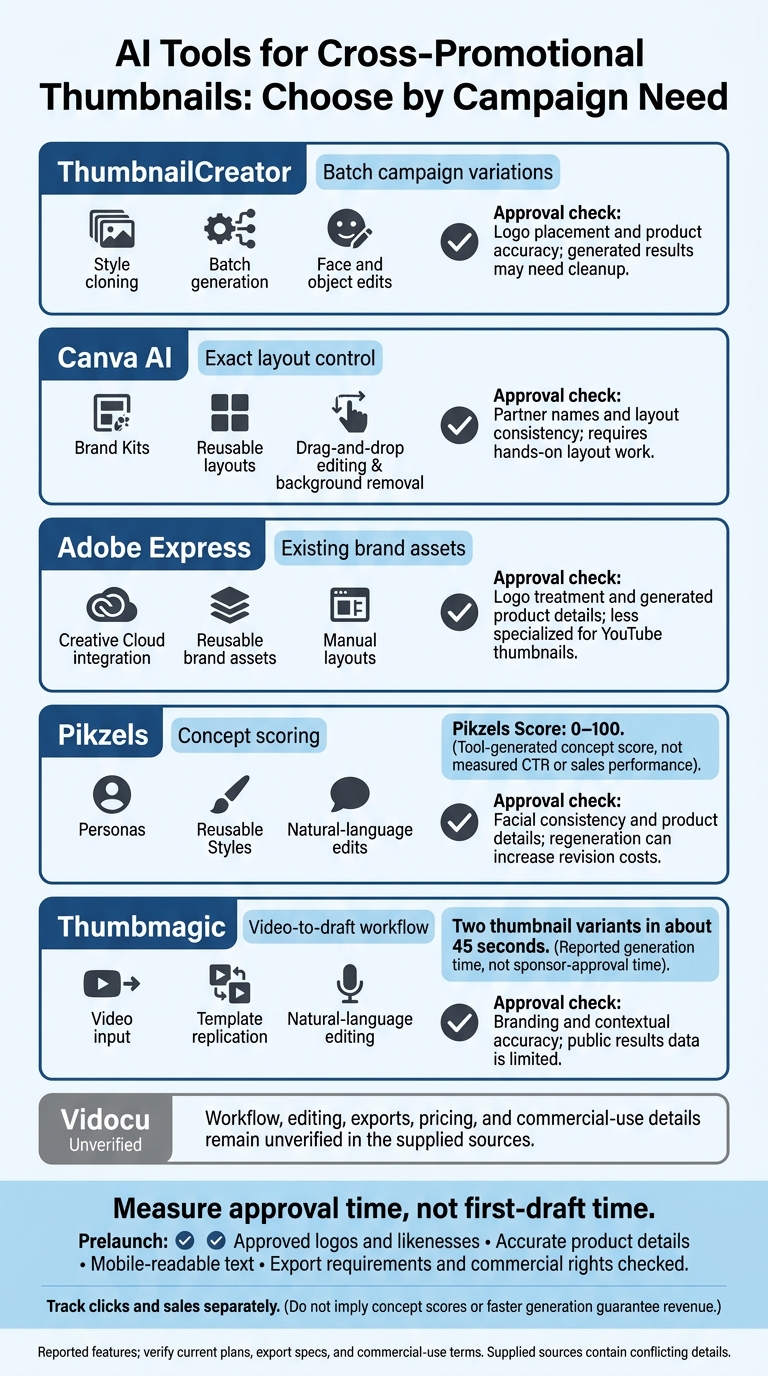
AI Thumbnail Tools: Choose by Campaign Workflow
1. ThumbnailCreator
Image Generation and Variations
ThumbnailCreator turns text prompts, YouTube URLs, or reference images into thumbnails that fit your video’s product, affiliate offer, or sponsor. Style cloning, batch generation, and templates let you create multiple offer-led versions from one base concept. You can test different campaign angles without starting each design from scratch.
Brand Controls and Editing
Face-aware editing, object swapping, background removal, and text overlays help you build sponsored and affiliate visuals.
Object swapping can place sponsored products or merchandise into the scene.
Brand kits are also mentioned for agencies.
Export Settings and Quality
Documented exports are 3,840 × 2,160 JPG files under the 2 MB limit. Check that text and images remain easy to read on mobile before publishing, and compare face thumbnails vs no face designs to see which performs better for your niche. For paid campaigns, output quality matters as much as speed.
Plans, Costs, and Commercial Rights
Listed pricing pairs monthly rates with annual credit allowances: Lite costs $8 per month for 240 annual credits, Starter costs $17 per month for 600 annual credits, Creator costs $33 per month for 1,200 annual credits, and Teams costs $62 per month for 3,000 annual credits.
A 7-day trial with 10 credits is also listed. Before using face swaps or likeness-based edits in paid campaigns, verify licensing and written consent.
sbb-itb-b59debf
2. Canva AI
Image Generation and Variations
Canva AI works best for revenue-focused thumbnails when you already have product photos and need a fast promo layout. Its AI Thumbnail Maker turns text prompts into thumbnail drafts. For merchandise or affiliate campaigns, generate a base layout and use actual product photos to keep details accurate. Make variations manually by swapping images, text, and layouts.
Brand Controls and Editing
Reusable YouTube templates and Brand Kits help keep promo thumbnails consistent across campaigns. Treat generated drafts as starting points, then edit the layout, text, and stock assets yourself. Pro also includes background removal and subject isolation.
Export Settings and Quality
Canva supports high-resolution exports. Keep promo text to 3–5 words and preview thumbnails at mobile size to check that small offer details remain readable. It’s a good fit for creators who want polished promo thumbnails with manual control over the final look.
Plans, Costs, and Commercial Rights
Canva Free includes basic tools and a limited selection of templates. Canva Pro starts at $12.99 per month in the U.S. Check current pricing, AI limits, and Brand Kit access before launch. Also confirm commercial-use rights before adding AI-generated assets to paid or affiliate campaigns.
3. Adobe Express
Adobe Express suits creators who already have brand assets and want polished layouts fast for sponsored or affiliate thumbnails. This is particularly useful for creating e-commerce thumbnails that drive sales.
Image Generation and Variations
Adobe Express uses Adobe Firefly to generate images and graphics from text prompts. Use these visuals as supporting assets, and check product details manually. Write a separate prompt for each thumbnail version.
Brand Controls and Editing
Creative Cloud integration lets you reuse approved product assets in Express. Adjust spacing manually and use large type so the offer, product, and text hierarchy stay clear on mobile.
Export Settings and Quality
Before publishing, check the app for current export formats, resolution options, and Free-plan limits.
Plans, Costs, and Commercial Rights
Adobe Express has a Free tier and a Premium plan starting at $9.99 per month. Check current limits and commercial-use terms for Firefly assets, stock media, and fonts.
The next tools offer more automated thumbnail generation, with a focus on faster iteration rather than manual control.
4. Pikzels
Pikzels focuses on automated testing and optimization rather than manual thumbnail building, helping creators test ideas faster.
Image Generation and Variations
Pikzels supports text-prompt generation, style templates, and a “Recreate” workflow that uses a YouTube thumbnail link. These tools let creators test sponsor or affiliate concepts without building each thumbnail from scratch. Pikzels Score rates thumbnail effectiveness and click potential from 0 to 100 to help rank those ideas.
Brand Controls and Editing
Personas keep a creator’s face consistent across thumbnails, while reusable Styles draw from three reference thumbnails. With natural-language edits, creators can change text size, facial expressions, and subject placement.
Export Settings and Quality
Trial exports include a watermark, making them unsuitable for public promotional thumbnails. Paid plans remove the watermark, but the sources don’t specify export dimensions, formats, or file-size limits.
Plans, Costs, and Commercial Rights
With annual billing, plans start at $14 per month. Monthly plans range from $20 to $80. Basic generation uses about 10 credits, revisions can use 50 to 100 credits per concept, and Persona training costs 200 credits.
Commercial use is tied to the paid Premium and Ultimate tiers.
5. Thumbmagic
Thumbmagic focuses on getting paid and affiliate campaigns from source material to a publishable thumbnail fast.
Image Generation and Variations
Thumbmagic turns a YouTube URL, video file, or transcript into two thumbnail variants in about 45 seconds. For promotional content, check that the selected frame accurately reflects the offer, or compare real photos vs AI-generated thumbnails to see which style fits your campaign.
Brand Controls and Editing
Use natural-language prompts or manual edits to change text, colors, layouts, and expressions. Template replication keeps thumbnails consistent across a campaign series, while six avatar expressions give you options for the avatar’s look.
Export Settings and Quality
Thumbmagic exports 1280 × 720 PNG files with a 16:9 aspect ratio. The free tier has no watermarks. Before publishing, check small text and product details, and avoid crops that make the image harder to understand. Balancing clarity is key when choosing between clickbait and authentic thumbnails for your brand.
Plans, Costs, and Commercial Rights
The free tier includes three generations - six thumbnails - with no credit card required. Basic starts at $29 per month, or $17 per month with annual billing. Business offers unlimited generations for $99 per month, or $59 per month billed annually. The docs don’t state the Basic plan’s generation limit.
Thumbmagic markets its service to commercial creators and agencies, but its published docs don’t state commercial-use rights.
6. Vidocu
The available sources don’t cover Vidocu, so its workflow, editing, export, pricing, and commercial-use details remain unverified. Without that information, we can’t compare it fairly. The next section compares the tools using only verified campaign features.
Campaign Features Compared
These tables compare the tools side by side for sponsored, affiliate, and merch thumbnails, focusing on speed, control, export quality, and usage rights.
Image Generation and Variations
| Tool | Reported inputs | Variation workflow | Generation time | Export-ready output |
|---|---|---|---|---|
| ThumbnailCreator | Text, URL, or reference image | Style cloning and batch generation for multiple videos | Under 30 seconds | JPEG at 3,840 × 2,160, under 2 MB |
| Canva AI | Text prompts and templates | Manual duplication and resizing | Not documented | PNG, JPG, and PDF |
| Adobe Express | Adobe Firefly generative AI and templates | Generative fill and resizing | Not documented | Not specified in the provided sources |
| Pikzels | Text prompts and style templates | Iterative concept generation and Recreate | Not documented | Not specified in the provided sources |
| Thumbmagic | YouTube URL, video file, or transcript | Natural-language editing and avatar reactions | Approximately 45 seconds | YouTube-ready output; exact specs not specified |
| Vidocu | Not documented | Not documented | Not documented | Not documented |
Brand Controls and Editing
| Tool | Consistency controls | Editing options | Manual check before approval |
|---|---|---|---|
| ThumbnailCreator | Style cloning from references | Face and object swapping | Logo placement and product accuracy |
| Canva AI | Brand Kits and reusable layouts | Drag-and-drop editing and background removal | Partner names and layout consistency |
| Adobe Express | Brand Kits and Creative Cloud Libraries | Template editing and generative fill | Logo treatment and generated details |
| Pikzels | Persona training | Recreate and iterative generation | Facial consistency and product details |
| Thumbmagic | Template replication | Natural-language editing | Branding and contextual accuracy |
| Vidocu | Not documented | Not documented | Requirements remain unverified |
Use approved logos, exact partner names, and licensed likenesses only.
Export Settings and Quality
| Tool | Reported dimensions and formats | Watermark restrictions | Mobile-size quality | YouTube suitability |
|---|---|---|---|---|
| ThumbnailCreator | 3,840 × 2,160 JPEG, under 2 MB | Not documented | Not documented | Check current YouTube requirements before publishing |
| Canva AI | PNG, JPG, PDF | Not documented | Not documented | Check image dimensions, format, and file size |
| Adobe Express | Export formats not specified | Not documented | Not documented | Check the exported file |
| Pikzels | Not specified in the provided sources | Not documented | Not documented | Confirm exact export specs |
| Thumbmagic | YouTube-ready output; exact specs not specified | Not documented | Not documented | Confirm exact export specs |
| Vidocu | Not documented | Not documented | Not documented | Unverified |
Before publishing, check dimensions, file size, format, watermarks, and plan limits. View the thumbnail at mobile size, too, to make sure it's readable. Comparing your work against trending YouTube thumbnails can also help ensure your design stands out in a crowded feed.
Plans, Costs, and Commercial Rights
| Tool | Free access | Verified U.S. price and billing | AI allowance / watermark removal | Commercial permissions |
|---|---|---|---|---|
| ThumbnailCreator | Free plan available | Confirm current pricing in the product | Free, Pro, and Agency tiers are available | Review the plan terms and asset rights |
| Canva AI | Free tier available | Pro starts at $12.99/month | Check plan terms | Review platform terms and individual assets |
| Adobe Express | Free tier available | Premium starts at $9.99/month | Check plan terms | Review platform terms and individual assets |
| Pikzels | Paid plans available | Monthly and annual billing options are reported | Check plan terms | Not documented |
| Thumbmagic | Free tier available | Paid plans are available | Check plan terms | Not documented |
| Vidocu | Not documented | Not documented | Not documented | Not documented |
Pikzels provides the clearest information on thumbnail scoring, while ThumbnailCreator gives the most explicit details about CTR-focused workflows. To measure actual results, use revenue dashboards in YouTube Studio and your affiliate or sales platform. The next section looks at what these feature gaps mean for each tool's pros and cons.
Pros and Cons of Each Tool
Choose a tool based on what your campaign needs most: speed, layout control, or fewer revisions by optimizing your thumbnail workflow.
| Tool | Workflow type | Documented advantage | Limitation or check |
|---|---|---|---|
| ThumbnailCreator | AI-first | Best for producing campaign variants in batches. | Generated results may need cleanup. |
| Canva AI | Template-first | Direct control over exact logo placement. | Requires hands-on layout work. |
| Adobe Express | Hybrid template and AI | Best for campaigns built around existing brand assets. | Less specialized for YouTube thumbnails. |
| Pikzels | Scoring-led | Scoring helps prioritize concepts. | Regeneration can increase revision costs. |
| Thumbmagic | Video-first | Best for turning existing video assets into thumbnails. | Public results data is limited. |
| Vidocu | - | Unverified in the supplied sources. | - |
Favor speed for recurring campaigns and precise control for high-stakes sponsorships. Measure approval time, not first-draft time, and leave room in your budget for revisions. A thumbnail isn't campaign-ready until it meets sponsor specs. For more help choosing, see our thumbnail tool comparisons.
Conclusion: Choose for Your Campaign
Match the workflow to your campaign: use ThumbnailCreator when you need fast campaign variations.
Before launch, check that the thumbnail matches the video, faces and brand assets are approved, text is readable on mobile, and the export meets YouTube’s requirements.
After export and launch, review performance by placement and audience. Measure each channel separately, tracking CTR and external revenue. Treat attribution as a guide, not an exact measure. Use the thumbnail to earn the click; use the offer and video to earn the revenue.
FAQs
How do I test thumbnails for affiliate sales?
Create a few thumbnail options for the same video, then upload up to three to YouTube Studio’s “Test and Compare” feature. Let the test run before reviewing click-through rate and watch-time results. Use those results to pick the thumbnail that gets the most clicks while keeping viewers watching your affiliate-focused uploads.
With ThumbnailCreator, you can make several options in minutes, download them, and upload them to YouTube Studio for testing.
What should my sponsor approval checklist include?
Check that the thumbnail’s wording matches the video, face and object swaps look natural and accurate, and the image reflects the topic without misleading viewers. Make sure the text and focal point are clear on mobile. Avoid misleading clickbait, and verify any sensitive or high-impact claims.
Before uploading, confirm the file is JPG or PNG, uses a 16:9 aspect ratio, measures 1,280 × 720 pixels, and is under 2 MB.
How can I keep AI-generated product images accurate?
Write specific, visual prompts that describe the subject, action, and composition. Use high-quality reference images and training features to keep brand or product elements consistent across designs.
Once you’ve generated an image, use built-in AI editing tools to swap objects, adjust colors, or refine details. Before publishing, check product accuracy, composition, and text readability, and fix any errors.