

Top 7 Facial Expressions in Viral Thumbnails
A face can change thumbnail clicks fast. In this piece, I’d sum it up like this: faces in thumbnails often get 38% to 40% more clicks, and strong reactions can beat neutral looks by up to 45%.
If I were choosing one expression for a thumbnail, I’d match it to the video’s promise first, then make sure it still reads on a phone screen. The 7 main options here are:
- Surprised for reveals and twists
- Happy for wins and positive results
- Shocked for big moments and high drama
- Skeptical for reviews, debunks, and commentary
- Concerned for risk, warnings, and suspense
- Serious for authority and clear teaching
- Confused for questions, tests, and comparisons
A few rules matter across all seven:
- Keep the face large: about 30% to 50% of the thumbnail
- Make the expression stronger than normal so it reads on mobile
- Use one face, a clean background, and short text
- Match the face to the video, or clicks may come with weak watch time —one of several thumbnail mistakes to avoid if you want to keep your audience.
Best Facial Expressions To Use on Thumbnails
If you're just starting out, check out our YouTube thumbnail beginners guide to master the basics before diving into advanced expressions.
sbb-itb-b59debf
Quick Comparison
| Expression | What it tells viewers | Best for |
|---|---|---|
| Surprised | Something happened | Reveals, reactions, gaming |
| Happy | Good result ahead | Travel, tutorials, fitness |
| Shocked | This is a big deal | Challenges, science, commentary |
| Skeptical | I doubt this | Reviews, debunks, finance |
| Concerned | Something may be wrong | Storytime, news, warnings |
| Serious | I know what I’m doing | Education, finance, health |
| Confused | This doesn’t add up yet | Tests, comparisons, explainers |
So if I had to boil the full article down to one line, it would be this: the best thumbnail face is the one that shows the video’s payoff in less than a second. Check out our thumbnail use cases to see how these expressions fit your specific niche.
Why Facial Expressions Drive Thumbnail Performance
Faces pull attention fast. The fusiform face area reads them in a split second, and viewers often notice a face within 200 milliseconds - before they read the title. That matters. In that tiny window, the expression starts setting expectations for the video.
A surprised face can spark curiosity. A worried face can create empathy. A confident smile can hint at authority. And when all of that has to work inside a small thumbnail, the expression has to do a lot of heavy lifting.
This gets even more important on mobile. Since more than 75% of YouTube views happen on phones, expressions need to stay clear at small sizes. That’s why creators often need about 50% more intensity than feels natural in person.
The numbers back it up:
- Exaggerated expressions beat subtle ones by 33%
- Large faces beat smaller faces by 44%
- Direct eye contact can add a 22% to 34% lift
There’s one catch: the expression has to fit the video. If the thumbnail promises one feeling and the video delivers another, clicks can drop. The best thumbnails feel authentic on first glance, not forced or fake.
With that in mind, here are the seven expressions most likely to drive clicks.
How to Use This List
Each entry in this list covers four things: what the expression communicates, why it drives clicks, where it works best by content type, and how to frame it visually.
That setup makes this list easy to scan when you're putting together your next thumbnail. It also helps you avoid a common mistake: using the right face for the wrong kind of video.
For example, a surprised face can work great on a science experiment. Put that same face on a budgeting tutorial, though, and it can feel off. The thumbnail should match the video's actual tone. Think of this section as a quick filter before you pick the best option below.
With those core ideas in place, use this guide to match the right expression to the right video type. Then check the sections below for the exact framing and use case.
| Content Type | Recommended Expression | Why It Works |
|---|---|---|
| Entertainment | Surprised | Curiosity ("What happened?") |
| Tutorials | Happy and Joyful | Positive Outcome Signal |
| Educational | Focused and Serious | Competence & Clarity |
| Travel | Happy and Joyful | Aspirational Energy |
| Gaming | Shocked and Awe-Struck | In-play Excitement |
| Storytime | Fearful and Concerned | Empathy & Suspense |
Across all seven, keep the face at 30% to 50% of the thumbnail. For more niche-specific advice, check out our YouTube thumbnail guides.
1. Surprised Expression
Use this look when the video includes a clear reveal, twist, or unexpected payoff.
Emotional Clarity at Thumbnail Size
A surprised face is easy to read in a split second. Wide eyes and an open mouth make high-contrast shapes that still hold up on a phone screen. Push the expression far enough that it still reads after the image shrinks. That kind of clarity helps stop the scroll and win the click.
Psychological Click Trigger
A surprised face makes people think, "What happened?" That little bit of unresolved tension creates a curiosity gap, and the click becomes the fastest way to answer it. Surprised or shocked expressions get 45% more clicks than neutral expressions, and an open mouth lifts CTR by 29%.
The key is keeping it believable. Fake shock might bring in clicks, but it can hurt retention. Some creators now test closed-mouth surprise, but the expression still needs to fit the video's actual payoff.
Best-Fit Video Niches
Extreme shock works well for gaming, challenges, and reaction content. Softer surprise fits tutorials, AI tools, and before-and-after videos. Concerned surprise makes sense for warnings or mistake-based content.
In gaming, surprised is the most common expression, showing up in 28.14% of thumbnails.
Visual Execution Cues
Place the face on the left or right third of the frame, then angle it toward the center. That helps guide the viewer's eye toward the text or main subject.
Use the version that matches the video's real payoff, not just the most exaggerated one.
2. Happy and Joyful Expression
If surprise sparks curiosity, happy delivers the payoff.
Use this look when the video shows a win, a good result, or an uplifting moment.
Emotional Clarity at Thumbnail Size
A small, natural smile can vanish at thumbnail size. That’s why the expression needs to be broad enough to register at a glance on a phone screen. Push it about 50% past normal.
Psychological Click Trigger
Happiness works fast because viewers tend to mirror the feeling right away. That creates a positive signal before they even click. A joyful face also hints at a good outcome, so the video feels like a win before it starts and builds reward anticipation.
In practice, that leads to a +21% CTR lift compared with neutral faces. Happy faces also drive a 56% increase in shares, which helps content travel beyond the first impression.
Best-Fit Video Niches
Happy works especially well in Travel thumbnails, where it shows up in 53.69% of top examples. It also fits Education and Fitness, where a confident smile suggests skill and a good result. Gaming uses it less often and leans more toward surprise.
Use happy faces only when the video delivers a real win. On dry tutorials, an upbeat smile can feel misleading and hurt retention.
Visual Execution Cues
Once the smile fits the message, the framing helps it read faster.
Frame the face straight on so the smile is easy to read right away. Pair it with a bright subject against a darker background so the expression stands out in any feed. Right now, the trend leans toward smaller, more natural smiles instead of wide-open "YouTube face" expressions.
3. Shocked and Awe-Struck Expression
Shock is surprise turned way up. A surprised face tells viewers something unexpected happened. A shocked or awe-struck face tells them the moment feels BIGGER than that. It hints that whatever happened was important enough to stop someone in their tracks.
Use shock when surprise alone doesn't feel strong enough.
Psychological Click Trigger
This works for a simple reason: people want to know what caused that reaction. They see the face and think, What happened here? That split-second curiosity is the whole point.
Shocked or surprised expressions generate 45% more clicks than neutral faces.
Emotional Clarity at Thumbnail Size
Wide eyes and raised eyebrows are easy to read, even when a thumbnail shrinks down on mobile. That's what makes them so useful.
You need to push the expression far enough that it still reads on a phone screen. If the shock is too subtle, it just looks flat.
Best-Fit Video Niches
Not all shock looks the same. The right level depends on the topic and the audience.
| Niche | Recommended Shock Style | Why It Works |
|---|---|---|
| Gaming | High-energy / Exaggerated | Matches high-intensity gameplay |
| Commentary | Disbelief | Signals a reaction to a dramatic event |
| Tech/AI | Fascination | Reacts to new capabilities |
| Finance | Disbelief / Skepticism | Signals a market anomaly |
| Science | Awe-struck | Reacts to an unexpected result |
Gaming uses shock the most. In that niche, it's the most common expression, showing up in 28.14% of thumbnails.
Finance and B2B are different. If you go too far, the image can feel forced. A lighter, more believable look of disbelief tends to work better and helps keep trust in place.
Visual Execution Cues
Placement matters. Put the face in the left two-thirds of the frame so the video duration badge doesn't cover it.
Contrast matters too. The face should stand out from the background, or the expression can get lost, especially for people browsing in dark mode.
And when you can, use a dedicated thumbnail still instead of grabbing a frame from the video. That gives you control over the expression and the final image quality.
When the emotion feels less explosive and more doubtful, use skepticism instead.
4. Skeptical and Doubtful Expression
When shock feels too theatrical, skepticism makes a thumbnail feel more believable. It’s the quieter cousin of shock. Instead of shouting, it says, "I'm not sure this is real." That makes it a strong fit for reviews, debunks, and commentary.
Psychological Click Trigger
A doubtful expression plants a question in the viewer’s mind right away: What’s being questioned here? That small bit of tension pulls people in without leaning on over-the-top reactions. Closed-mouth, thoughtful looks also tend to feel more believable than exaggerated shock.
Emotional Clarity at Thumbnail Size
Use a raised brow, side-eye, or a slight head tilt to show doubt fast. Those signals still read well, even on a small mobile thumbnail. A hand-to-chin pose can add that “hmm, really?” feeling without making the expression look forced.
Best-Fit Video Niches
Skepticism works best when the channel’s value comes from judgment, review, or critical thinking.
| Niche | Recommended Skeptical Style | Why It Works |
|---|---|---|
| Reviews | Raised brow, side-eye | Honest, unfiltered opinion |
| Commentary / Debunking | Furrowed brow, closed mouth | Challenges a claim |
| Finance / B2B | Subtle disbelief | Flags a concern without losing trust |
| Education / Analysis | Thoughtful, quizzical look | Drives 18% better conversion than shock |
Visual Execution Cues
Place the face so it looks toward the center of the thumbnail, ideally at the text or image being questioned. That helps guide the viewer’s eye across the frame in a natural way.
The key is to keep the doubt believable. The expression should match the actual tone of the video. Finance and B2B audiences usually respond better to a restrained look of doubt, while gaming or entertainment channels can push it a bit more.
When doubt starts to look more like concern, switch to the fearful and concerned expression next.
5. Fearful and Concerned Expression
When doubt starts to look like actual risk, switch from skepticism to fear or concern. That shift matters. Skepticism says, “I’m not sure I buy this.” Concern says, “Something might be wrong here.” Fear grabs attention because it points to a problem, not just a dramatic face.
Psychological Click Trigger
Concern sparks a gut-level need to check what’s happening. People want to know what went wrong and whether it affects them. That makes this emotion feel more personal than shock, which gives it strong click appeal.
Emotional Clarity at Thumbnail Size
A furrowed brow, a slight head tilt, or part of the face covered can all work well here. The expression should feel bold but still believable. These days, closed-mouth concern often feels more natural than over-the-top shock.
Best-Fit Video Niches
| Niche | Recommended Style | Why It Works |
|---|---|---|
| Storytime | Concerned expression + narrative visual | Builds empathy and suspense |
| Finance / B2B | Calm authority with a worried edge | Signals risk without losing credibility |
| News / Updates | Serious look + bold colors | Urgency and relevance |
| Gaming | High-energy fear or disbelief | Signals high stakes or failure moments |
MrBeast uses fearful expressions in 18.18% of his thumbnails, while the Stokes Twins use fear as their main emotion in 47.37% of theirs. They often pair it with humor, which softens the intensity.
Visual Execution Cues
Put the face in the left two-thirds of the frame so it stays clear of the video duration badge. Have the creator look toward the problem, like a red downward arrow or a warning symbol, so viewers can spot the cause of concern right away.
Red accents help signal urgency, and text should stay at three words or fewer. If you want the concern to feel personal, use direct eye contact. And if the problem appears in the same frame, the emotion feels earned instead of forced.
When the emotion starts to feel less anxious and more analytical, a focused or serious expression is usually the better choice.
6. Focused and Serious Expression
When you want the emotion to suggest judgment instead of alarm, use a focused, serious look.
A serious expression fits videos that need authority, clarity, or competence. It tells the viewer, at a glance, that this content is about knowing what you're doing.
Psychological Click Trigger
A serious face signals authority and competence. It works best when the thumbnail is promising expertise, not spectacle.
Emotional Clarity at Thumbnail Size
Keep the expression restrained, but easy to read. Serious should never drift into blank, harsh, or accidentally hostile.
Best-Fit Video Niches
| Niche | Recommended Style | Why It Works |
|---|---|---|
| Finance / B2B | Calm authority and trust | Signals trust and expertise |
| Education | Thoughtful and analytical | Signals clear thinking |
| Health & Fitness | Determination | Conveys transformation and aspirational energy |
| Science / Gadgets | Calm and focused | Adds a human touch without distracting from the experiment |
In Fitness & Sports, calm or serious faces are the most common expression type, appearing in 37.38% of thumbnails.
Visual Execution Cues
Make the face large enough to read right away. Strip back the background so nothing competes with the expression. High-contrast lighting helps the face stand out, especially at small thumbnail size. It also helps to place the face on one side and direct the gaze toward the main subject or text.
For finance, education, and other professional niches, don't push the expression too hard. If it looks overdone, it can come off as untrustworthy. A calm, purposeful look with one clear emotional note is often enough.
If the face needs to suggest uncertainty instead of control, move to confusion.
7. Confused and Puzzled Expression
If a serious look signals control, confusion does the opposite: it tells the viewer something doesn’t add up yet. That makes this expression a strong match for videos built around a question, a test, or an unclear result.
Psychological Click Trigger
A confused face opens a curiosity gap. People want to know what caused the reaction and what the answer is. That’s why this look works best when the thumbnail hints at a test, comparison, or reveal. In educational and analytical content, curious or thoughtful expressions convert 18% better than shock in those niches.
Emotional Clarity at Thumbnail Size
Confusion can be hard to read in a small thumbnail. It’s a subtle emotion, so a normal puzzled look often gets lost on mobile. Push the expression about 50% past your usual level so it still reads at a glance. One raised eyebrow, a slight head tilt, and a focused stare aimed at a clear object or piece of text can do a lot of the heavy lifting. Thumbnails with exaggerated expressions outperform subtle ones by 33%.
Best-Fit Video Niches
This expression works best when the video is built around uncertainty or discovery. It fits well in:
- Educational tutorials
- Product comparisons
- Science and tech experiments
- Gaming reaction content
If the title promises a comparison, a test, or a “Does this actually work?” setup, a puzzled face usually feels like a natural match.
Visual Execution Cues
Once the question is set up, the next job is simple: make the expression easy to read fast. Use one face, not several, since extra faces weaken the signal. Keep the background clean so the viewer’s eye doesn’t wander. Then aim the gaze toward the center of the frame or toward the text you want people to notice.
If you add text, keep it short. Three words or fewer is enough. Something like > "BUT WHY?" backs up the curiosity gap without fighting the face for attention.
Ground Rules for Using These Expressions Well
Before you pick between surprise, shock, or skepticism, start with a few basic rules. They make any facial expression pull more weight. Surprise, joy, shock, skepticism, fear, focus, or confusion can all work. The difference is how clearly the thumbnail communicates at a glance.
Keep the face large enough to read on mobile right away. Before you publish, shrink the thumbnail down to mobile size and check it. If the eyes and brows don’t stand out, the expression probably isn’t strong enough yet.
Use eye contact to build a connection. If you want to direct attention, shift the gaze toward the main subject or text instead.
Match the expression to the video’s actual tone. If the thumbnail promises one feeling and the video delivers another, clicks may go up while retention drops. That matters for both retention and recommendations. A high CTR doesn’t help much if people leave within the first 15 to 30 seconds.
Keep the frame clean: one face, a simple background, and minimal text. When thumbnails have more than three visual elements, CTR can drop by 23%.
If you want to compare all seven expressions side by side, these rules give you a solid baseline. To move faster, ThumbnailCreator lets you swap expressions, text, and objects in just a few minutes.
Side-by-Side Look at All 7 Expressions
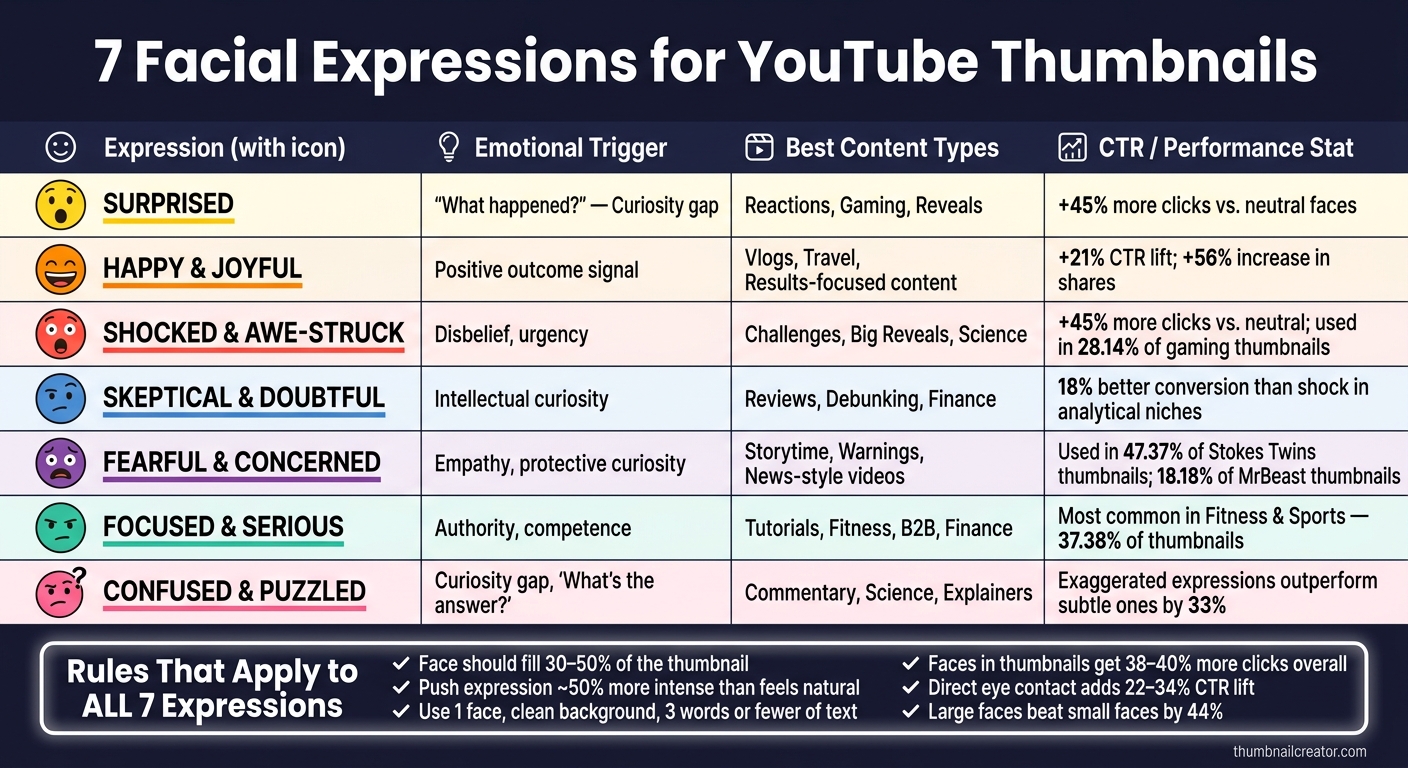
7 Facial Expressions for YouTube Thumbnails: Which One Gets More Clicks?
Each expression signals a different kind of promise. Some hint at drama. Others suggest clarity, trust, or a feel-good result. This table helps you line up the right emotion with the right niche and visual style at a glance. For more inspiration, you can explore various YouTube thumbnail styles to see how these expressions fit into different design frameworks.
| Expression | Emotional Trigger | Best Content Types | Visual Treatment |
|---|---|---|---|
| Surprised | "What happened?" | Reactions, gaming, reveals | Wide eyes, high contrast |
| Happy and Joyful | Positive outcome | Vlogs, travel, results-focused content | Genuine smile, bright background |
| Shocked and Awe-Struck | Disbelief, urgency | Challenges, big reveals, science | Intense reaction; closed-mouth shock can outperform open-mouth shock in some niches |
| Skeptical and Doubtful | Intellectual curiosity | Reviews, explainers, debunking | Raised eyebrow, cool-toned backgrounds or blue accents |
| Fearful and Concerned | Empathy, protective curiosity | Storytime, warnings, news-style videos | Tense expression, dark color accents |
| Focused and Serious | Authority, competence | Tutorials, fitness, B2B, finance | Closed mouth, direct gaze, clean background |
| Confused and Puzzled | Curiosity gap | Commentary, science, explainers | Tilted head, hand-to-chin |
As a rule of thumb, high-energy content tends to lean on surprise, shock, and fear. More analytical topics Usually work better with skepticism, focus, and confusion, often leveraging a curiosity gap vs direct value strategy.
Conclusion
Each expression makes a different promise before the click. That promise only lands when the thumbnail lines up with the video itself. A high CTR helps only when the thumbnail matches what the video delivers.
Pick the version that fits the payoff, then test the intensity. Try one stronger option and one softer one to find the sweet spot.
Keep the expression in line with your channel tone so returning viewers spot your style right away. Choose the face that fits the promise, and the thumbnail does the rest.
FAQs
Which thumbnail expression should I test first?
Whoa - start with a surprised or shocked expression. That approach has long pulled strong engagement because it sparks curiosity fast.
For 2026, trends also lean toward genuine micro-expressions or a confident, closed-mouth look. The right pick depends on the video itself: curiosity tends to work well for educational content, while excitement often fits entertainment.
Then A/B test both to see what lands with your audience.
How can I make a facial expression read on mobile?
Use big, punchy expressions - about 50% stronger than what would feel normal face-to-face. On mobile, faces look smaller, so crop in tight and let the face take up about 30% to 50% of the thumbnail.
If the thumbnail feels a little over-the-top on desktop, that usually means it’s in the right range for mobile. ThumbnailCreator can help you generate, swap, and fine-tune expressions so they stay clear on smaller screens.
Can the wrong expression hurt watch time?
Yes. The wrong facial expression can hurt watch time, even if it gets more clicks at first.
Here’s why: if the emotion looks fake or misleading, retention and recommendations can drop by over 80%.
And when the thumbnail promises a bigger reaction than the video delivers, people can feel tricked. That loss of trust can lead to audience drop-off of up to 40% in the first 30 seconds.