

Top 7 Emotions That Boost Thumbnail Clicks
I’d start with the emotion your video earns - not the biggest reaction. Choose two expressions, check them at 116 × 65 pixels, and test them on the same video while keeping the title, text, background, and layout unchanged.
These seven expressions give you different ways to frame the payoff. None guarantees more clicks.
Quick Comparison
| Emotion | What it tells viewers | Best fit | Main risk |
|---|---|---|---|
| Surprise | “I didn’t expect that.” | Reveals and unexpected results | Promising too much |
| Joy | “That went well.” | Wins and celebrations | Looking fake |
| Curiosity | “What’s the answer?” | Lessons and mysteries | Being too subtle |
| Confusion | “Something doesn’t add up.” | Troubleshooting and comparisons | Hiding the problem |
| Concern | “This could go wrong.” | Warnings and costly mistakes | Overstating the risk |
| Determination | “I’m working toward this.” | Challenges and skill practice | Looking angry |
| Disgust | “That’s unpleasant.” | Taste tests and failed products | Turning viewers away |
My rule: <u>judge clicks and viewing together</u>. A higher click-through rate (CTR) isn’t enough if viewers leave sooner. AI tools can help make variations, but I’d check every face for a natural look and mobile clarity, then repeat tests across related videos before choosing a favorite.
Professional Thumbnail Shooting - Behind the Scenes
sbb-itb-b59debf
What Makes an Emotional Thumbnail Work?
A strong expression is easy to read at a glance and draws attention to the video’s main subject.
Make Faces Clear on Small Screens
Export your thumbnail and check it on your phone at 116 × 65 pixels. If you can’t read the expression, enlarge the face, clear away background clutter, and leave space around the focal point.
Use a ring light or window light to define facial features. Add strong contrast so the subject stands out from the background, and keep text to 3–5 words at most.
Match the Emotion to the Video
Once the face is clear, choose an expression that fits the video’s hook and title. Aim for a reaction viewers can read - not an exaggerated one. Curiosity or a reflective look works for educational videos; save shock for actual surprises.
The video should contain a real moment that earns the reaction. If it doesn’t, dial down the intensity or choose another expression.
1. Surprise
Message and Facial Cues
Wide eyes, lifted eyebrows, and an open mouth signal surprise. Keep the mouth shape simple.
Suitable Videos
Make the facial expression clear, and use surprise only when the video delivers a real reveal or unexpected outcome - especially in entertainment content.
Risks of Exaggeration
The surprised face should match the video’s payoff. If the thumbnail overpromises, watch time drops, so A/B testing matters.
CTR and Watch-Time Test
Test surprise against curiosity gap vs direct value strategies. Choose the version that increases CTR without lowering watch time.
2. Joy
Surprise signals a reveal. Joy signals a win.
Message and Facial Cues
Use a genuine smile, lifted cheeks, and bright eyes to show a positive payoff.
Suitable Videos
Joy works for entertainment, celebrations, transformations, and clear wins. This is especially effective for vlog thumbnails that capture authentic moments. Match the smile to the size of the payoff so it doesn’t look fake.
Risks of Exaggeration
Keep the smile believable. An overdone grin can make a modest result feel fake.
CTR and Watch-Time Test
Once you’ve set the smile, test joy against mild surprise. Keep the subject, text, and layout unchanged, then compare CTR and watch time.
3. Curiosity
Message and Facial Cues
Curiosity works best when the thumbnail asks a question the video answers. Use lifted eyebrows, a slight head tilt, and an inquisitive look to draw attention to the key detail.
Suitable Videos
Use curiosity for lessons, investigations, mysteries, and experiments that promise one clear answer. Show viewers what the video is about without revealing that answer.
Risks of Exaggeration
Make the brow lift easy to see on mobile, but don't push it so far that the face looks confused. This balance is critical when considering the science of faces in thumbnails and how they impact viewer perception.
CTR and Watch-Time Test
Once the expression is clear, test it against a neutral face to see whether it gets more clicks without hurting retention. Evaluate CTR alongside impressions and watch time. High CTR paired with weak watch time may mean the thumbnail teased a question the video didn't answer well enough.
4. Confusion
Message and Facial Cues
Furrowed brows and a puzzled look suggest that something doesn’t add up. Confusion should point to a visible problem or mismatch - not a broad question. Pair the face with one clear subject and, if needed, 3–5 words of bold text. Use this expression only when viewers can see the mismatch.
Suitable Videos
Confusion works for troubleshooting, myth-busting, comparisons, and complex explanations where something clashes with expectations. Show the problem, not just the reaction.
A broken component or a clear “vs” comparison can anchor the message.
Viewers should spot the conflict instantly.
Risks of Exaggeration
Make the frown clear enough to read on mobile, but match its intensity to the topic. Both the face and the problem should be readable at a glance. An overdone expression can feel misleading if the video doesn’t deliver that tension.
CTR and Watch-Time Test
Test confusion against curiosity while keeping the subject, text, crop, and layout identical. Compare CTR and watch time to see which version performs better. Choose confusion only if the extra clicks lead to sustained viewing - not quick exits from viewers expecting a different payoff.
5. Concern
Message and Facial Cues
Concern follows confusion when a thumbnail needs to show risk rather than mystery. The face should convey worry or empathy at a glance. When designing for mobile versus desktop, simplify the facial cues and increase contrast so the expression stays clear at 116 × 65 pixels.
Suitable Videos
Use concern for videos about safety risks, costly mistakes, financial decisions, health topics, and personal challenges.
Risks of Exaggeration
Don’t overstate the risk. Concern can increase clicks, but retention can drop if the video doesn’t address that risk soon enough. The expression should signal risk without promising panic.
CTR and Watch-Time Test
Test a concerned expression against a calm one, keeping everything else the same. Compare CTR and watch time: strong CTR paired with weaker watch time may suggest the emotional promise is too strong.
6. Determination
Message and Facial Cues
Unlike surprise or joy, determination signals effort and focus before the payoff. Pair slightly narrowed eyes with a firm mouth. Direct the gaze toward the task so the expression reads as focus, not aggression.
Use this emotion when the video promises grit, progress, or persistence.
Suitable Videos
Determination fits challenges, tutorials, workouts, builds, competitions, and skill practice. In educational and analytical videos, expressions that match the context can outperform generic shock faces, especially when paired with effective YouTube thumbnail styles.
Risks of Exaggeration
Keep the focus clear without making the face look angry or turning the eyes into an unreadable squint. For small screens, enlarge the face or improve contrast if needed.
CTR and Watch-Time Test
Test determination against joy, changing only the face, and compare thumbnail tools to see which A/B testing features work best for your workflow. Review CTR, impressions, and watch time together. Judge the results by CTR and retention - not CTR alone.
7. Disgust
Message and Facial Cues
Concern signals risk. Disgust signals rejection. A wrinkled nose or tightened mouth tells viewers the content is unpleasant. It’s the strongest negative signal here, so use it only when the video is meant to repel. Keep the nose and mouth clear on mobile so viewers can read the expression at a glance.
Suitable Videos
Disgust works for unpleasant taste tests, product failures, messy cleanup videos, and negative reviews - but only when the negative result is the point of the video.
Risks of Exaggeration
An intense disgust face can make a neutral lesson look like clickbait, one of several thumbnail mistakes to avoid. Match the reaction to the on-screen result. Preview the thumbnail at 116 × 65 pixels. If the expression isn’t clear at a glance, simplify the background or strengthen the expression.
CTR and Watch-Time Test
Test disgust against concern, keeping the subject, text, layout, and background the same. Check CTR alongside impressions and watch time. If disgust increases CTR but reduces watch time, the emotional promise is too strong.
Compare the 7 Expressions
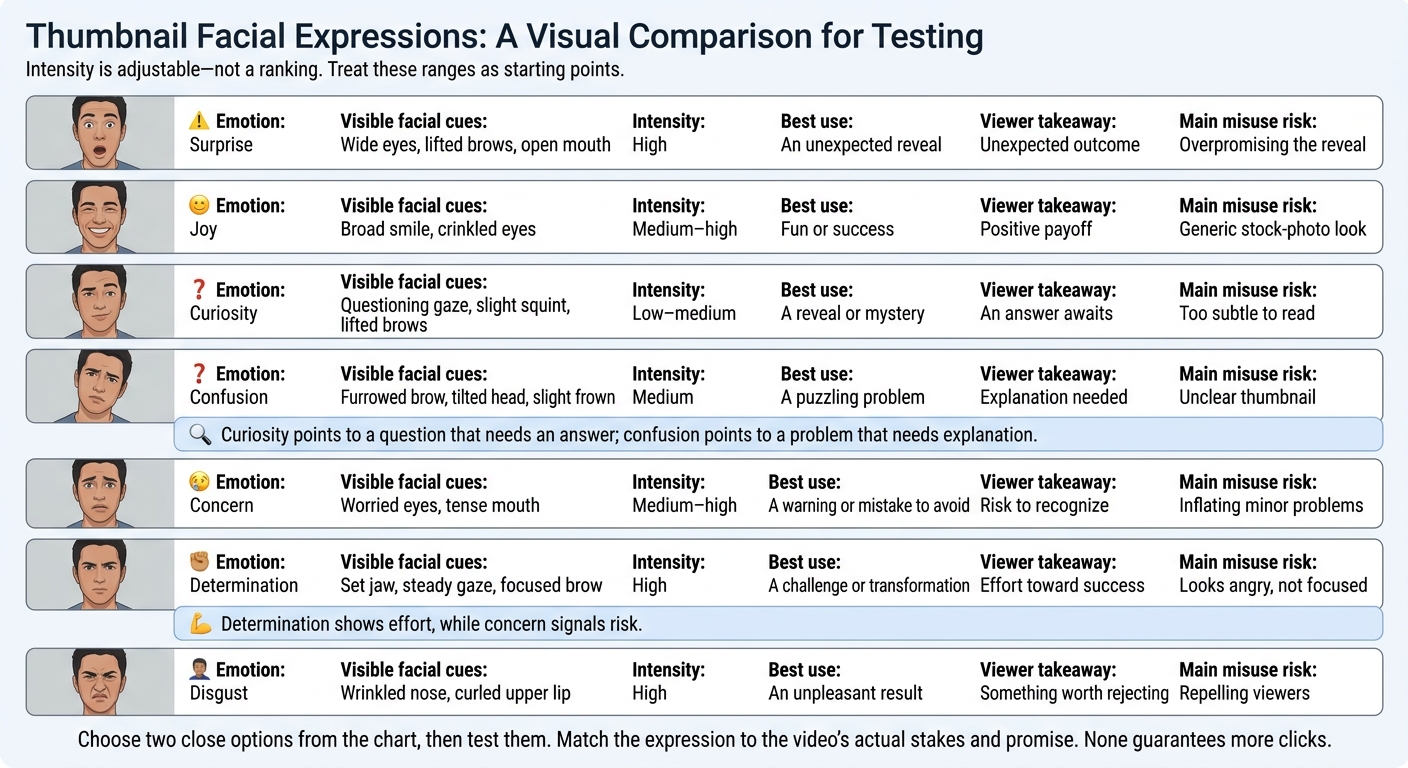
7 Thumbnail Expressions Compared
Intensity is adjustable - not a ranking. Treat these ranges as starting points. Match the expression to the video’s actual stakes and promise, then use the chart to narrow your thumbnail options before testing.
| Emotion | Visible facial cues | Intensity | Best use | Viewer takeaway | Main misuse risk |
|---|---|---|---|---|---|
| Surprise | Wide eyes, lifted brows, open mouth | High | An unexpected reveal | Unexpected outcome | Overpromising the reveal |
| Joy | Broad smile, crinkled eyes | Medium–high | Fun or success | Positive payoff | Generic stock-photo look |
| Curiosity | Questioning gaze, slight squint, lifted brows | Low–medium | A reveal or mystery | An answer awaits | Too subtle to read |
| Confusion | Furrowed brow, tilted head, slight frown | Medium | A puzzling problem | Explanation needed | Unclear thumbnail |
| Concern | Worried eyes, tense mouth | Medium–high | A warning or mistake to avoid | Risk to recognize | Inflating minor problems |
| Determination | Set jaw, steady gaze, focused brow | High | A challenge or transformation | Effort toward success | Looks angry, not focused |
| Disgust | Wrinkled nose, curled upper lip | High | An unpleasant result | Something worth rejecting | Repelling viewers |
Curiosity points to a question that needs an answer; confusion points to a problem that needs explanation. Determination shows effort, while concern signals risk.
Choose two close options from the chart, then test them. For more inspiration, browse trending YouTube thumbnails to see these emotions in action.
How to Test Thumbnail Expressions
Once you’ve narrowed your options to two expressions, test both on the same video.
Change Only the Facial Expression
Use YouTube Studio A/B tests. Change only the facial expression - keep the title, subject, background, text, and layout identical.
Example setup:
Test variable Version A Version B What stays constant Facial expression Wide-eyed surprise (open mouth) Focused curiosity Video title, subject, background, text, and layout
Run both versions at the same time. Testing them one after another can skew the results because the video reaches different viewers over time. Simultaneous testing gives you a cleaner read on which expression performs better.
Read CTR, Impressions, and Watch Time Together
CTR tells you how often thumbnail impressions turn into views. Impressions measure exposure, while watch time tells you whether viewers stayed.
A high CTR isn’t a clear win if watch time drops. That may mean the thumbnail used clickbait vs authentic strategies that promised more than the video delivered. Read these numbers together to judge whether the click was worth it.
Test Across Several Related Videos
Repeat the same test across similar videos to learn which expression fits your audience. If the results stay mixed, keep testing.
Make Expression Variations With ThumbnailCreator
Once you’ve narrowed down the expressions, ThumbnailCreator can help you test faster with AI generation, templates, face swapping, text editing, and object swapping. Small changes in expression can affect clicks without changing the video. Use it to test faster, not to assume a win. Change just one facial feature at a time.
Keep the Subject, Text, and Layout the Same
Start with one base design and change only the face using face swapping or AI generation. Test object swaps separately so you can tell which change affected the click rate.
Compare each version with the base design. Don’t treat any auto-generated version as final. Check that the face still fits the video.
Check Natural Appearance and Mobile Readability
Reject versions that look artificial or distort the face, especially when comparing real photos vs AI-generated thumbnails. Preview each one at 116 × 65 pixels. If the emotion is hard to read, simplify the design or make the expression clearer.
Test the best versions against the same video, then use your CTR and watch-time data to pick the strongest version.
Conclusion: Choose a Fitting Emotion, Then Test
Compare the seven expressions above and narrow your choice to the two that best match the video’s payoff. Pick the emotion that fits - not the most dramatic face.
Test those two expressions head-to-head, keeping the base thumbnail the same. Judge the winner by CTR and watch time.
If a thumbnail has strong retention but weak CTR, try a different emotional trigger and test again. Let the results guide your next expression.
FAQs
How long should I test thumbnail expressions?
Run A/B tests for at least 48 hours to collect enough data to identify a clear winner. Some approaches recommend testing for up to two weeks for a more complete analysis.
Track performance over a consistent window, such as 7 or 28 days, so you don’t mix early results with mature ones. Test one change at a time to see what your audience responds to.
Can emotional thumbnails work without a face?
Yes. Emotional thumbnails can work without a face. Still, expressive faces typically increase click-through rates by 35% to 50% compared to faceless designs.
Some niches do better without faces. Data shows an 8% boost for product reviews and a 14% boost for food content.
If you choose to include a face, ThumbnailCreator can help you quickly add strong expressions, such as shock or curiosity, to maximize visibility and engagement.
How do I judge tests with few impressions?
Run tests for 5 to 14 days, or until they reach at least 1,000 impressions, to collect reliable data. If traffic is low, focus testing on the first 24 to 72 hours after upload, when viewership is typically highest. Don’t make decisions too early: YouTube labels tests that end without enough data as inconclusive.
ThumbnailCreator can quickly generate multiple variations, helping you learn from tests more efficiently.