

7 Emotions Gaming Thumbnails Trigger
A gaming thumbnail should show the feeling the video delivers. Choose one main emotion, pair a clear reaction with its gameplay cause, and check that both are easy to read at phone size.
These 7 emotions give viewers different reasons to click:
- Fear: Will the player survive the threat?
- Surprise: What caused that unexpected moment?
- Tension: How will this close call end?
- Humor: What makes this failure or situation funny?
- Anger: What caused the conflict, and how does it end?
- Shock: What led to this extreme result?
- Curiosity: What explains that strange detail?
Quick Comparison
| Emotion | Main visual cue | What stays unresolved |
|---|---|---|
| Fear | Enemy blocking an escape | Survival |
| Surprise | Unexpected item or event | Its explanation |
| Tension | Low health or a countdown | The outcome |
| Humor | Funny failure or absurd pose | How the gag plays out |
| Anger | Disputed hit or lost item | The conflict |
| Shock | Wreckage or a destroyed build | What happened |
| Curiosity | One partly hidden object | The missing detail |
Keep the frame simple: one main subject, one clear event, and little text. Let the title add context rather than repeat the image - and make sure the footage delivers what the thumbnail promises.
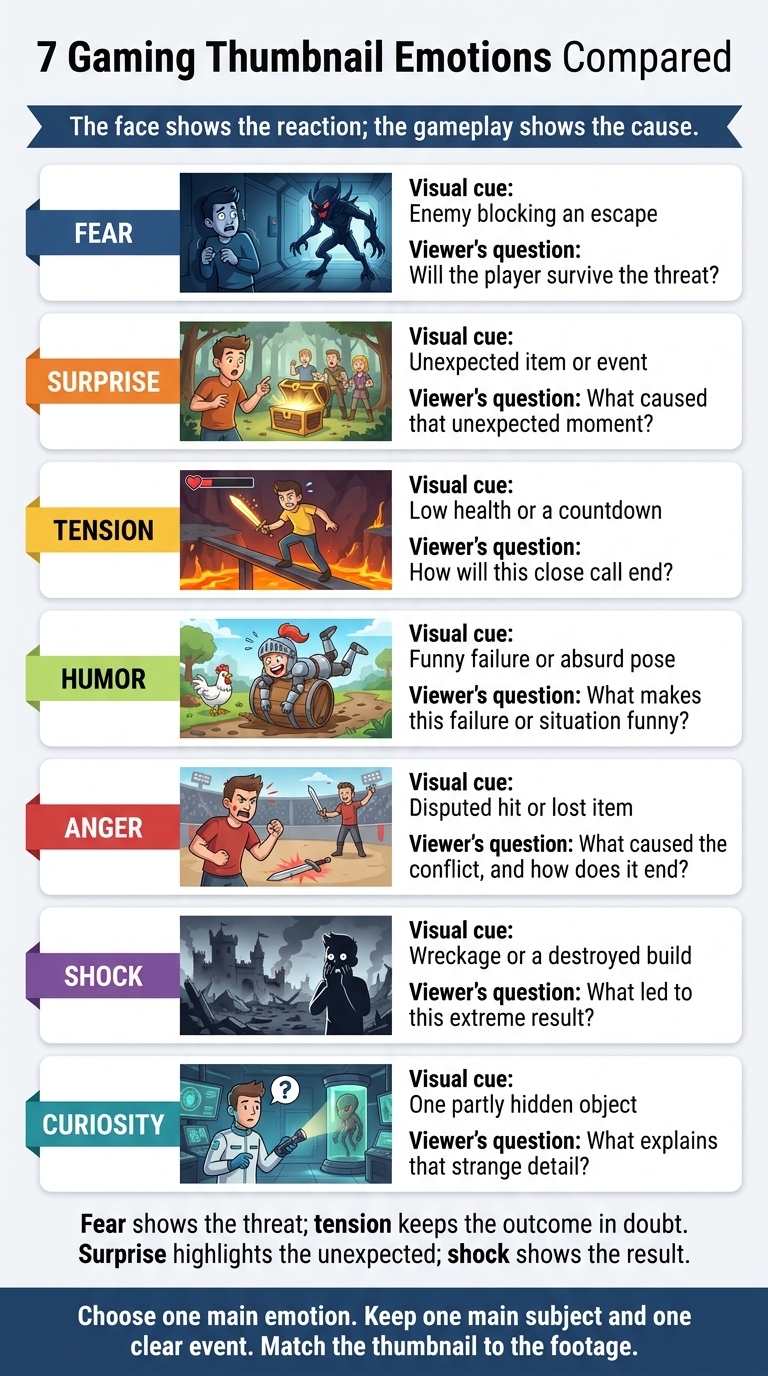
7 Gaming Thumbnail Emotions Compared
The New Thumbnail Strategy Dominating YouTube in 2026
sbb-itb-b59debf
How Gaming Thumbnails Show Emotion
Start with one rule: the face shows the reaction; the gameplay shows the cause. Pair widened eyes, a clenched jaw, or tense brows with one clear stake, like low health, a boss attack, or a rare item.
Match the lighting and color psychology to the feeling. Use dark, cool tones for unease and bright, saturated tones for humor. Keep both the face and the key gameplay detail easy to see.
Give the face and the event separate space, then link them with a gaze or pointing gesture. A simple layout and rule-of-thirds framing help viewers read the emotion at a glance. Shrink the image to thumbnail size to check that the expression and its cause still come through.
Match the thumbnail to the footage. Use this face-plus-stakes formula for each emotion below.
1. Fear
Why viewers click
Fear draws clicks because viewers want to know whether the player survives a visible threat.
Visual cues
Use wide eyes, lifted eyebrows, or a pose that shows the player bracing for danger. Make the threat easy to spot: missing hearts, a nearly empty health bar, a trap beneath the player, or an enemy blocking the exit.
Dark lighting can set the mood, but viewers still need to see the danger. If needed, add 1–3 words to clarify the stakes, such as:
“LAST LIFE.”
Limited visibility, scarce resources, traps, and shrinking safe zones quickly signal danger in horror, survival, action-adventure, and gaming thumbnails for battle royale titles.
What to avoid
Skip tiny health indicators, competing threats, and lighting so dark it hides the danger. Choose suspense over graphic violence, which can trigger thumbnail policy issues. Keep the danger visible - and the outcome unresolved.
2. Surprise
Why viewers click
Fear sells danger. Surprise sells the unexpected. A surprise thumbnail breaks expectations: it shows something viewers didn’t see coming but leaves out the cause. That missing explanation creates a reason to click. Shock focuses on intensity; surprise focuses on the unexpected.
Visual cues
Pair wide eyes, lifted brows, or an open mouth with one clear event - an explosion, a rare item, an unusual character, or a sudden movement. Give that event the highest contrast or sharpest focus so viewers understand the reaction at a glance.
Common game genres
Sandbox games like Minecraft, RPGs, and action games work well for surprise thumbnails featuring rare finds, hidden bosses, and sudden reversals.
What to avoid
Skip generic reaction faces, multiple surprises competing for attention, and reveals that don’t match the video. Make sure viewers can spot the unusual detail when designing for mobile screens. If the reaction looks drawn out rather than sudden, the thumbnail moves toward tension.
3. Tension
Why viewers click
Tension stretches a click trigger: viewers see the danger, but not how it ends. The outcome feels close, yet unfinished. They click to find out whether a final move, closing zone, or record attempt leads to success or a near-loss.
Visual cues
Show that pressure in a single frame. Put one clear source of risk at the center:
A ledge, low health, a countdown, an approaching boss, a closing zone, a locked exit, or a final face-off.
Make the subject large and use strong contrast. Guide the eye toward the risk through the subject’s gaze or movement.
Common game genres
- Competitive shooters: final face-off.
- Battle royale: closing zone and low health.
- Survival games: scarce resources or an approaching enemy.
- Stealth games: detection meters near their limit.
- Speedrunning: timer, target time, or final obstacle.
What to avoid
Don’t show the victory, escape, or completed run. Keep health values and timers true to the footage, and don’t turn a skill challenge into a monster scare. Promise a close call that the video actually resolves to maintain authentic thumbnails that build trust.
4. Humor
Why viewers click
Unlike fear or tension, humor lowers the stakes and makes clicking feel safe. It promises light, low-stakes entertainment that’s easy to enjoy and remember. But the joke needs to connect directly to the video’s premise. A laughing face alone won’t do the job.
Visual cues
Build around one obvious gag: an exaggerated pose, absurd physics, a funny failure, or an unexpected pairing tied to the action. Make sure viewers can read the joke at thumbnail size. If it needs a caption, use large, bold text of roughly two to five words. The image should still make sense without it.
Common game genres
Sandbox and simulation games suit experiments and weird outcomes, while party games lend themselves to failures and reactions. Multiplayer content works well with betrayal and team conflict. For challenge videos, make the restriction obvious and the punchline visible.
What to avoid
Skip multiple jokes, tiny reaction faces, dense captions, and sarcasm that requires backstory. Don’t add an unrelated character or impossible event just for laughs. Show a real comedic moment from the video, with a visual joke viewers can understand at a glance. Misleading humor hurts trust.
5. Anger
Why viewers click
Unlike tension, anger turns pressure into confrontation. A visible wrong, hit, or loss signals conflict. Viewers click to find out who caused it and how the confrontation ends. Use anger only when the gameplay shows a clear conflict.
Visual cues
Pair clenched teeth, narrowed eyes, or furrowed brows with one visible cause:
A disputed hit, lost item, or teammate betrayal.
Place the reaction and its cause in separate parts of the frame. Use red to highlight the hit marker or damage number - not the entire image. This setup works best in games built around direct competition.
Common game genres
Anger works well for competitive shooters, fighting games, sports games, and rivalry-driven multiplayer videos.
What to avoid
Don’t turn frustration into a false accusation. Avoid suggesting a betrayal or dispute that the video never addresses, and keep replay frames accurate. Misleading thumbnails hurt trust and can lead to policy issues.
6. Shock
If surprise is the twist, shock is the aftermath.
Why viewers click
Extreme imagery grabs attention fast. A major failure, consequence, or reveal makes viewers want to find out what happened.
Visual cues
Show the consequence first, then the cause. Center the thumbnail on one event, one subject, and one consequence. Make the damage or collapse easy to see.
Use a tight close-up, strong light-dark contrast, a clean silhouette, and warning colors like red or orange. A strained face, wide eyes, or an open mouth can add to the alarm.
Let the background serve only as proof:
Flames, wreckage, or a revealed enemy.
A before-and-after split can show damage clearly at thumbnail size, even without a reaction face. Add 1–3 words only when the image needs context.
Common game genres
- Horror: monster reveals and their aftermath.
- Action: wreckage from explosions or boss attacks.
- RPGs/story games: character deaths, betrayals, transformations, major reveals.
- Survival: ruined shelters or losses from failed expeditions.
What to avoid
Skip graphic detail and full plot spoilers. Show a reaction, partial reveal, or aftermath instead. Use only moments the video actually shows.
7. Curiosity
Why viewers click
Curiosity gives viewers a reason to click by creating a clear information gap. Show a familiar scene with one unexplained element. If the whole image is vague, you create confusion instead.
Visual cues
Use a recognizable setting, one obstacle, and one missing detail. Partially hide or blur the key object without making the scene hard to understand.
Familiar locations with one strange detail, unusual mechanics, contrasting scenes, and incomplete outcomes can all establish the question.
Point viewers toward what matters with one arrow or a character’s gaze, rather than several competing signals.
Let the title add the missing context instead of repeating the mystery. Keep the result hidden in the image.
Common game genres
- Unclear choices and unusual mechanics: strategy games.
- Hidden structures and strange locations: Minecraft and other sandbox games.
- Hidden systems, clues, and unresolved outcomes: puzzle, mystery, and RPG thumbnails.
- Visible restrictions or obstacles, with success unresolved: challenge content.
What to avoid
Avoid common thumbnail mistakes like excessive blur and vague imagery. Don’t show the solution beside the mystery. Use curiosity when the thumbnail asks a question the video answers.
The question-first setup gives you a clear point of comparison with the other six emotions below.
Compare the 7 Emotions
The main difference is the question the thumbnail promises to answer, not just the facial expression. Use this table to match each emotion with its click driver, visual cues, and common genres.
| Emotion | Primary click driver | Visual cues | Common genres |
|---|---|---|---|
| Fear | See whether the player escapes danger | Approaching enemy, retreating pose, frightened face | Horror, survival |
| Surprise | Understand an unexpected event | Lifted eyebrows, sudden reveal, unexpected item | Sandbox, RPG, adventure |
| Tension | Find out how a high-stakes moment ends | Countdown, precarious position, low health | Stealth, survival, competitive multiplayer |
| Humor | Enjoy an absurd situation or relatable failure | Comedic pose, visual mismatch, exaggerated failure | Party, sandbox, simulation |
| Anger | Witness conflict or a heated response | Furrowed brows, opponent face-off, loss screen | Fighting, sports, competitive multiplayer |
| Shock | Understand an extreme result | Destroyed build, massive explosion, before-and-after contrast | Action, horror, RPG, survival |
| Curiosity | Explain an unresolved detail | Visual contradiction, unexplained object, partial reveal | Mystery, puzzle, RPG, sandbox |
Fear shows the threat; tension keeps the outcome in doubt. Surprise highlights the unexpected; shock shows the result. The gameplay detail - not the face alone - sets them apart.
Minecraft is a sandbox game. Speedruns and challenge runs are formats, not genres. Match the emotion to what the video delivers: tension for a close run, or humor, surprise, or shock when those fit the footage.
Choose and Design for One Main Emotion
Turn your chosen emotion into a clear thumbnail plan. Start by writing the video’s core promise in one sentence. Find the moment that delivers on that promise, then settle on one main emotion. Let it guide the expression, lighting, and composition.
Next, simplify the frame. Build around one focal subject - a face, character, enemy, or object - and keep everything else in the background. Use contrast, lighting, blur, or an outline to separate the subject from its surroundings. Crop close enough that viewers can read the expression or recognize the silhouette.
Give the title and image different jobs. The title can explain the challenge, while the thumbnail shows what makes it difficult. Limit overlay text to 2–5 readable words, and cut anything that repeats the title. Every character, reaction, and event should match the footage.
Before publishing, preview the thumbnail at feed size on both light and dark backgrounds. Give yourself one or two seconds to spot the subject, emotion, and key text. If something gets lost, enlarge the subject, shorten the text, or remove background detail.
ThumbnailCreator can help you generate and edit emotional thumbnail variations quickly.
Conclusion
Fear, surprise, tension, humor, anger, shock, and curiosity give viewers different reasons to click - but the thumbnail must match the video.
Build around the video’s central moment, with one clear subject that’s easy to recognize at thumbnail size, often by using specific YouTube thumbnail styles. Choose one emotion, make the reaction easy to read, and let the video deliver the result. This keeps the image honest and clear, giving viewers a preview of the footage rather than a guessing game.
FAQs
How can I test which thumbnail emotion works best?
Choose two facial expressions that match your video’s payoff. Test them at the same time with YouTube’s A/B testing feature, changing ONLY the facial expression. Keep the title and every other thumbnail element identical.
Run the test for 48 hours to two weeks. Compare click-through rate (CTR), impressions, and watch time - not just CTR. If viewers click but leave soon after, the thumbnail may be making an emotional promise the video doesn’t deliver. Repeat the test across related videos to see which expressions win consistently.
Can I convey emotion without showing my face?
Yes. Expressive human faces generally increase click-through rates, but you can convey strong emotion without showing your face.
Use action-packed gameplay visuals - a sniper’s trigger pull, a character mid-explosion, or a clutch play - to spark curiosity and convey conflict and urgency. ThumbnailCreator can help you create these high-impact visuals.
How do I make emotional thumbnails without clickbait?
Use facial expressions and visual cues that match a real moment in your video. Don’t overplay emotions or promise content you don’t deliver. Both can hurt watch time and viewer trust.
Match the emotion to your genre - think tension for competitive gaming. A/B test expressions in YouTube Studio, keeping all other elements the same. Limit text to 3–5 words, and make sure the face stays clear at 116 × 65 pixels.