

Object Isolation vs. Background Removal
If the background helps explain the video, I keep it. If it adds clutter, I cut it. That’s the whole choice.
I’d make the call based on context, clarity, and brand use. The article’s data points back that up: simple thumbnails with 1–2 elements averaged 9.6% CTR, while cluttered ones averaged 4.1%. And in one case study, a cleaner gaming thumbnail lifted CTR from 1.8% to 4.2%.
Here’s the short version:
- Object isolation works best when the setting helps tell the story
- Background removal works best when I need the subject and text to stand out fast
- On mobile, I should check thumbnails at about 120–168 px wide
- Solid, clean backgrounds often beat busy scenes for readability
- A small outline or shadow can help cutout subjects stand out
Quick take: if viewers need the scene to get the point, keep part of it. If not, remove it and keep the layout clean.
5 BEST Tools To Remove Backgrounds In Photoshop
For a deeper dive into the process, check out our thumbnail background removal guide.
sbb-itb-b59debf
Quick Comparison
| Criteria | Object Isolation | Background Removal |
|---|---|---|
| Main goal | Keep context | Remove clutter |
| Background | Still visible, but toned down (often seen in cinematic thumbnails) | Fully removed or replaced |
| Best for | Travel, cooking, DIY, software, desk setups | Reviews, commentary, lessons, series branding |
| Text readability | Can be harder on busy scenes | Usually easier |
| Brand consistency | Lower | Higher |
| Risk | Background still feels noisy | Image can feel flat or generic |
So if I want a fast rule, it’s this: keep context when it helps, remove it when it gets in the way.
Object Isolation: Use It When the Background Adds Meaning
Use object isolation when the setting helps sell the click. A travel creator standing in front of a blurred but still recognizable city skyline tells viewers the destination right away. A gamer’s face over a softened Fortnite scene tells fans exactly what they’re about to watch. Cut the background out completely, and you lose part of the pitch. When the scene matters, the job becomes simple: keep it there without letting it steal attention.
How Object Isolation Works in Thumbnail Design
The goal is to keep the subject in charge while the background still does its job. You can do that with selective blur, lower background brightness, a thin outline around the subject, and a background color shift. Use those moves only when the scene still adds meaning.
When Keeping the Background Helps Clicks
Keeping the background can help when it explains the video at a glance, such as a real desk setup or a software interface. Desk setup and productivity videos often work better when viewers can see the actual room and gear, because people want to see a real setup, not just an idea. Software tutorials also get easier to read when a blurred but recognizable interface sits behind the instructor. It tells viewers which tool the video covers in a split second.
But there’s a catch. The background still needs to read at thumbnail size. In a 1,000-thumbnail analysis, scene backgrounds averaged 4.4% CTR, compared with 6.9% for dark solid-color backgrounds and 6.1% for bright solid-color backgrounds. That gap makes the point pretty clearly: contextual backgrounds can work, but only when they’re tightly controlled. Once the frame gets busy, object isolation starts to lose its edge.
Where Object Isolation Falls Short
Object isolation has limits. If the original scene is packed - a busy street, a messy desk, or a dense game HUD - even heavy blur can still feel noisy. At mobile thumbnail size, about 120–200 px wide, that mess shrinks into visual clutter and starts fighting with both the subject and any text on top.
A documented gaming thumbnail case study showed just how much this matters. CTR jumped from 1.8% to 4.2% - about a 133% increase - simply by cutting the composition from multiple characters down to a single face with a cleaner focal point.
Text placement is another weak spot. If you drop bold copy over a detailed area like buildings, software panels, or foliage, viewers have to work harder to read it. That extra effort adds friction at the exact moment you want the click. A quick squint test helps. So does previewing the thumbnail at roughly 120 px wide. If the subject or text stops reading clearly, strip away more of the background.
Background Removal: Use It When Clarity and Consistency Come First
When the background no longer adds meaning, cut it out. Background removal lifts the subject from the original scene and places it on a clean backdrop, which gives you full control over the layout.
How Background Removal Improves Visual Hierarchy
Removing the background makes the subject the first thing people notice. A clean backdrop gives the subject and any text more room to breathe. That extra space is handy for bold text, arrows, badges, or price callouts like $19.99.
One small finishing touch can make a big difference: add a 2–6 px outline or a soft drop shadow around the cutout subject. This helps ground the subject so it doesn't look like it is floating.
When Background Removal Is the Better Choice
Use background removal when the original scene adds no useful context. That's often the case in product reviews and educational thumbnails. In both examples, the background isn't helping tell the story. The subject and text do the heavy lifting.
If you want consistency across a series, reuse the same framing, spacing, and color palette from one thumbnail to the next. Many free thumbnail tools and guides suggest a three-color brand palette - primary, secondary, and neutral - to build channel recognition.
Where Background Removal Can Weaken the Image
Removing the background can also take away mood, context, or story signals. If the scene carries emotion or story - like it often does in travel, lifestyle, or reaction thumbnails - cutting it out can make the image feel generic.
There's also the cutout itself to think about. Hair, fur, motion blur, glass, and reflections are tougher to separate cleanly. Rough edges or color halos stand out fast at thumbnail size and can make the subject look fake. After automated removal, zoom in to 200–400% and inspect the edges with care, especially around hair and shoulders.
Next, compare both methods on context, clarity, and branding.
Object Isolation vs. Background Removal: Direct Comparison
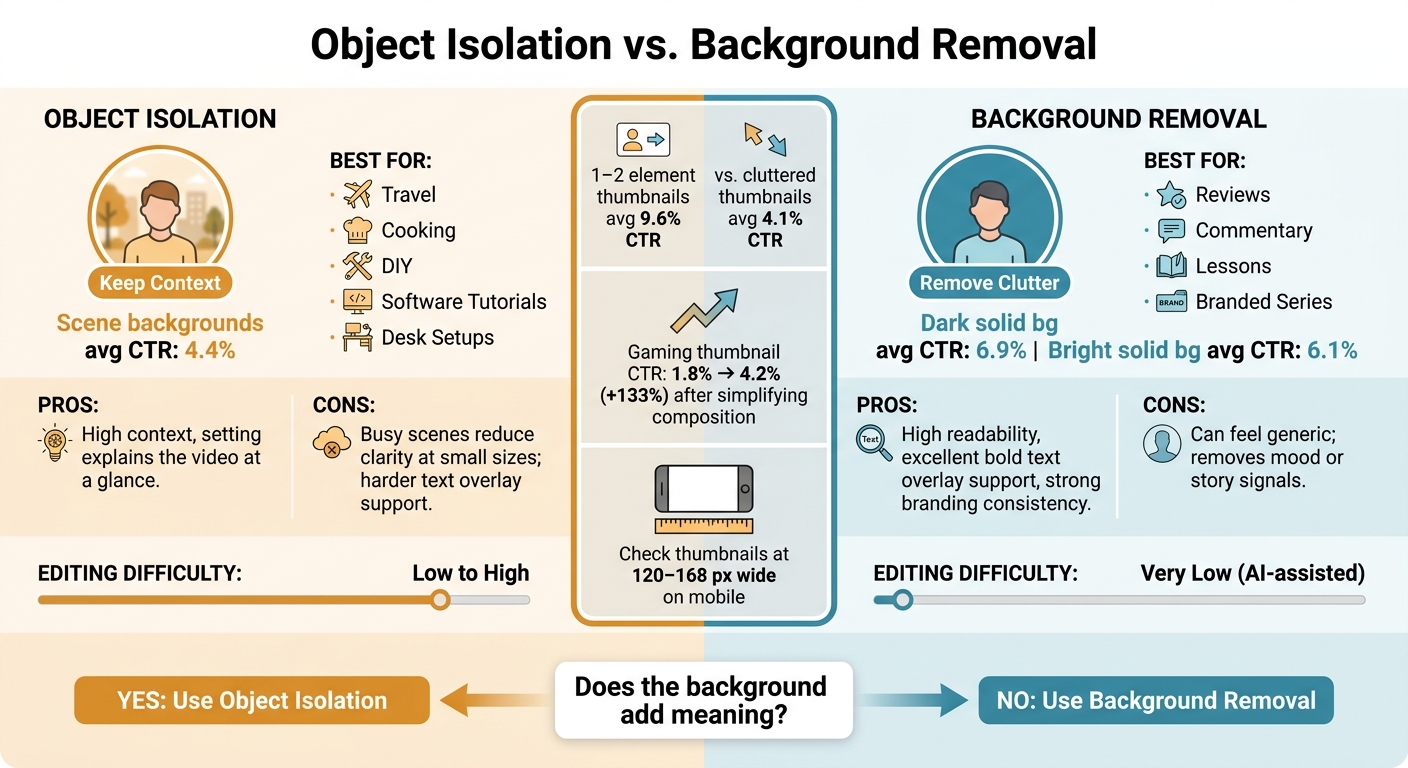
Object Isolation vs. Background Removal: CTR Data & Best Use Cases
Object isolation keeps context. Background removal cuts distraction. The right pick is the one that makes the video's message clear at a glance.
Now that both methods are defined, the next step is to compare them across three things that matter most: context, clarity, and branding.
Comparison Table: Context, Clarity, and Branding
| Criteria | Object Isolation | Background Removal |
|---|---|---|
| Context kept | High - the setting helps explain the video's context | Low - only the subject remains |
| Readability at small sizes | Moderate - busy scenes reduce clarity | High - the subject stands out clearly against a simpler backdrop |
| Bold text overlay support | Harder - background colors and patterns can compete with text | Excellent - a clean background makes bold text easier to place |
| Branding consistency | Lower - the background changes from scene to scene | High - the same backdrop can be reused across an entire series |
| Editing difficulty | Low to high - simple cutouts are easy, but precise isolation can take more manual refinement | Very low - AI removal handles most cutouts quickly |
| Best fit by video type | Travel, cooking, DIY, on-site tutorials | Reaction, commentary, product reviews, branded series |
There’s a clear pattern here. If the setting helps tell the story, object isolation usually works better. If the setting adds noise, background removal tends to win.
That tradeoff matters even more on small screens. Thumbnails with 1–2 elements average a 9.6% CTR, compared to just 4.1% for cluttered designs.
That’s why this choice shouldn’t be made at full size on a desktop monitor. It should be made based on what still reads on a phone.
How to Pick the Right Technique for a Specific Video
Start with one simple question: does the setting add meaning?
If it does, keep it. A workshop helps sell a home renovation video. A kitchen helps frame a cooking tutorial. In cases like that, isolate the subject within the scene so viewers get both the person and the setting.
If the background feels generic, messy, or off-topic, remove it. A plain room, random office corner, or cluttered shelf can pull attention away from the one thing that should stand out.
A simple way to check: use the 120–168 px shrink test. If the subject and message still look clear, the context can stay. If they start to blur together, cut the background and keep only what earns its place.
Using ThumbnailCreator for Both Approaches and Final Takeaway
Building Object-Isolated and Background-Removed Thumbnails Faster
Once you’ve picked your approach, ThumbnailCreator can build either version fast. The tool can generate 10 thumbnail variations in about 30 seconds from a single YouTube URL. That gives you a simple way to test both styles on the same video before you settle on one.
For context-rich thumbnails, use ThumbnailCreator to keep the scene in place while making the subject sharper. Templates help frame the subject and still leave space for the setting. You can use AI generation to try context-rich versions, then use object swapping to adjust the main focal point without rebuilding the whole layout. Text editing helps keep your copy easy to read without covering the parts of the scene that matter.
For clean, subject-first thumbnails, ThumbnailCreator’s background removal can strip out distractions fast. Start with a clean cutout. AI background removal creates a clean cutout fast. It can handle complex edges like hair and fur, which makes subject-first layouts much easier to build. Once the background is gone, text editing matters even more because you have more room for a headline that reads well at thumbnail size.
If you run a series, there’s another nice perk. Creators can save and reuse a specific AI-generated background across multiple thumbnails. That helps keep the look consistent without doing the same manual setup for every upload.
Conclusion: Keep Context When It Helps, Remove It When It Distracts
Ask one question: does the background help viewers understand the video faster? If not, remove it.
Object isolation works best when the setting carries meaning, like a workshop, a kitchen, or a travel location. Background removal works best when the subject needs to stand out right away and the environment adds nothing to the premise. Pick the version that makes the thumbnail clear at a glance.
FAQs
How do I know if the background adds enough context to keep?
Ask a simple question: does the background help tell your video’s story? If it adds to the message, keep it. If it feels distracting or out of place, tone it down or take it out.
Here’s an easy gut check: your subject should still be the main focal point. If the background starts stealing attention, use ThumbnailCreator to blur, darken, or desaturate it while keeping the context you need.
Which option works better on mobile thumbnails?
For mobile thumbnails, simple visuals matter most. On some screens, images can shrink to about 120 pixels wide, so extra detail tends to get lost fast.
That’s why both object isolation and background removal can work well. The goal is the same: cut visual noise and make the main subject stand out right away.
A clean, uniform background - like a solid color or a slight blur - usually works best. Whatever approach you choose, make sure the thumbnail still passes the squint test at mobile size.
Can I test both styles before choosing one?
Yes. With ThumbnailCreator, you can quickly make object isolation and background removal versions of a thumbnail, then export both for A/B testing in YouTube Studio to see which one gets the better click-through rate.
You can also use mobile preview mode to check how each version looks on smaller screens. For the clearest read on performance, test one change at a time over 7 to 14 days.