

Ultimate Guide to YouTube Viewer Demographics 2026
I use YouTube demographics to choose what to test - not to decide what every viewer wants. Start in YouTube Studio → Analytics → Audience, select a fixed date range, and check age, reported gender, and geography alongside watch time and retention.
For context, 84% of U.S. adults say they use YouTube, according to Pew’s 2025 survey. But that adoption rate doesn’t describe your channel’s audience.
Here’s how I turn the numbers into a plan:
- Separate the data: Keep market estimates, channel demographics, viewing behavior, and device use apart.
- Test one change: Try a different topic, introduction, upload time, caption track, or thumbnail design.
- Check the outcome: Read CTR alongside watch time and retention - not on its own.
- Use public channels for ideas: Their views and comments don’t reveal private audience data.
- Record the limits: Save report dates, filters, missing fields, results, and your next step.
My rule: <u>let your channel data guide the decision</u>. Treat broad benchmarks as context, then run one measurable test.
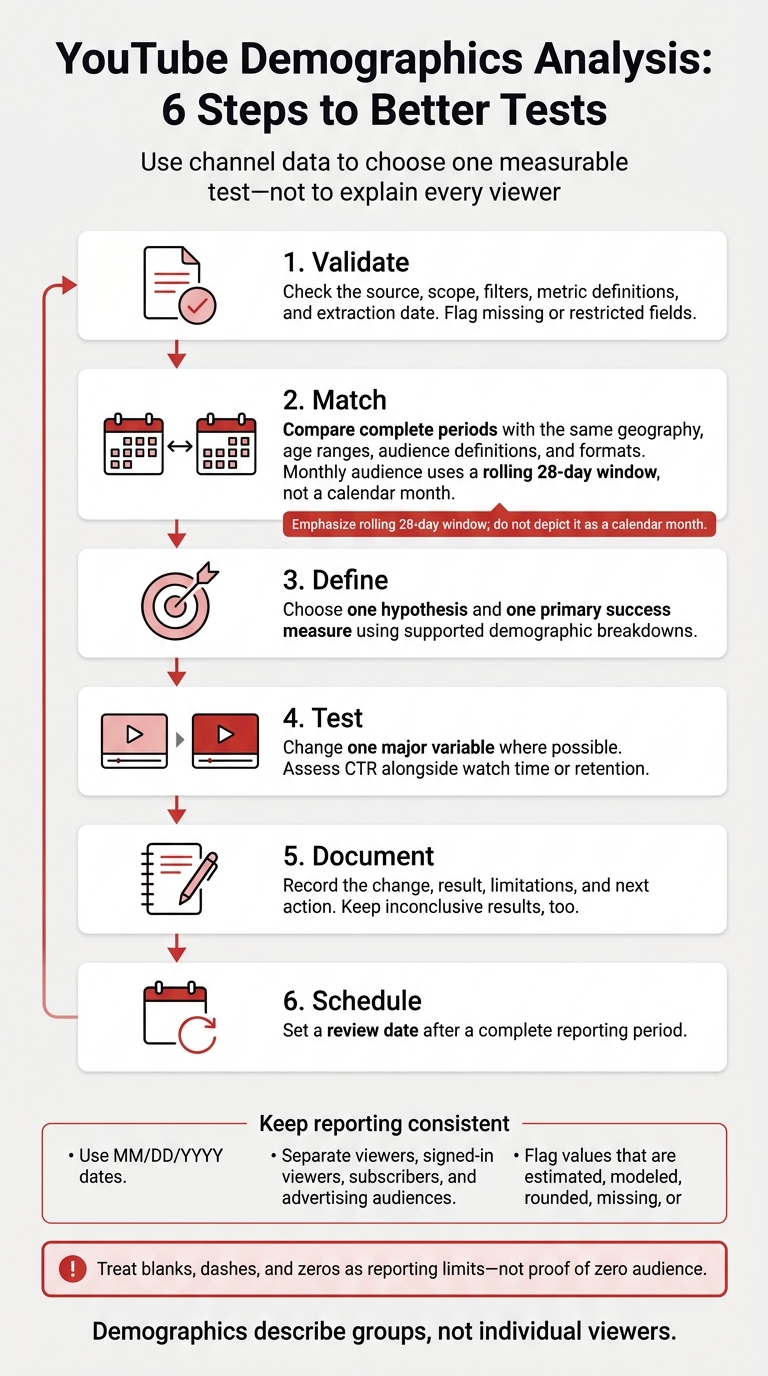
YouTube Demographics Analysis: 6 Steps to Better Tests
How to See YouTube Channel Audience Demographics | Step-by-Step Guide 2026
Once you understand your audience, you can begin thumbnail A/B testing to see which visuals resonate most with specific demographic segments.
sbb-itb-b59debf
2. Find and Read YouTube Audience Reports
After benchmarking the market, check the same signals on your own channel.
Find Audience Reports in YouTube Studio
Start with one demographic question. Open YouTube Studio → Analytics → Audience, and set a fixed date range before reviewing Age and gender or Top geographies. Check the metric, scope, and denominator so you know what each percentage represents. Watch-time share is not the same as unique viewers: the age and gender report is weighted by watch time.
Open See More or Advanced Mode, then select Add comparison to compare videos, groups, or time periods. Keep the time zone, format, and publishing conditions consistent. Change one filter at a time, and check which videos drive the result before changing your content plan.
Export the view and record the report name, date range, scope, filters, primary metric, comparison period, and decision. That record lets you repeat the review rather than rely on isolated snapshots.
Choose Reports for Your Questions
Match each report below to one decision. Device, subtitle, retention, and other reports may sit elsewhere in Analytics or Advanced Mode - not directly in Audience.
| Report or dimension | What it measures | Question it helps answer | Supporting checks | Main limit |
|---|---|---|---|---|
| Age and gender | Age ranges contributing to watch time and reported gender | Which age groups engage most? | Watch time, views, average view duration, retention | Age data may be limited and may not equal unique viewers. |
| Top geographies | Geographic distribution of viewing activity | Which locations should guide language, captions, or timing? | Watch time, views, revenue where available, subscribers | Some geography data may be limited, and country-level results may hide regional differences. |
| Subtitle or CC language | Caption language used for the longest portion of a view | Should captions or translated metadata take priority? | Views, watch time, retention by language where supported | Caption-language activity does not establish a viewer’s nationality or preferred spoken language. |
| Audience segments | New, casual, and regular-viewer behavior | Are new viewers becoming regular viewers? | Monthly audience, returning viewers, watch time | Segment definitions and available combinations depend on the report and current Studio features. |
| Device type | Viewing activity by device category and operating system where available | Should videos and thumbnails be optimized for mobile or TV? | Views, watch time, average view duration, revenue | Device reports may sit outside the Audience tab and may not support every demographic pairing. |
| When your viewers are on YouTube | Recent patterns in when the audience is online | When are viewers active? | Views by publish time, early watch time, notifications | Audience activity does not guarantee that publishing at that time will improve performance. |
Missing data does not mean a missing audience. Available detail depends on data volume, date range, scope, privacy restrictions, content status, and current Studio features. Try a longer period, remove narrow filters, and check the channel-level report.
YouTube does not publish exact suppression thresholds. Private, unlisted, Made for Kids, or Community Guidelines-restricted content can also limit reporting. If data remains unavailable, record the limit and use video performance to guide your next test. Never estimate hidden demographic shares by subtracting visible categories from 100%.
Use these report patterns to compare A/B testing vs gut feeling for your first content and thumbnail tests.
3. Plan Content and Thumbnail Tests
Use demographics to choose a test, not to explain the result. Connect each audience signal to one primary metric. Before publishing, write down your hypothesis, the variable you’ll change, and how you’ll measure success. Control for topic, traffic source, format, and distribution before attributing results to demographics.
| Audience signal | Hypothesis | Recommended test | Primary metric |
|---|---|---|---|
| One age range contributes more watch time | The topic or presentation may suit that segment | Change the introduction while keeping the topic and packaging consistent | Retention |
| One region delivers many impressions but low CTR | The packaging may feel less relevant locally | Test thumbnail wording that makes sense in that region; compare matching traffic sources | CTR |
| Mobile viewers dominate | Small text may be hard to read | Test larger thumbnail text | CTR |
| A subtitle-language group shows stronger retention | Captions may help viewers understand the video | Improve one caption track | Retention |
| Viewers are active in one window | Timing may improve initial distribution | Compare upload windows labeled in U.S. time zones | Early watch time |
Run one controlled test at a time.
Test Topics, Formats, and Video Length
Choose one primary variable per test cycle. When testing topics, compare closely related subjects. For formats, compare a tutorial, review, livestream, or Short. For video length, compare runtimes that meet the same viewer need.
Compare results within the same traffic mix whenever possible. Viewers from Search, Browse, Suggested, external sources, and Shorts may behave differently. Don’t assume a younger or older audience knows more about a subject. Use observed behavior, stated viewer needs, and retention patterns instead.
Give each content test one main outcome: CTR, watch time, retention, or returning-viewer share.
Test Publishing Times, Languages, and Captions
Compare at least two upload windows, labeling each in U.S. time zones. Measure early impressions, CTR, watch time, retention, and returning viewers over the same elapsed period.
Repeat the tests across weeks rather than picking a winner from one upload. Account for U.S. daylight saving time changes, too. Treat “When your viewers are on YouTube” as an activity signal - not proof of the best publishing time.
If geography points to a regional audience, test captions and localization next. Use geography and subtitle-language data together, but give subtitle use more weight when deciding what to localize.
Start with accurate English captions. Then add subtitle tracks or localized titles and descriptions where the data shows meaningful demand. Compare videos with and without those changes, using retention as the primary metric and checking traffic sources.
Once you’ve defined your content and timing tests, apply the same approach to thumbnails.
Create Thumbnail Variations With ThumbnailCreator
Use ThumbnailCreator to change one major visual element at a time without changing what the video promises. Its AI generation, templates, text editing, face swaps, and object swaps can help you produce controlled variations.
Keep the subject accurately represented. Face swaps shouldn’t suggest a false identity, and object swaps shouldn’t show features or results the video doesn’t deliver. The tool speeds up production, but it doesn’t offer private demographic targeting or guarantee higher CTR.
Use YouTube’s native Test and Compare feature where available. It supports up to three thumbnail options and reports results using watch-time share, not CTR alone.
Keep the title, video content, audience source, and testing period as stable as possible. Review CTR alongside impressions, watch time, average view duration, retention, and returning-viewer behavior. If CTR improves but retention drops, the thumbnail may promise something the video doesn’t deliver.
If you must test thumbnails one after another, don’t compare one used during a major Browse or Suggested surge with another shown during a low-distribution period. For each period, record the date, traffic sources, impressions, upload age, title changes, external promotion, seasonality, and audience mix. Describe the result as an observed association - not proof that the thumbnail caused the change.
4. Compare Similar Channels Using Public Data
Public channels can help you check whether a pattern extends beyond your audience. Use public benchmarking only to form hypotheses for your own channel. Choose three to five channels with similar topics, formats, and languages.
Public views, visible likes, and comments show activity, but view counts can include advertising views. These numbers don’t reveal actual viewer demographics or private metrics such as retention and unique viewers. Subscriber counts don’t equal active viewers, either.
Before collecting data, set a matching window: sample up to 10 long-form uploads per channel published within the same 30-day period. Keep Shorts and livestreams separate. Save each URL and the collection timestamp, since public counts can change. Mark missing counts as N/A, not zero.
Compare median views, visible likes, and comments, rather than focusing on the strongest upload. Even within the same publication window, uploads will differ in age. Use 7-day or 30-day snapshots when available, and never reconstruct missing historical counts. You can also calculate likes or comments per 1,000 views, but these ratios describe public interaction only.
Record visible facts in the worksheet. Use them to infer positioning - not viewer identity - and keep your interpretation in the confidence column.
| Channel | Content category | Apparent audience positioning | Regional positioning | Format | Median public views, likes, and comments | Evidence | Confidence level |
|---|---|---|---|---|---|---|---|
| Channel name and URL | Stated topics, series, and visible title and thumbnail styles | Stated skill level or viewer need | Visible language, subtitles, currency, units, and local references | Type, duration, and visible cadence | Sample size; median views, visible likes, and comments | Video URLs, publication dates, collection timestamp | Positioning hypothesis; rate each claim: high for repeated explicit cues, medium for several supporting signals, low for limited evidence |
Treat comments as themes, not a survey. Don’t infer identity or demographics from names, accents, presenter appearance, or individual commenters. Assign confidence to the positioning claim, not a demographic guess.
Use repeated public patterns in the worksheet to choose one testable idea, then check it against your own YouTube Studio data.
5. Reporting Limits and Review Steps
Before comparing results, agree on how to read the report.
Keep Reporting Consistent
Keep report definitions fixed so demographic comparisons stay meaningful. Label every report with its source, scope, geography, age range, gender categories, audience definition, metrics, reporting period, and extraction date. Use MM/DD/YYYY dates.
Separate viewers, signed-in viewers, subscribers, and advertising audiences. Flag values that are estimated, modeled, rounded, missing, or restricted. YouTube bases age and gender reporting on signed-in viewers and geography on IP addresses.
Treat blanks, dashes, and zeros as reporting limits - not proof of zero audience, especially for private, unlisted, or Made for Kids content.
Demographics describe groups, not individual viewers. Before making a decision, check them alongside watch time, retention, traffic sources, returning viewers, and feedback.
Use a Demographic Analysis Checklist
- Validate: Check the source, scope, filters, metric definitions, and extraction date. Flag missing or restricted fields.
- Match: Compare complete periods with the same geography, age ranges, audience definitions, and formats. Monthly audience uses a rolling 28-day window, not a calendar month.
- Define: Choose one hypothesis and one primary success measure using supported demographic breakdowns.
- Test: Change one major variable where possible. Assess CTR alongside watch time or retention.
- Document: Record the change, result, limitations, and next action. Keep inconclusive results, too.
- Schedule: Set a review date after a complete reporting period.
Review the same report again after the next complete period.
Conclusion: Use Channel Data to Guide Tests
Open YouTube Studio and review your latest complete Audience report. Choose one pattern backed by your channel data - not broad benchmarks - and schedule one measurable test.
FAQs
How much data do I need before acting on audience trends?
Wait until each thumbnail variant gets at least 1,000 to 2,000 impressions before judging the results. Trends may show up at 500 impressions, but testing across 10,000 total impressions gives you the most dependable results.
Run tests for 7 to 14 days to account for normal shifts in viewer behavior. If your videos average fewer than 10,000 impressions per week, give the tests more time.
What should I do if my audience differs from my target viewers?
Use YouTube Analytics, not gut feeling, to confirm an audience mismatch. Check your click-through rate (CTR) across segments such as age, location, and traffic source.
If your actual audience differs from your target viewers, use ThumbnailCreator to make thumbnail variants for the people watching. Test one element at a time - color, facial expression, or text density - so you can see which changes affect engagement.
How can I tell whether an audience shift will last?
Track performance over 30 days, not just the first click-through rate (CTR) spikes. A drop in CTR as your audience grows may point to growth - not fading interest. Check CTR alongside average view duration and retention to see whether viewers stay engaged.
If YouTube Studio doesn’t connect each variant’s performance to specific demographics, treat those differences as early signals until the same patterns appear across multiple videos.