

Can You Use Logos in Thumbnails Legally?
Yes, you can sometimes use company logos in YouTube thumbnails legally under U.S. law - but how you use them matters. My starting rule: use a logo to identify your video’s subject, not to suggest sponsorship or approval.
Before publishing, I check 2 separate rights: trademark and copyright. A review or criticism may support use without permission, but fair use depends on the facts.
Here’s my checklist:
- Check the context: Does the whole thumbnail suggest a brand partnership?
- Check the terms: Review licenses and brand guidelines; government seals may have extra restrictions.
- Keep records: Save written permission and license terms when they apply.
- Consider leaving it out: Use your own branding or licensed visuals if the logo adds little. You can also compare thumbnail tools to find safer design alternatives.
<u>A disclaimer, an edited logo, or an AI tool doesn’t clear third-party rights.</u> YouTube complaints can also affect your video even when you believe your use is lawful.
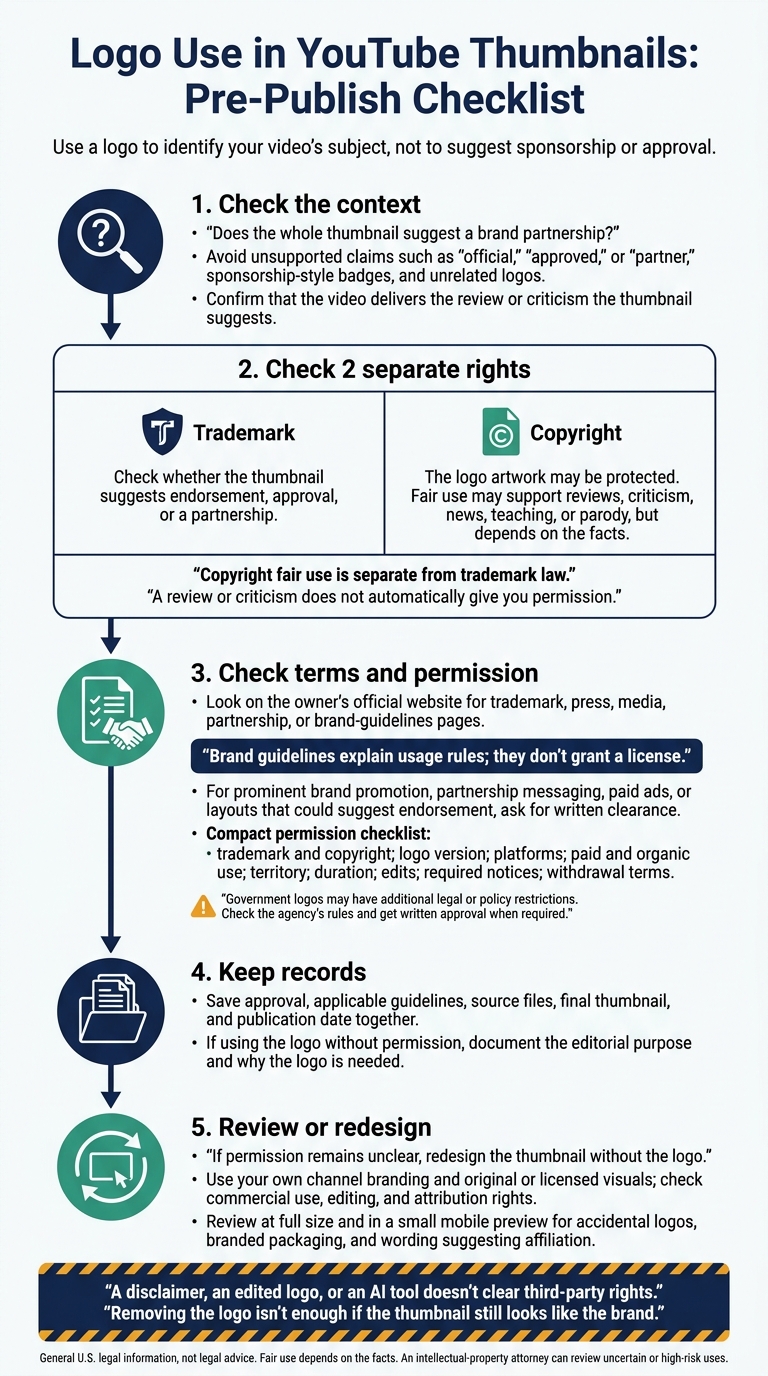
Logo Use in YouTube Thumbnails: Pre-Publish Checklist
Can We Use Logos That Aren't Ours In Our Content Legally? (Lawyer Tony Iliakostas Breaks It Down)
sbb-itb-b59debf
When Is Using a Logo Legally Risky?
The main risk isn’t the logo itself. It’s whether the thumbnail suggests endorsement, approval, or a partnership.
Can You Use a Logo in a Product Review?
A logo can identify the product you’re reviewing, which often involves photographing the item yourself, but that doesn’t automatically give you permission to use it in a thumbnail. Use only as much of the logo as you need to identify the subject.
Copyright fair use is separate from trademark law. It may support reviews, criticism, news, teaching, or parody, but it doesn’t excuse implied endorsement.
That standard applies to the entire thumbnail - not just the logo.
Which Thumbnail Choices Increase Legal Risk?
Look at the whole thumbnail, not just its wording, for signs of implied sponsorship or endorsement. Avoid unsupported claims such as official, approved, or partner, as well as sponsorship-style badges and unrelated logos.
Large or prominent branding is harder to justify when the video barely discusses the company. Relevance alone doesn’t justify branding, and redrawing, recoloring, cropping, or stylizing a logo doesn’t make its use lawful. Before publishing, check that the video delivers the review or criticism the thumbnail suggests.
Government marks follow the same core rule: don’t imply endorsement.
Do Government Logos Have Special Rules?
Government logos may be restricted by law or policy even when the artwork isn’t copyrighted. The Department of Veterans Affairs, for example, prohibits seal use that implies endorsement of commercial products or services.
Check the agency’s rules, get written approval when required, and avoid badge-style graphics that look official and suggest endorsement.
How Do You Check Logo Permissions?
If a thumbnail may pose a risk, check the rights before publishing.
Start with the logo owner’s official website. Look for trademark, press, media, partnership, or brand-guidelines pages. Confirm who owns the mark, which rights you need, and whether your thumbnail could suggest endorsement. Brand guidelines explain usage rules; they don’t grant a license.
What Should Written Permission Cover?
Ask for written clearance when using a logo for prominent brand promotion, partnership messaging, paid ads, or a layout that could suggest endorsement. Include the exact thumbnail mockup, video context, and channel details in your request.
The approval should cover trademark use and copyright in the artwork, plus the specific logo version, platforms, paid and organic use, territory, duration, edits, required notices, and withdrawal terms. Check that the person approving your request controls those rights. Permission for one thumbnail doesn’t automatically cover future campaigns.
Store the approval, applicable guidelines, source files, final thumbnail, and publication date together. If you use the logo without permission, document the editorial purpose and explain why the logo is needed.
Whether you need permission also depends on how you use the logo.
How Do Common Logo Uses Compare?
Use the cases below to help decide whether to keep or remove a logo. This table is a screening tool, not a final decision: risk depends on the design, context, and rights involved.
| Logo use | General risk | Permission considerations | Recommended action |
|---|---|---|---|
| Your own logo | Lower if ownership is clear | Contractor-created designs may require a transfer of rights | Confirm ownership of both the mark and artwork, including contractor-created design work |
| Licensed logo | Lower within the license’s scope | Uses outside the license need separate clearance | Check whether the license covers thumbnails, edits, ads, platforms, territory, and duration |
| Identifying use in commentary or review | Depends on context | Limited use to identify the brand may be defensible without permission | Use only what’s needed and avoid cues that suggest endorsement |
| Incidental inclusion | Often lower, but depends on context | Not automatically exempt; photo rights may also apply | Crop or redesign if the logo isn’t needed |
| Prominent promotional use | Higher without permission | Ads, partnerships, and endorsement-style layouts may require approval | Get written clearance or redesign |
If permission remains unclear, redesign the thumbnail without the logo. For more help with the basics, see our YouTube thumbnail beginners guide.
How Can You Make a Thumbnail Without Another Company's Logo?
Build the thumbnail around the topic, not the logo. Use your channel branding, clear text, and visuals that explain the video. Choose original or licensed visuals, and check commercial use, editing, and attribution rights. Free doesn’t mean unrestricted.
Hypothetical small-business tutorial: For a video about tracking expenses, use the thumbnail text “Track Expenses,” an original calculator-and-spreadsheet illustration, and your channel’s colors. This communicates the topic without an unrelated accounting-software logo or any suggestion of sponsorship.
Removing the logo isn’t enough if the thumbnail still looks like the brand, which is one of many thumbnail mistakes to avoid.
A template can help you make the change without bringing the logo back.
How Can ThumbnailCreator Help Replace Logos?
ThumbnailCreator lets you generate, edit, and swap thumbnail elements. Start with a business or education template, replace branded objects with original or licensed visuals, and apply your channel’s styling. Keep important text and images clear of YouTube’s lower-right timestamp.
AI tools and templates don’t clear third-party rights. Check the rights for every image, font, and template element, and save the license terms. Then review the thumbnail at full size and in a small mobile preview. This ensures your design follows mobile thumbnail optimization best practices. Look for accidental logos, branded packaging, or wording that suggests affiliation.
Conclusion: Check Rights and Avoid Implied Endorsement
Trademark and copyright require separate checks: trademark addresses brand confusion, while copyright may protect the logo artwork. Use a logo to identify the video’s subject - not just to grab attention - and never in a way that suggests sponsorship or endorsement. A small disclaimer won’t necessarily fix a misleading thumbnail.
Keep records of written approval, permitted uses, source files, and dates. Check the terms again before reusing the logo in ads or other paid uses. If the logo adds little information, leave it out. For more design best practices, see our YouTube thumbnail guides.
This is general U.S. legal information, not legal advice. Fair use depends on the facts. An intellectual-property attorney can review uncertain or high-risk uses before publication.
FAQs
Does monetization affect logo fair use?
Monetization doesn’t automatically make logo use fair use. It generally adds risk because monetized YouTube thumbnails are treated as commercial use. Courts weigh four factors case by case: purpose, nature, amount used, and market effect.
Using a logo just to borrow a brand’s credibility - when the video isn’t about that brand - weighs against fair use. And even if fair use applies, it doesn’t necessarily resolve separate trademark or publicity-related issues.
Can I use a brand name instead of its logo?
Using a brand name instead of its logo doesn’t automatically remove legal risk. It can still create problems if your thumbnail suggests the brand sponsors or is affiliated with your video without permission. Keep your thumbnail accurate to the video, and don’t mislead viewers.
ThumbnailCreator’s AI-powered tools can help you make original, professional thumbnails while keeping control over your visual assets.
What should I do if my thumbnail receives a logo complaint?
Save screenshots of the complaint, your YouTube dashboard, and any related communications. Replace the thumbnail right away with a lower-risk version that uses plain text or your own artwork while you investigate.
Review your rights log to confirm that each asset’s license allows commercial use in thumbnails. If you believe your use qualifies as fair use, consult legal counsel before filing a counter-notification. This is a formal legal statement made under penalty of perjury.