

Top 5 Visual Elements for High-CTR Thumbnails
I focus on five thumbnail elements to make a video’s promise clear at a glance. My first check: shrink the image to phone size. Can you spot the subject and read the text?
Here’s what I look for:
- Color contrast: Separate the subject from the background without making every color loud.
- Faces or informative subjects: Show an expression, object, or result that fits the video.
- One focal point: Give viewers one clear place to look first.
- Short, readable text: Use 2–5 words when they add something the image and title don’t.
- Original visual storytelling: Show a clear payoff that the video actually delivers.
I treat these as a checklist, not a guaranteed CTR formula. I test one major change at a time, compare the same traffic sources, and check watch time and retention - not clicks alone. <u>A click helps only if the video keeps its promise, highlighting the importance of authentic thumbnails over deceptive ones.</u>
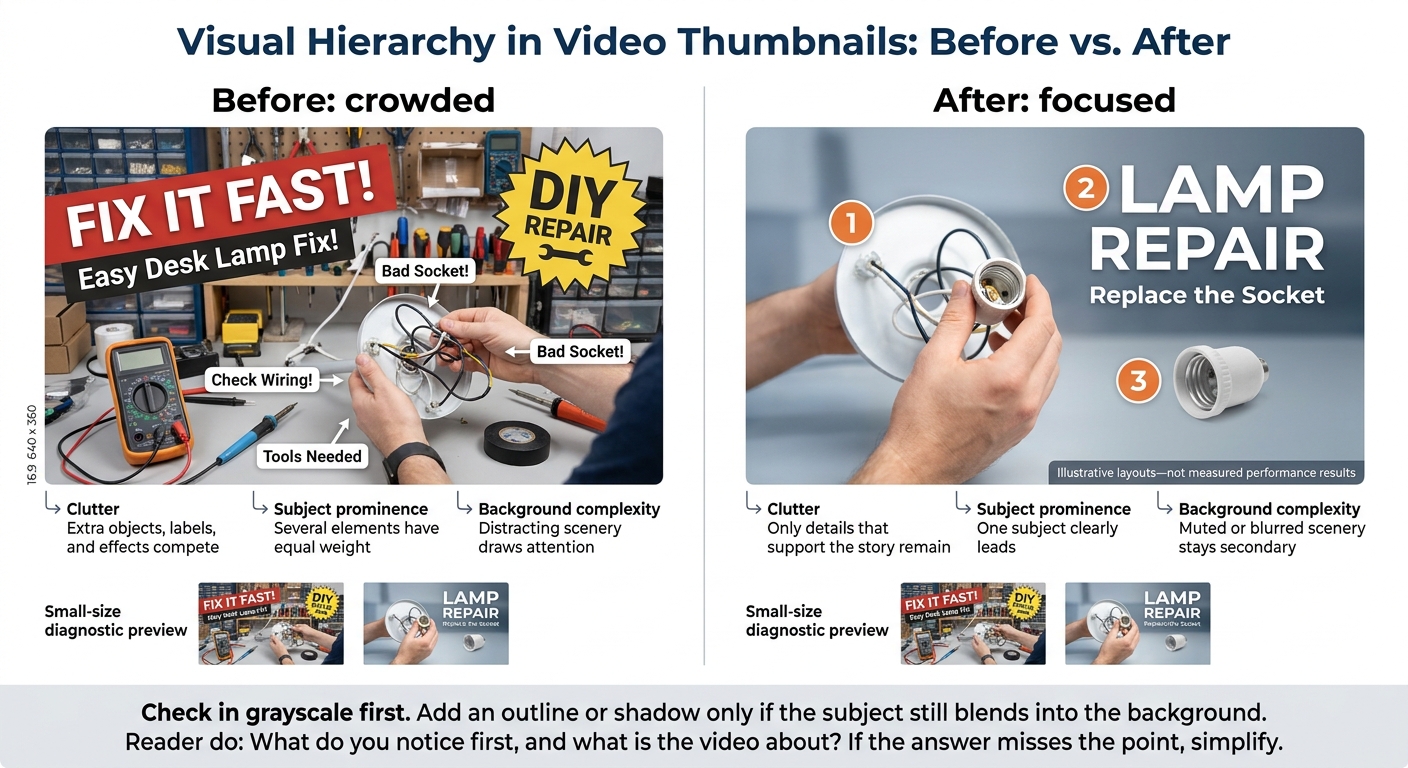
Thumbnail Visual Hierarchy: Crowded vs. Focused
What Viewers Need to Understand at a Glance
Impressions CTR is the share of counted thumbnail impressions that turn into views.
Viewers should immediately recognize the subject, understand the payoff, and read any supporting text with ease. Test the thumbnail at phone size and in grayscale. If the subject or text becomes hard to read, simplify it. You can also use an AI thumbnail generation guide to streamline this design process. These checks help you judge whether viewers can grasp the message fast enough to click.
Use emotion only when it helps tell the story. If a face adds nothing, let the subject or result do the talking. Keep the thumbnail, title, and opening aligned.
The next section ranks these five elements by impact.
sbb-itb-b59debf
How the 5 Elements Compare
Use this table to spot a thumbnail’s weakest element - not to rank design choices across every video. Compare your thumbnails with competing videos’ thumbnails to find what may be limiting CTR.
| Element | Primary benefit | Common drawback | Assessment signal |
|---|---|---|---|
| Saturated vs muted color contrast and controlled saturation | Better visibility in the feed | Too much saturation distracts from the subject | CTR by surface |
| Expressive faces and informative subjects | Clearer emotion and topic | Exaggerated expressions or poor cropping create confusion | Emotion clarity and subject recognition |
| One focal point and clear visual hierarchy | Faster recognition and scanning | Competing focal points or too little context | Fast recognition |
| Short, readable text | A clearer video promise | Crowded, repetitive, or exaggerated wording | Promise clarity |
| Original visual storytelling | Standing out and setting accurate expectations | A confusing concept or a promise the video cannot deliver | How well it stands out, promise fit, watch time, retention |
After spotting a likely weakness, test controlled variations. These signals do not prove causation. Change one variable at a time and compare results on the same traffic surfaces to see what changed.
Check early CTR on Home and Suggested within the first 24 hours. Treat that window as a diagnostic check, not a deadline. YouTube’s native testing compares up to three variants and judges results by watch time, not CTR alone.
The elements work together: strong color cannot fix a weak focal point, and readable text cannot save a misleading promise. Test one isolated change first, then test full concepts.
1. Color Contrast and Controlled Saturation
Color should support one focal point, not compete with it.
Separate the Subject From the Background
Stick to two or three colors: one for the background, one for the subject, and a small accent. Keep saturation strongest on the subject and softer in the background. In a crowded feed, that contrast can help your thumbnail stop the scroll.
Complementary pairs like blue and orange can separate foreground from background, but mute one side so both do not compete for attention.
Check the design in grayscale. If the subject blends into the background, adjust lightness before changing hues. Lightness - not hue alone - creates separation.
Keep Text Readable
Once the subject stands out, check that viewers can read the text at feed size.
Place text over a plain area, or add a solid or semi-opaque panel behind it. Use WCAG’s 4.5:1 contrast ratio for normal text and 3:1 for large text as benchmarks for legibility.
Match the Palette to the Video’s Promise
| Palette approach | Advantages | Limits |
|---|---|---|
| Bright backgrounds | Suit energetic, playful content | Can overwhelm the subject |
| Dark backgrounds | Add depth and drama to bright subjects | May lose shadow detail on dim screens |
| Complementary colors | Separate foreground from background | Can look harsh when both sides are fully saturated |
| Muted palettes | Suit a calm, editorial style | May need stronger light-dark contrast or one bold accent |
Whether you choose bright vs dark thumbnails, no palette wins in every niche. Judge yours against audience expectations and nearby thumbnails in the feed, rather than a universal color formula.
Preview the thumbnail on a phone in both light and dark modes. Check for disappearing edges, muddy shadows, and harsh accents. Fix those issues before testing the palette with viewers.
Color guides the eye. Faces or subjects give viewers something to connect that color to.
2. Expressive Faces and Informative Subjects
Color gets attention. The face or subject then needs to give viewers a reason to click. Both can improve CTR, but only if viewers recognize them at a glance.
Frame for Recognition
Use a close or medium-close crop to keep the eyes, mouth, and expression clear. Crop tight. Skip full-body shots unless the pose is the point, and keep text and graphics away from facial features.
Match the Emotion to the Video
Choose an expression that matches the video’s promise: concentration for a tutorial, surprise for a discovery, or concern for a warning. Clear doesn’t mean overdone. For new viewers, use familiar actions and emotions that are easy to read. Familiar faces work better for subscriber-heavy videos.
Let the Subject Show the Promise
Put the subject first when it tells the story and communicates the payoff faster than a face. Show its defining feature rather than the whole scene. If you include a face, let it play a supporting role: the person provides emotion, while the subject provides context.
Check Mobile Size Optimization
Preview the thumbnail at 120–168 px wide. If viewers can’t read the subject and expression in one second, tighten the crop or remove distractions.
3. One Focal Point and Clear Visual Hierarchy
After viewers recognize the colors and subject, visual hierarchy guides where they look first. Your next job is to Avoid common thumbnail mistakes that cause other elements to compete with the subject.
Make the First Look Count
Use size, brightness, and sharpness to set a clear order: subject first, text second, details last. Keep supporting details to one or two.
Place the subject off-center when you need room for text. A centered layout may work better for a symmetrical subject.
Keep Background Secondary
Blur background details, mute saturation, or darken the setting so the subject stands out. Check in grayscale first. Add an outline or shadow only if the subject still blends into the background.
| Design factor | Before: crowded | After: focused |
|---|---|---|
| Clutter | Extra objects, labels, and effects compete | Only details that support the story remain |
| Subject prominence | Several elements have equal weight | One subject clearly leads |
| Background complexity | Distracting scenery draws attention | Muted or blurred scenery stays secondary |
Check the Hierarchy at Small Size
Preview the design at about 120 × 68 pixels. Use this as a diagnostic check, not a fixed YouTube size.
Ask someone unfamiliar with the video what they notice first and what they think it’s about. If their answer misses the point, simplify the design further.
Use these hierarchy checks to build test variants in the testing section. For a deeper dive, follow our thumbnail A/B testing guide to scientifically improve your results.
4. Short, Readable Text
Once the subject and hierarchy are clear, use text to sharpen the promise. It should make the payoff clear sooner, not compete for attention.
Make Each Word Earn Its Place
Aim for 2–5 words that add tension, payoff, or curiosity - not a shorter version of the title. Write the full thought, then cut filler and anything the title already says. Make the promise clear, but save the exact answer or method for the video. Add text only when it helps viewers read the thumbnail faster.
Leave Room for the Text
Choose a bold sans-serif font, large letters, and comfortable line spacing. Put the phrase in open space beside the subject, with padding around the edges. Don’t cover faces, hands, products, or other key objects.
Use strong light–dark contrast between the letters and background. A subtle shadow, dark overlay, outline, or solid text block can make words easier to read - but skip anything that adds clutter. Check the thumbnail at 120–240 pixels wide, not just at full size. Look closely at letter clarity, line breaks, and separation from the background.
If the text still competes with the subject, remove it and test the image alone to see if data-driven testing beats your intuition.
Test the Thumbnail Without Text
Hide the text layer. The image should still communicate the idea. Then bring the words back: do they sharpen the promise, or just label what viewers can already see? If they only label the image, cut them.
5. Original Visual Storytelling
Once color, hierarchy, and text are clear, the thumbnail needs a specific story that makes viewers want to click. A clear, believable story helps viewers see the payoff faster, which may make a click more likely.
Choose One Clear Story
Build around one clear story: a result, transformation, comparison, or defining object. Add emotion only when it supports that story, and match the expression and color to the payoff.
Keep the result dominant. Use a short label only if the relationship needs explaining. For before-and-after images, keep the framing consistent so viewers can spot what changed.
Keep the Promise Accurate and Original
Show what viewers will get; leave the method for the video. Every visible result, person, product, and number must appear in the video. Use your own footage and framing, and don’t promise more than the video delivers.
Familiar storytelling formats are fine. Copying another channel’s composition, pose, branding, or wording isn’t.
When building test versions, vary the story type and thumbnail formats first.
Create Thumbnail Variations for Testing
Once the concept is set, start with one approved thumbnail and test one major variable at a time: background color, subject crop, facial expression, text, or story type. Keep brand cues vs. click-optimized colors in mind while testing. Make the change easy to spot - tiny edits may not give you a clear result. If you test broader design directions, label each hypothesis before you begin.
ThumbnailCreator can help you make variants faster with AI layouts, templates, face swapping, text editing, and object swapping. Review every generated or swapped image at full size and in a phone-size preview. Check facial identity, hands, product details, logos, spelling, and numbers. Reject any swap that suggests someone appeared in the video or used a product when they didn’t.
For a controlled comparison, use YouTube Studio, which supports up to three thumbnail options per test. Keep the title fixed for a thumbnail-only test. Don’t edit the title or thumbnail while the test runs - either change stops it and requires a restart. Tests usually take about two weeks and may still end without a clear result. YouTube chooses the winner based on watch time, not CTR alone. More clicks won’t be enough if viewers leave quickly. Understanding thumbnail CTR benchmarks can help you determine if your results are truly successful.
Save the original thumbnail, each variant, its hypothesis, and the test dates. Record impressions, CTR, watch time, and retention so your future thumbnail choices draw on your own data.
Measure CTR, Watch Time, and Retention
After testing thumbnail variations, check whether the change brought better clicks - not just more clicks. In YouTube Studio → Analytics, compare the first 24 hours and first 7 days after publication. Track impressions, CTR, views from thumbnail impressions, watch time from impressions, average view duration, retention, and traffic source. These metrics help you judge which visual change - color, face, hierarchy, text, or story - improved performance.
Compare the same discovery surface over matching time windows. Match Search with Search or Suggested with Suggested. Don’t compare Search CTR with Home CTR, or first-day results with a lifetime average. CTR measures counted thumbnail impressions; it doesn’t account for every view from external sites, end screens, or other placements.
Even with a controlled comparison, context matters. Small samples fluctuate, and reaching a broader audience can lower CTR without meaning the thumbnail is worse. Treat before-and-after results as a guide, not proof. Audience mix, topic demand, and recommendation reach can change between periods. Check traffic source, subscriber status, and, where available, device and geography. Record any relevant changes. No universal impression count or fixed waiting period guarantees a reliable result.
CTR matters only if the thumbnail brings the right audience to the video. Check watch time from impressions, average view duration, average percentage viewed, and the first 30 seconds of the retention curve. High CTR followed by an early drop-off can point to a promise mismatch: the thumbnail drew viewers in, but the video’s opening didn’t match their expectations. Use comments, likes, shares, and returning-viewer behavior as supporting evidence.
Conclusion: Thumbnail Design and Testing Checklist
These five elements work together: contrast draws attention, the subject makes the premise clear, hierarchy guides the eye, text adds context, and original visuals keep the promise honest.
Test the weakest element first. Change one variable and keep everything else consistent. Before publishing, check each item:
- Color: Make the subject stand out from the background without oversaturating colors. Check contrast in grayscale. You can use free thumbnail tools to quickly verify these visual adjustments.
- Subject: Choose a face, object, or scene that makes the topic clear based on your thumbnail strategy.
- Focus: Keep one dominant subject or action.
- Text: Use 2–5 readable words that add context rather than repeat the title.
- Promise: Use an original image that accurately shows the video’s outcome.
- Mobile preview: Shrink the thumbnail to phone size and check it in light and dark mode. It should still read in about one second.
- Results: Compare CTR on the same traffic surface and within the same time window. Keep the version with stronger watch time and retention.
FAQs
Which thumbnail element should I fix first?
Start with your thumbnail’s background color. ThumbnailCreator’s A/B testing found that it produces the largest average CTR change - about 18–25%. That makes it the first element to adjust, before facial expressions or text.
Run each test for at least 48 hours, and change only one element at a time. This helps you see which change drives the CTR difference.
What should I do if my thumbnail test is inconclusive?
If results are inconclusive, simplify your design. Squint at your thumbnail or resize it to 120–180 pixels wide. Can you recognize the subject and read the text at a glance? If it looks unclear or cluttered, cut back to three or fewer visual elements.
Keep text contrast at 4.5:1 or higher against the background, and place key elements away from YouTube’s timestamp. ThumbnailCreator can help you test these adjustments.
Can consistent branding make my thumbnails less noticeable?
Yes - without strong visual contrast, branded elements can get lost on mobile screens. Still, consistent branding helps viewers recognize your channel as they scroll. That recognition can build attention and trust and may improve click-through rates (CTR). ThumbnailCreator notes that using the same colors, fonts, and logos can boost CTR by up to 38%.