

Top 5 Thumbnail A/B Testing Tools 2026
A small thumbnail change can shift clicks by 20% to 50%. If I had to sum this up in one line: YouTube Studio is the top pick for live testing, TubeBuddy is for rotation-based tests, Thumblytics is for pre-publish feedback, ThumbnailCreator is for making versions fast, and Thumbnail Test looks like a light option with limited public detail.
If you want the short answer, here it is:
- Best free live test tool: YouTube Studio Test & Compare
- Best for making multiple thumbnail versions: ThumbnailCreator
- Best for time-based thumbnail rotation: TubeBuddy
- Best for pre-upload audience feedback: Thumblytics
- Most lightweight option: Thumbnail Test
What matters most is how each tool tests:
- YouTube Studio splits live traffic at the same time
- TubeBuddy rotates thumbnails over different time periods
- Thumblytics uses audience responses before publish
- ThumbnailCreator helps me make versions to test
- Thumbnail Test appears to focus on simple pre-publish checks
My takeaway: if I want the most dependable live result, I’d start with YouTube Studio. If I need thumbnail ideas first, I’d pair it with ThumbnailCreator. If I need feedback before a video goes live, I’d look at Thumblytics.
How To A/B Test YouTube Thumbnails
sbb-itb-b59debf
Quick Comparison
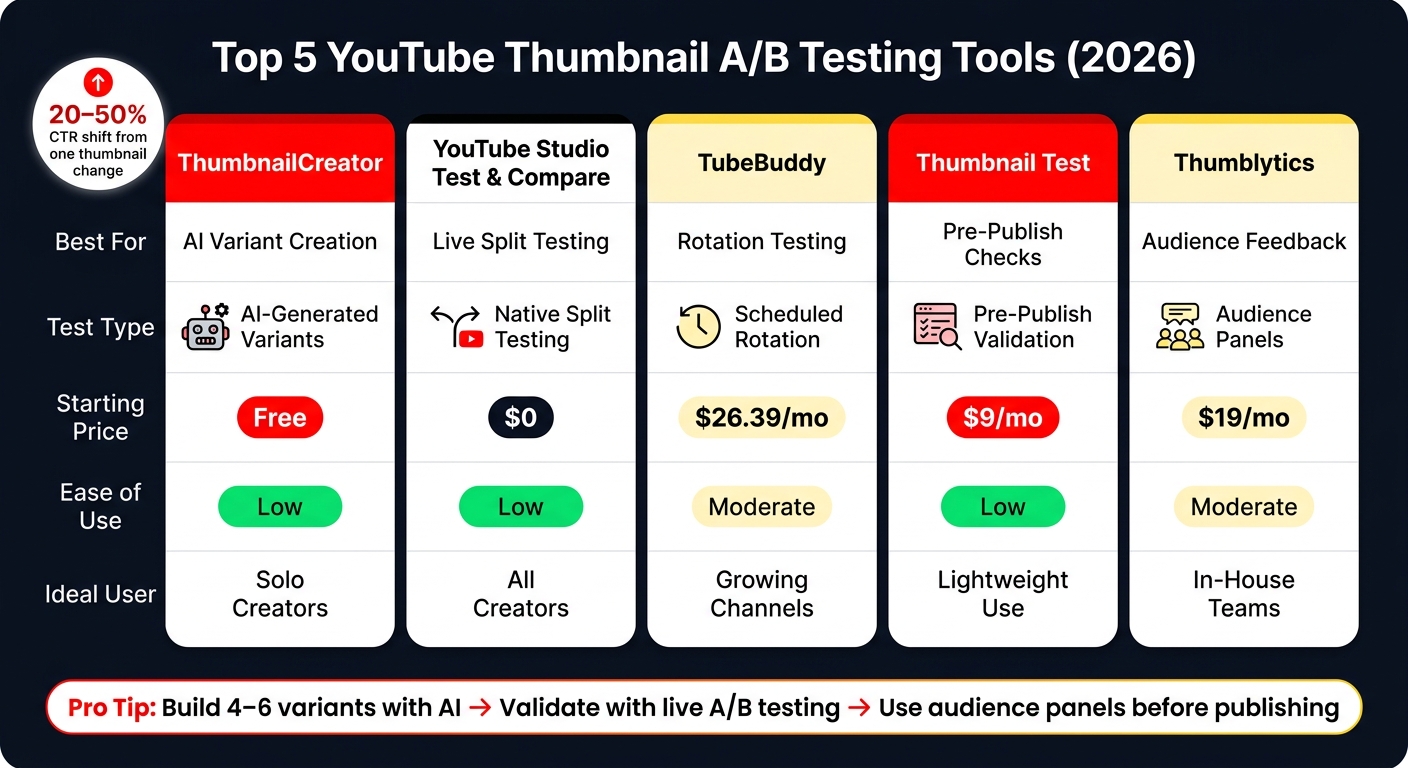
Top 5 YouTube Thumbnail A/B Testing Tools Compared (2026)
| Tool | Main Use | Test Type | Starting Price |
|---|---|---|---|
| ThumbnailCreator | Generate AI thumbnail versions | AI-generated variants | Free to start |
| YouTube Studio Test & Compare | Live thumbnail testing | Simultaneous split test | $0 |
| TubeBuddy | Rotation-based testing | Timed rotation | $26.39/month |
| Thumbnail Test | Simple pre-publish checks | Panel-based | $9/month |
| Thumblytics | Audience feedback before upload | Response panel | $19/month |
So if I’m choosing fast: use AI to make options, use YouTube to pick the winner, following a thumbnail A/B testing guide for best results, and use audience panels when I need feedback before publish.
Quick Comparison Table
Some tools test live traffic. Others collect feedback before you publish. And one helps you make the thumbnail versions you want to test in the first place.
This YouTube thumbnail comparison table gives you the fast view: features, pricing, and how easy each tool is to use. It’s a simple way to cut down your shortlist before getting into the tool-by-tool breakdown.
| Tool | Best For | How It Works | Price | Ease of Use |
|---|---|---|---|---|
| ThumbnailCreator | AI-generated thumbnail variants | AI-generated thumbnail variants | Free to start | Low |
| YouTube Studio Test & Compare | Most reliable live-test data | Simultaneous split testing | Free | Low |
| TubeBuddy | Timed thumbnail rotation | Timed rotation | $26.39/mo | Moderate |
| Thumbnail Test | Quick pre-publish feedback | Panel-based testing | $9/mo | Low |
| Thumblytics | Pre-upload audience feedback | Audience panel feedback | $19/mo | Moderate |
The big differences come down to speed, cost, and test type.
- YouTube Studio tests live traffic at the same time.
- TubeBuddy rotates thumbnails over a set period.
- Thumblytics gets audience feedback before upload.
- ThumbnailCreator helps you generate versions to test.
The next section looks at each tool in more detail. For high-volume channels, you may also want to explore thumbnail testing at scale.
What Thumbnail A/B Testing Actually Measures
Before you pick a tool, get clear on the signal you want. That’s the big split here: some tools test live traffic, some rotate thumbnails over time, and some try to predict how a thumbnail might do.
YouTube's native Test & Compare uses watch time share as its main metric, not just CTR. That makes it a stronger signal because it looks at both the click and what happens after the click, including retention.
Third-party tools that rotate thumbnails over time can skew results because each version reaches a different audience mix. Same thumbnail, different crowd. And that can muddy the result.
AI scores and heatmaps sit in a different bucket. They’re predictive, not live-tested, which means they estimate performance from models instead of actual viewer behavior. Use AI for screening, and use live tests when it’s time to make the call.
With that baseline in place, the first tool below is all about building an efficient thumbnail workflow to create test-ready assets fast.
1. ThumbnailCreator
Best for: Creators who want to make several thumbnail options fast, even if they don’t have design skills.
ThumbnailCreator is built for making test-ready thumbnails fast. It helps with the creation side, not the measurement side.
Its Variation Generator can turn a prompt, base image, or YouTube URL into 2–10 thumbnail variants. You can use those versions to test composition, color, facial expression, and text. A simple way to use it is to generate 4–6 ideas, narrow them down with the Thumbnail Analyzer, and then test the strongest picks.
Face swapping and expression morphing let you try different emotional angles while keeping the overall look in line. That matters because even small facial changes can shift click behavior. The Style Cloning feature also lets you copy the visual structure of a thumbnail that already works, then compare that version against a new concept.
| Plan | Price | Annual Credits | Key Testing Features |
|---|---|---|---|
| Lite | $8/mo | 240 | Basic generation |
| Starter | $17/mo | 600 | Good for 1–2 videos/week |
| Creator | $33/mo | 1,200 | Face training, expression morphing, trending discovery to find trending YouTube thumbnails |
| Teams | $62/mo | 3,000 | API access, unlimited team members |
Use ThumbnailCreator to build stronger variants before you run live tests.
2. YouTube Studio Test & Compare
Best for: Creators who want reliable, first-party thumbnail data without paying for extra tools.
If you want the most direct read from YouTube itself, start here. YouTube Studio Test & Compare is built into YouTube Studio, and it's free. Open the video's Details tab, then look under the thumbnail section for Test & Compare. From there, you can upload up to 3 thumbnail variants, and YouTube will split test them by showing each one to viewers at the same time.
The main metric is watch time share. That matters because it doesn't just reward thumbnails that get clicks. It also helps you identify thumbnail mistakes to avoid that might be hurting your performance. It also favors the ones that help keep people watching.
YouTube shows three main signals:
- Watch time share
- Relative CTR
- Confidence
YouTube suggests waiting until the test hits at least 80% confidence, which usually takes 7 to 14 days. So this tool is strong for making final calls, but only if the video gets enough traffic. For high-confidence results, aim for 5,000+ impressions per variant.
| Feature | Details |
|---|---|
| Cost | Free |
| Max Variants | 3 thumbnails |
| Primary Metric | Watch time share |
| Secondary Metrics | Relative CTR, confidence |
| Recommended Duration | 7–14 days |
| Eligibility | Advanced Features access |
The downside is simple: speed. If a video doesn't get much traffic, the test can drag on. Try to use it on videos getting at least 500 daily impressions so you can reach a reliable result sooner. On low-traffic videos, it may take 14 to 28 days to get there.
3. TubeBuddy
Best for: Creators who want thumbnail testing inside a full channel optimization toolkit.
TubeBuddy is a broader channel optimization suite that includes thumbnail A/B testing along with search rank optimization, title generators, and predictive AI analytics. That setup matters because TubeBuddy tracks performance over time, not through a live split test.
Instead, TubeBuddy uses scheduled rotation and compares CTR across different time windows. The main signal here is the CTR trend over time. So the results are better used as directional, not final. If you're running a test, give it enough time to pick up weekday and weekend traffic swings.
A/B testing is available for any channel on the Legend plan. But there's a catch: it's locked behind that plan at $26.39/month. The Free and Pro tiers don't include it.
| Plan | Monthly Price | A/B Testing Included |
|---|---|---|
| Free | $0.00 | No |
| Pro | $6.00 | No |
| Legend | $26.39 | Yes |
| Enterprise | Bundle pricing | Yes |
If you want pre-publish feedback instead of live rotation, the next tool goes in a different direction.
4. Thumbnail Test
Best for: Creators who want a simple thumbnail testing tool.
Thumbnail Test does offer thumbnail testing. But based on the sources provided, there isn’t enough verified information on its limits, pricing, or reporting.
That means the confirmed details are pretty limited. If thumbnail testing alone is enough for your workflow, this tool may still fit. But if you need data you can trust for bigger publishing calls, it makes sense to lean on tools with clearer documentation.
Use Thumbnail Test as a lightweight option, not your main source for decision-making.
If you want clearer pricing and testing details, the next tool is easier to evaluate from the sources available.
5. Thumblytics
Best for: Creators who want to test thumbnails before publishing.
If you want feedback before your video goes live, Thumblytics keeps things pretty simple. It uses a credit system: one credit gets you about 50 responses, so you can test a thumbnail and collect reactions ahead of publishing.
Here’s the pricing breakdown:
| Plan | Price | Test Credits | Max Responses | Concurrent Tests |
|---|---|---|---|---|
| Hobby | $19/mo | 3 | 150 | 1 |
| Starter | $49/mo | 10 | 500 | 2 |
| Basic | $99/mo | 25 | 1,250 | 5 |
| Pro | $349/mo | 100 | 5,000 | 20 |
Every plan also comes with an AI Title Generator and a YouTube Preview Tool, which lets you see how your thumbnail appears inside the YouTube UI.
The biggest constraint here is response volume. Basic pushes the limit to 1,250 responses, while Pro goes up to 5,000.
Use the table to line up response volume with how often you publish.
Which Tool Fits Your Workflow
Pick your tool based on where you are in the testing process, how much traffic you get, and how many people are involved. Some tools are better for making thumbnail variants fast. Check out our YouTube thumbnail guides for more design tips. Others are better for pre-launch feedback or live testing on published videos.
Here’s the short version:
- Solo creators: YouTube Studio + ThumbnailCreator - the lowest-cost path for live testing, and ThumbnailCreator helps you make variants fast.
- Growing channels: TubeBuddy Legend - gives you more room to test and works well for refreshing older videos.
- In-house teams: Thumblytics Basic - gives you more monthly tests plus pre-launch feedback.
- Agencies: Thumblytics Pro - built for large-scale testing across many channels.
- Multi-channel brands: TubeBuddy Enterprise - includes 1:1 training and structured support for 3+ channels.
Think of this as your shortlist before you look at the final comparison table.
Final Comparison Table
Here’s the side-by-side view for method, access, and price so you can compare each option fast.
| Tool | Testing Method | Best For | Price | Ease of Use |
|---|---|---|---|---|
| ThumbnailCreator | Pre-publish AI generation | Creators who need multiple variants fast | Free to start | Low |
| YouTube Studio Test & Compare | Live simultaneous split testing | Reliable first-party data | Free | Low |
| TubeBuddy | Time-based rotation | Channel optimization with testing included | $26.39/mo | Moderate |
| Thumbnail Test | Panel-based testing | Quick pre-publish feedback | $9/mo | Low |
| Thumblytics | Audience panel feedback | Pre-upload feedback before publishing | $19/mo | Moderate |
Conclusion
After looking at method, price, and ease of use, the right pick comes down to how you work.
Choose the tool that fits your testing stage:
- YouTube Studio for live data
- TubeBuddy for channel optimization
- Thumblytics for pre-publish feedback
- ThumbnailCreator for fast thumbnail variants
AI is great for narrowing ideas fast. But when it’s time to choose the winner, real audience data beats guesses.
A simple way to handle it: build 4–6 concepts with AI, then use live A/B testing to decide which thumbnail stays. If you need a side-by-side way to choose, use the tables above to match the testing method, budget, and workflow speed with the tool that fits best.
FAQs
When should I use live testing vs. pre-publish feedback?
Use pre-publish feedback before your video goes live to quickly improve your thumbnail’s contrast, text clarity, and emotional impact.
Once it’s published, use live A/B testing to measure actual viewer behavior. Together, pre-publish feedback helps you avoid weak designs, while live testing shows what works best.
How many impressions do I need for reliable thumbnail test results?
Aim for at least 1,000 impressions per variation to get a baseline you can work with. If you want stronger statistical confidence and clearer takeaways, 5,000+ impressions per variation is a better target.
It also helps to let the test run for 7 to 14 days. That gives you a cleaner read by smoothing out normal day-to-day traffic swings.
What should I test first in a thumbnail?
Start with background color and overall brightness. Those two often make the biggest difference in click-through rate.
Next, test facial expressions. After that, try very different text angles instead of tiny wording tweaks.
The big rule: change one major variable at a time. That way, you can tell what actually moved the numbers.
ThumbnailCreator can help you make these versions fast while keeping contrast and readability strong.